The 3 Pipe Intersection is the flat pattern (development) of one branch of a junction where three round pipes of the same diameter meet at a single point. The three pipe axes lie in one plane, and each pipe is cut off where it meets the other two, so the three pieces fit together into a Y piece or similar three-way junction. Cut the pattern from thin plate and roll it to make that branch. The shape develops one pipe at a time, so the junction is made from three parts, one with each Dev. Pipe setting.
It appears in the shapes library under Thin Walled Developments. The shape is defined in 3D; the property page shows the 3D junction, and the part that is cut is the 2D flat pattern of the selected pipe.
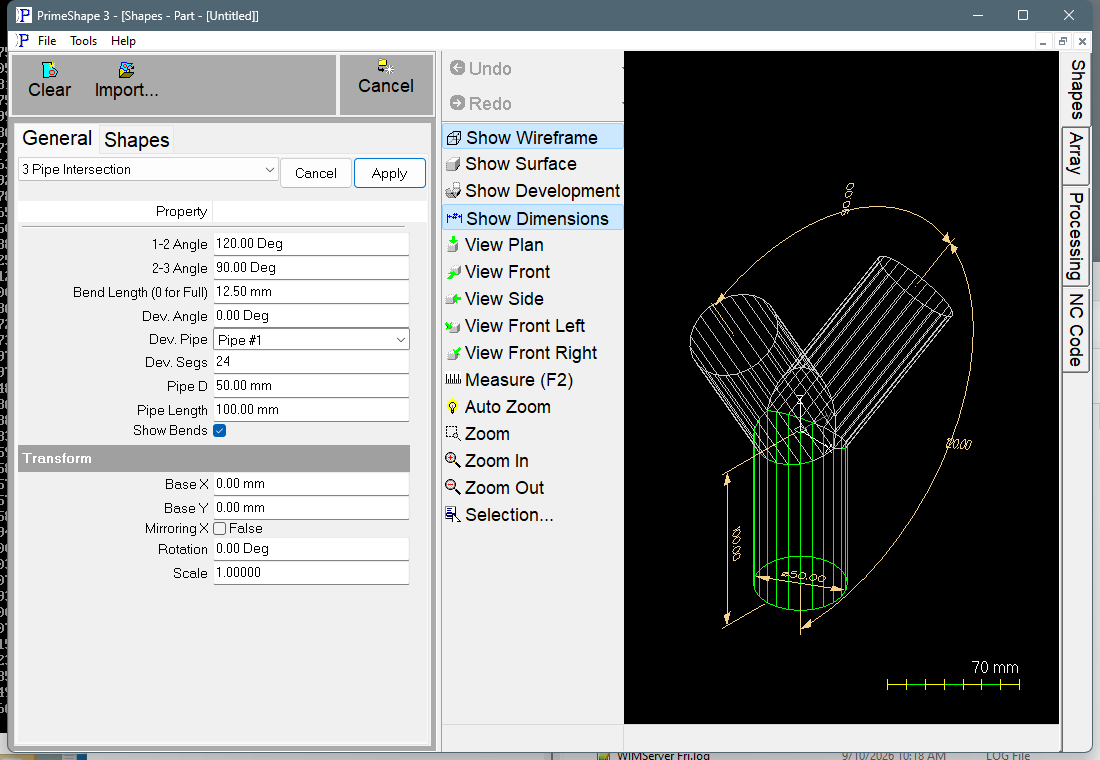
3 Pipe Intersection in PrimeShape: the property page (left) and the shape as a wireframe with its dimensions (right).
How the junction is defined and developed
All three pipe axes meet at the shape origin and lie in the plane of the Y and Z axes:
•Pipe #1 runs from the origin straight down the Z axis.
•Pipe #2 is Pipe #1 turned by 1-2 Angle about the X axis.
•Pipe #3 is turned a further 2-3 Angle from Pipe #2, in the same direction.
Going round from Pipe #3 back to Pipe #1 is a turn of 360° minus 1-2 Angle minus 2-3 Angle; with the defaults (120° and 90°) that turn is 150°. The angle between the axes of Pipe #3 and Pipe #1 is the smaller of that turn and 360° minus it. For a symmetrical Y piece set both angles to 120°, which spaces the three pipes 120° apart.
Every pipe has diameter Pipe D and runs Pipe Length along its axis from the origin to its free end. The free end is cut square to the axis. The other end of each pipe is trimmed by the surfaces of the other two pipes, so its junction end follows the mitre where the pipes meet.
Dev. Pipe selects which of the three pipes is developed and cut. The selected pipe is drawn green in the 3D view and the other two grey. Its surface is divided into Dev. Segs flat strips round the circumference, and the strips are unrolled one after another into a single flat outline.
The pattern has one seam, the straight line where the rolled pipe closes. At Dev. Angle 0 the seam lies on a line of the pipe surface in the plane of the three axes; Dev. Angle turns it round the pipe axis. In the flat pattern the first seam is laid along the X axis with its junction end on the insert point (0, 0) and its free end along +X; the strips are unrolled from there. The outline is: one seam, the developed junction edge, the other seam, and the developed free end, as one closed path. Moving the seam with Dev. Angle changes where the seam sits on the finished pipe and how the flat pattern is laid out; the shape of the pipe does not change.
Bend lines
With Show Bends on, a bend line is added on every fold between two strips – Dev. Segs minus 1 lines. They are marking entities, not cuts, and alternate lines run in opposite directions so the marking tool zig-zags across the pattern instead of returning to the same side each time. If Bend Length is more than 0, each bend line is shortened to two marks of that length, one at each end, instead of a full line across the plate. A bend line no longer than 2.1 times Bend Length is left as a full line.
Properties
The property page lists the junction properties first, then the development properties, then the Transform group.
Property |
Description |
Default |
Pipe D |
Diameter of all three pipes, in length units. The property page sets no minimum, and the shape does not check the value. |
50 mm (2 in) |
Pipe Length |
Length of each pipe along its axis, from the point where the three axes meet (the origin) to the square free end. The same for all three pipes, in length units. The property page sets no minimum, and the shape does not check the value. |
100 mm (4 in) |
1-2 Angle |
Turn of Pipe #2 about the X axis from Pipe #1. Equal to the angle between their axes when it is 180° or less. Angle units. |
120° |
2-3 Angle |
Turn of Pipe #3 about the X axis from Pipe #2, in the same direction as 1-2 Angle. Equal to the angle between their axes when it is 180° or less. Angle units. |
90° |
Dev. Pipe |
Which pipe is developed into the flat pattern: Pipe #1, Pipe #2 or Pipe #3. The 3D view shows all three; only the selected one is cut. |
Pipe #1 |
Dev. Angle |
Position of the seam round the axis of the developed pipe, measured from the plane of the three axes. Angle units; any value is accepted. |
0° |
Dev. Segs |
Number of flat strips the developed pipe is divided into. More segments give a smoother mitre edge and more bend lines. Whole number, minimum 3. |
24 |
Show Bends |
On: add the bend lines between strips to the pattern as marking. Off: the pattern is the outline only. |
On |
Bend Length (0 for Full) |
Length of the bend marks at each end of a bend line. 0 marks the full bend line from edge to edge. Length units, 0 or more. Used only when Show Bends is on. |
12.5 mm (0.5 in) |
The dimensions drawn on the 3D view are Pipe Length, Pipe D, 1-2 Angle and 2-3 Angle.
Notes and limits
•All three pipes have the same diameter and the same length, and their axes always meet at one point in one plane. The shape cannot make pipes of different sizes.
•The pattern is built on the surface of diameter Pipe D; there is no plate thickness or neutral-axis allowance. Enter the diameter you want the pattern laid out on (for example the mean diameter for a pipe rolled from thick plate).
•The mitre edge and the free end of the pattern are made of straight segments, one per strip, so a low Dev. Segs value gives a visibly faceted edge.
•The shape does not check the angles. If 1-2 Angle or 2-3 Angle is 0, or the two add up to 360° or more, two pipes lie on top of each other or cross, and the pattern is meaningless. Keep each of the three angles between the pipes (1-2, 2-3 and the remainder 3-1) well above 0°, and check the 3D view before cutting.
•The shape does not check Pipe Length against Pipe D or the angles. Check the 3D view before cutting, especially with a short pipe.
•If the shape cannot be built from the values entered, the 3D view is cleared and the property page shows Warning: Cannot build shape from these parameters. Change the values until the warning goes away.
•The shape has no aliases (no former names).
The 3 Pipe Intersection also has the Transform properties (Base X, Base Y, Rotation, Scale, Mirroring X), listed after its own properties. It has no Polar Array properties, because 3D shapes have no Polar Array group.