The Angle Section shape is the outline of a rolled steel angle: a vertical leg and a horizontal leg of the same Thickness, meeting at a right angle with a filleted inside corner. It is one closed profile. Depth and Width are set separately, so Depth equal to Width gives an equal angle and other values give an unequal angle.
The shape is also known as Angle, Angle Iron and L Section. These names are searchable in the shapes library.
It appears in the shapes library under Other Shapes.
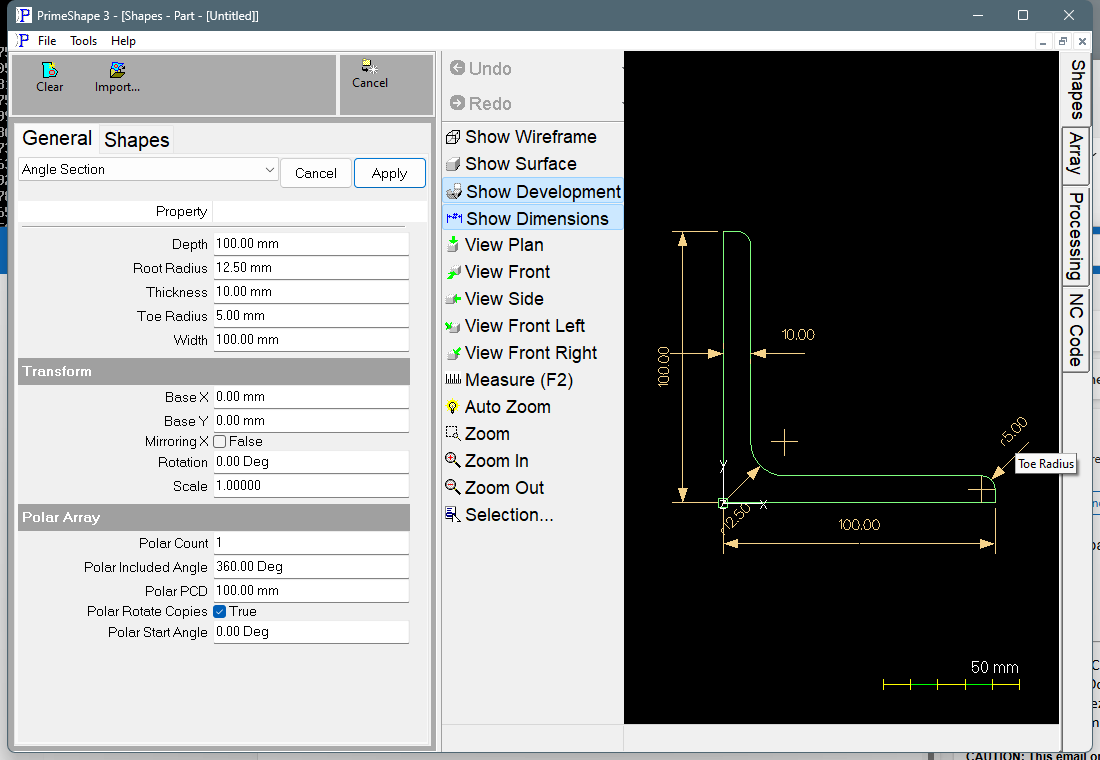
Angle Section in PrimeShape: the property page (left) and the shape with its dimensions (right).
Insert point and direction
The insert point (Base X, Base Y) is the heel of the angle: the outside corner where the back of the vertical leg meets the underside of the horizontal leg. The section lies entirely above and to the right of the insert point. The horizontal leg runs along +X for Width, and the vertical leg runs along +Y for Depth.
The outline is traced anticlockwise from the heel: along the underside of the horizontal leg, up its end, back along its inside face, round the root fillet, up the inside face of the vertical leg, across the top of the vertical leg, and down its back to the heel.
Only three corners are rounded: the Root Radius at the inside corner, and the Toe Radius on the inside edge of each leg tip. The heel and the outside edges of the leg tips are sharp.
The dimensions on the shape are named after their properties, so clicking one edits that value. Depth is dimensioned on the back of the vertical leg, Width below the horizontal leg, and Thickness across the vertical leg at mid-height of the part above the horizontal leg. Root Radius is dimensioned on the fillet at the inside corner. Toe Radius is dimensioned on the fillet at the end of the horizontal leg only; the fillet at the end of the vertical leg carries no dimension. Each radius dimension is hidden when its radius is 0 or when the radii cannot be built.
Properties
Property |
Description |
Default |
Depth |
Length of the vertical leg, along Y, from the heel to the top of the leg (mm or inch). Must be greater than 0 and greater than Thickness. |
100 mm (4 in) |
Width |
Length of the horizontal leg, along X, from the heel to the end of the leg (mm or inch). Must be greater than 0 and greater than Thickness. |
100 mm (4 in) |
Thickness |
Thickness of both legs (mm or inch). Must be greater than 0 and less than both Depth and Width. |
10 mm (0.4 in) |
Root Radius |
Radius of the inside fillet where the two legs meet (mm or inch). 0 gives a sharp corner. Cannot be negative. |
12.5 mm (0.5 in) |
Toe Radius |
Radius on the inside edge of each leg tip (mm or inch). The same radius is used on both legs. 0 gives a sharp corner. Cannot be negative. |
5 mm (0.2 in) |
The angle has one Thickness for both legs. It has no Flange Thickness or Flange Slope, unlike the I Beam Section, Channel Section and Tee Section shapes.
Limits
The property page shows Warning: Cannot build shape from these parameters and no outline is drawn when any of these is true:
•Depth or Width is 0 or less.
•Thickness is 0 or less.
•Thickness is equal to or greater than Depth or Width.
•Root Radius or Toe Radius is negative.
•Root Radius or Toe Radius is too large for the leg lengths. Each side of the outline must hold the radii at its two ends: Root Radius + Toe Radius no more than Width − Thickness, and no more than Depth − Thickness; and Toe Radius no more than Thickness, because the toe fillet sits at the end of each leg.
To point the legs in another direction, use Rotation or Mirroring X in the Transform properties. For I beam, channel or tee profiles, use the I Beam Section, Channel Section or Tee Section shapes.
Every 2D shape also has the Transform properties (Base X, Base Y, Rotation, Scale, Mirroring X) and the Polar Array properties, listed after the shape's own properties.