The Arbitrary Lobster is the set of flat patterns (developments) for a lobster-back bend: a round pipe or duct elbow made from a number of short mitred cylinder sections welded end to end. You choose the pipe diameter, the bend radius, the total bend angle and the number of sections (Parts), and the shape lays out one flat pattern per section. Cut the patterns from thin plate, roll each one along its bend lines and weld the sections together to make the elbow.
It appears in the shapes library under Thin Walled Developments. The shape is defined in 3D; the property page shows the 3D elbow, and the part that is cut is the 2D flat patterns built from it.
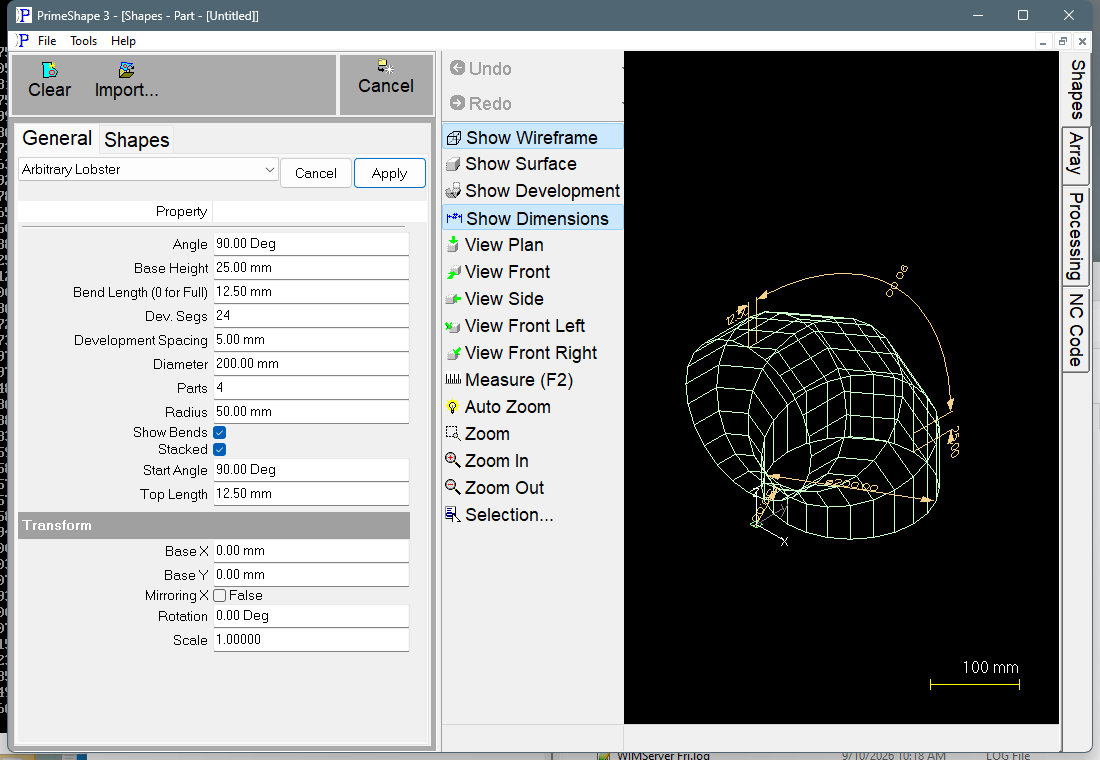
Arbitrary Lobster in PrimeShape: the property page (left) and the shape as a wireframe with its dimensions (right).
How the elbow is defined
The bend turns about a bend axis, which is the X axis through the shape origin. The pipe has diameter Diameter, and its inside wall (the throat of the bend) is Radius from the bend axis, so the pipe centreline is at Radius + Diameter/2 from the bend axis. Note that Radius is the throat radius, not the centreline radius.
The total bend Angle is shared between the sections:
•There are Parts sections and Parts − 1 mitre joints. Each joint is a plane through the bend axis.
•The section axes are spaced Angle / (Parts − 1) apart, and each joint lies halfway between two section axes. The middle sections each turn the full Angle / (Parts − 1); the first and last sections each turn half of that.
•The first section also has a straight length, Base Height, before the bend starts. The last section has a straight length, Top Length, after the bend ends. Both are measured along the pipe centreline from the plane where the bend starts or ends.
For example, the defaults (Angle 90°, Parts 4) give two end sections that each turn 15° and two middle sections that each turn 30°, with mitre joints at 15°, 45° and 75°.
How the patterns are laid out
Each section is divided into Dev. Segs flat strips round its circumference and unrolled into one closed outline. Each pattern has one seam, the straight line where the rolled section closes. Start Angle sets where the seam lies round the pipe, measured from the throat (the inside of the bend): 0° puts the seam on the throat, 90° on the side of the pipe, 180° on the outside of the bend.
The insert point (0, 0) is at the top of the first section (with Stacked on). With Stacked off the first section is moved down by a bend-tip (bulge) allowance, so its top is not at Y = 0. Each pattern runs from its seam to the right (+X), about π × Diameter wide, with the length of the section running downwards (−Y). The sections are laid out one below the other, first section (with Base Height) at the top and last section (with Top Length) at the bottom.
How the patterns sit against each other depends on Stacked:
•Stacked on – the seam of every second section is turned 180° round the pipe from Start Angle. Each pattern is placed Development Spacing below the bottom of the previous one. Dev. Segs must be even in this mode; an odd value is raised by 1 when the shape is built.
•Stacked off – every section has its seam at Start Angle, and each pattern is placed below the lowest point of the previous one with a gap of Development Spacing, so the patterns do not overlap.
Changing Stacked also moves the seam to suit: switching Stacked on while Start Angle is 0° sets Start Angle to 90°, and switching it off while Start Angle is 90° sets Start Angle to 0°. Other Start Angle values are left alone.
Bend lines
With Show Bends on, a bend line is added on every fold between two strips of each pattern – Dev. Segs minus 1 lines per pattern. They are marking entities, not cuts, and alternate lines run in opposite directions so the marking tool zig-zags across the pattern. If Bend Length is more than 0, each bend line longer than 2.1 × Bend Length is shortened to two marks of that length, one at each end, instead of a full line across the plate. Bend lines of 2.1 × Bend Length or less stay full length.
Properties
The property page lists Top Length to Stacked, then Dev. Segs, Show Bends and Bend Length, then the Transform group. Default lengths are shown for metric and (inch) settings.
Property |
Description |
Default |
Top Length |
Straight length added to the last section beyond the end of the bend, measured along the pipe centreline. Length units. Not range-checked; see Notes. |
12.5 mm (0.5 in) |
Base Height |
Straight length added to the first section before the start of the bend, measured along the pipe centreline. Length units. Not range-checked; see Notes. |
25 mm (1 in) |
Diameter |
Diameter of the pipe the patterns are laid out on. Length units. Not range-checked; see Notes. |
200 mm (8 in) |
Radius |
Distance from the bend axis to the inside wall of the pipe (the throat radius). The centreline radius is Radius + Diameter/2. Length units. Not range-checked; see Notes. |
50 mm (2 in) |
Parts |
Number of sections in the elbow, and so the number of flat patterns. Whole number, minimum 2. With 2 the elbow is a single mitre joint. |
4 |
Angle |
Total bend angle of the elbow, shared between the sections as described above. Angle units. |
90° |
Start Angle |
Position of the seam round the pipe, measured from the throat of the bend. 0° = throat, 90° = side, 180° = outside of the bend. With Stacked on, every second section has its seam 180° from this. Angle units. |
90° |
Development Spacing |
Gap between one flat pattern and the next in the layout. Length units. Not range-checked; see Notes. |
5 mm (0.197 in) |
Stacked |
On: alternate the seam side on every second section so the patterns nest into each other. Off: all seams at Start Angle, patterns spaced so they do not overlap. See above. |
On |
Dev. Segs |
Number of flat strips each section is divided into for the development. More segments give smoother mitre edges and more bend lines. Whole number, minimum 3. With Stacked on, an odd value is raised by 1. |
24 |
Show Bends |
On: add the bend lines between strips to each pattern as marking. Off: the patterns are outlines only. |
On |
Bend Length (0 for Full) |
Length of the bend marks at each end of a bend line. 0 marks the full bend line from edge to edge. Length units, 0 or more. Used only when Show Bends is on. |
12.5 mm (0.5 in) |
The dimensions drawn on the 3D view are Base Height, Top Length, Diameter, Radius and Angle.
Notes and limits
•The patterns are built on the surface of diameter Diameter; the code makes no plate thickness or neutral-axis allowance. Enter the diameter you want the patterns laid out on.
•The mitre edges of the patterns are made of straight segments, one per strip, so a low Dev. Segs value gives a visibly faceted edge.
•Every mitre plane passes through the bend axis. The property page sets a minimum for Parts (2), Dev. Segs (3) and Bend Length (0). The shape does not check Top Length, Base Height, Diameter, Radius, Development Spacing, Angle or Start Angle for negative or zero values. Check the 3D view before cutting.
•Because Stacked raises an odd Dev. Segs by 1, the value on the property page can change after the shape is built.
•If the shape cannot be built from the values entered, the 3D view is cleared and the property page shows Warning: Cannot build shape from these parameters. Change the values until the warning goes away.
The Arbitrary Lobster also has the Transform properties (Base X, Base Y, Rotation, Scale, Mirroring X), listed after its own properties. The Arbitrary Lobster is a 3D shape, so it has no Polar Array properties; Polar Array applies to 2D shapes only.