The Arc is a single open circular arc. It is given either by its centre, radius, start angle and swept angle, or by three points on the arc. By default it is a marking arc: it is drawn on the marking tool with no kerf offset, so it is marked on the line. This suits bend lines, centre marks, layout lines and similar. With Marking turned off it is an ordinary open path with no marking hint.
It can also be found by searching for Open Arc, Marking Arc or 3 Point Arc.
It appears in the shapes library under Basic Shapes and Primitives.
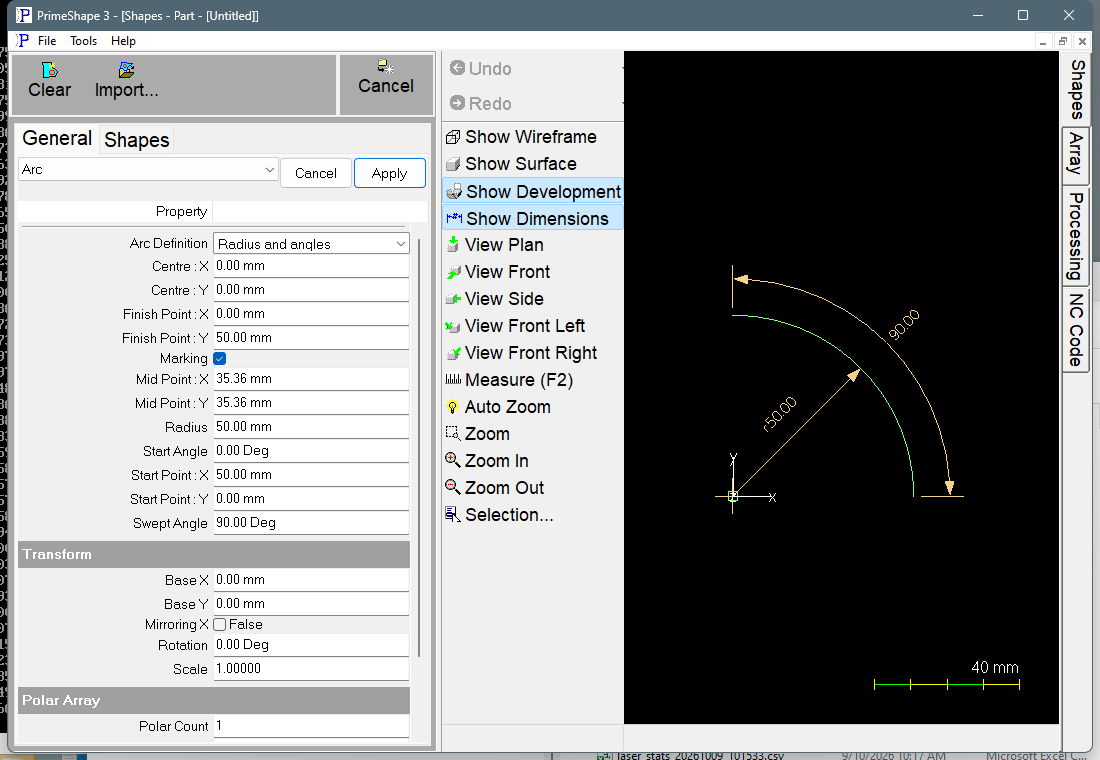
Arc in PrimeShape: the property page (left) and the shape with its dimensions (right).
Insert point and direction
The insert point is the origin of the shape's own coordinates. Centre, Start Point, Mid Point and Finish Point are all measured from it, so with the default Centre of 0, 0 the arc is centred on the insert point.
The arc always runs from its start to its finish. With Radius and angles it starts at Start Angle and turns through Swept Angle – anticlockwise for a positive Swept Angle, clockwise for a negative one. With 3 points it starts at Start Point, passes through Mid Point and ends at Finish Point; the direction follows from which side of the chord Mid Point lies on.
Properties
Lengths are in the current units (mm or inch); angles are in degrees. The defaults are shown in mm and in inches. All the properties are listed whichever Arc Definition is chosen, but only the ones for the chosen form are used.
Property |
Description |
Default |
Arc Definition |
How the arc is given. Radius and angles uses Centre : X, Centre : Y, Radius, Start Angle and Swept Angle. 3 points uses Start Point, Mid Point and Finish Point. Each time the shape is built the arc is copied into the other set of properties, so switching Arc Definition keeps the same arc. |
Radius and angles |
Centre : X |
X position of the arc centre, measured from the insert point (mm or inch). Negative values are allowed. Used by Radius and angles. |
0 |
Centre : Y |
Y position of the arc centre, measured from the insert point (mm or inch). Negative values are allowed. Used by Radius and angles. |
0 |
Radius |
Radius of the arc (mm or inch). Must be greater than 0. Used by Radius and angles. |
50 mm (2 in) |
Start Angle |
Angle of the start of the arc, measured anticlockwise from the +X axis about the centre (degrees). Any value is allowed, including negative values and values over 360°. Used by Radius and angles. |
0° |
Swept Angle |
Angle the arc turns through from its start to its finish (degrees). A positive value runs anticlockwise, a negative value clockwise. From –360° to 360°, and not 0. A Swept Angle of ±360° gives a full circle that starts and finishes at the Start Angle. Used by Radius and angles. |
90° |
Start Point : X |
X position of the start of the arc, measured from the insert point (mm or inch). Negative values are allowed. Used by 3 points. |
50 mm (2 in) |
Start Point : Y |
Y position of the start of the arc (mm or inch). Negative values are allowed. Used by 3 points. |
0 |
Mid Point : X |
X position of any point on the arc between the start and the finish (mm or inch). It need not be half way; it fixes which way round the arc runs and how far it bulges. Negative values are allowed. Used by 3 points. |
35.355 mm (1.414 in) |
Mid Point : Y |
Y position of the point on the arc between the start and the finish (mm or inch). Negative values are allowed. Used by 3 points. |
35.355 mm (1.414 in) |
Finish Point : X |
X position of the end of the arc (mm or inch). Negative values are allowed. Used by 3 points. |
0 |
Finish Point : Y |
Y position of the end of the arc (mm or inch). Negative values are allowed. Used by 3 points. |
50 mm (2 in) |
Marking |
True: the arc is drawn on the marking tool with no kerf offset, so it is marked on the line. False: the arc has no marking hint and is processed as an ordinary open path. |
True |
Every build overwrites the properties of the form that is not chosen. With Radius and angles, Start Point, Mid Point and Finish Point are reset to the start, middle and end of the arc; with 3 points, Centre, Radius, Start Angle and Swept Angle are reset to match the three points. A value typed into the unused set is replaced the next time the shape is built – change Arc Definition first, then edit its properties.
The dimensions drawn on the shape are named after Radius, Swept Angle and Start Angle, and clicking one edits that value. Radius is drawn to the middle of the arc, Swept Angle from end to end, and Start Angle from the +X axis to the start of the arc the short way round. They are hidden when Arc Definition is 3 points. The Start Angle dimension is also hidden when Start Angle is 0 or a whole number of turns (360°, –360° and so on).
Limits
The shape is checked every time it is built. If any of these conditions is broken the shape is not built. The property page then shows only the red bar Warning: Cannot build shape from these parameters, not the reason, so check the values against this list:
•Radius must be greater than zero (Radius and angles).
•Swept Angle cannot be zero (Radius and angles).
•Swept Angle cannot be more than a full turn (Radius and angles) – more than 360° either way.
•Coincident points cannot be used to define a circle (3 points) – two of the three points are in the same place.
•Collinear points cannot be used to define a circle (3 points) – the three points lie on one straight line.
The arc is one open path. When Marking is True it is marked exactly on the drawn line. When Marking is False it is an ordinary open path with no marking hint.
Every 2D shape also has the Transform properties (Base X, Base Y, Rotation, Scale, Mirroring X) and the Polar Array properties, listed after the shape's own properties.