The Box is the flat blank for a rectangular box folded from one sheet: a base with a side panel on each of its four edges, and optionally a lid hinged off the back panel. Use it to cut trays, open boxes and lidded boxes that are bent up along the marked bend lines. The 3D view shows the folded box; the cut part is the flat development.
It appears in the shapes library under Thin Walled Developments.
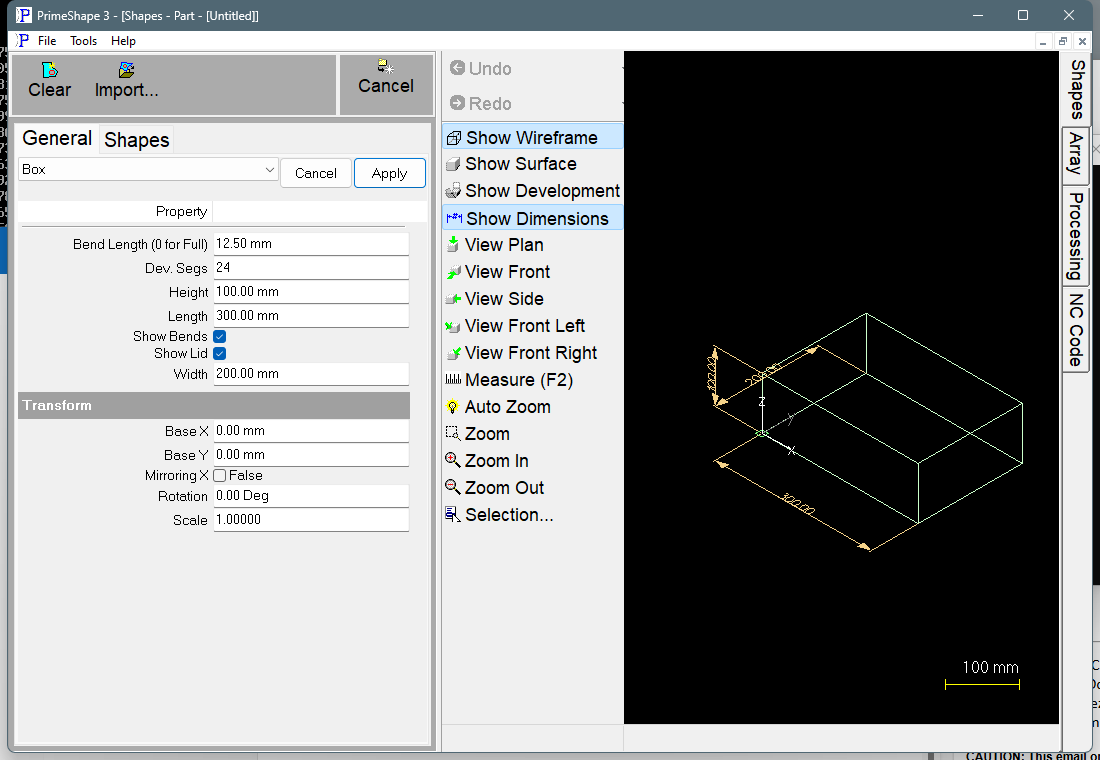
Box in PrimeShape: the property page (left) and the shape as a wireframe with its dimensions (right).
Insert point and how the shape is built
The insert point is the bottom left corner of the base. The base runs Length along +X and Width along +Y from there. The other panels are attached to the edges of the base, so the blank is a cross shape:
•Front – Length x Height, below the base (–Y).
•Back – Length x Height, above the base (+Y).
•Left and right sides – Height x Width, to the left (–X) and right (+X) of the base.
•Lid (Show Lid on) – Length x Width, attached to the far edge of the back panel.
The blank is Length + 2 x Height along X. Along Y it is Width + 2 x Height without the lid, and 2 x Width + 2 x Height with it. The corners between panels are square notches of Height x Height. There are no corner tabs or glue flaps. Each vertical corner is a plain edge where two adjacent panels meet.
The outline is one closed profile that starts and finishes at the insert point. With Show Bends on, the bend lines are added as marking lines (marked, not cut): one along each edge of the base, and with the lid on, one between the back panel and the lid. Each bend line stops 2 mm short of the panel corners at each end.
In the 3D view the base lies flat, the four panels stand up Height from its edges, and the lid (if shown) closes the top.
Properties
Property |
Description |
Default |
Width |
Size of the base along Y (front to back), and so the width of the side panels and the lid (mm or inch). The least allowed is 1. |
200 mm (8") |
Length |
Size of the base along X (left to right), and so the length of the front panel, back panel and lid (mm or inch). The least allowed is 1. |
300 mm (12") |
Height |
Height of the box: how far each of the four side panels extends out from the base (mm or inch). The least allowed is 1. |
100 mm (4") |
Show Lid |
True adds a lid (Length x Width) to the far edge of the back panel, with a bend line between them. False leaves the box open-topped. |
True |
Dev. Segs |
Number of segments used to develop curved surfaces; shared by every 3D development shape. The least allowed is 3. The Box is made only of straight edges, so this setting has no effect on it. |
24 |
Show Bends |
True marks the bend lines on the blank. False leaves them off, so only the outline is produced. |
True |
Bend Length (0 for Full) |
Length of the bend marks (mm or inch). 0 marks each bend line along its full length. A larger value replaces each bend line longer than 2.1 x Bend Length with two short marks of this length, one at each end of the line; a bend line that is not that long is still marked in full. The least allowed is 0. |
12.5 mm (0.49 in) |
The dimensions drawn on the shape are Length, Width and Height.
Notes
•The development takes no account of material thickness or bend allowance. The panel sizes are exactly Length, Width and Height as entered, with the bends on the panel edges. Adjust the values for your material and bending method if the folded size matters.
•The shape does not test the values against each other. The only limits are the edit-box minimums: Width, Length and Height cannot be set below 1, Dev. Segs below 3 and Bend Length below 0. If building the geometry raises an error, the 3D view is cleared, the property page shows the red bar "Warning: Cannot build shape from these parameters", and the cut outline is not produced, because the outline is added last. Check the values before cutting.
•Width, Length and Height default to 200, 300 and 100 mm in metric and 8", 12" and 4" in imperial. The Bend Length default is fixed at 12.5 mm (about 0.49") in both, because it is set when the program loads, before the unit system is read.
The Box also has the Transform properties (Base X, Base Y, Rotation, Scale, Mirroring X), listed after the shape's own properties. They place the flat blank. As a 3D development shape it has no Polar Array properties; those apply to 2D shapes only.