The Filleted Rect Lobster is a lobster-back (segmented, mitred) bend in a duct whose cross-section is a rectangle with fully rounded ends: two flat faces joined by two half-round sides. The shape builds the bend in 3D from a number of straight pieces mitred together, and produces one flat pattern (development) for each piece. Cut the patterns from thin plate, fold or roll each along its bend lines, and weld the pieces together to make the elbow. With Flat set to 0 the cross-section is a plain circle and the shape makes a round lobster-back pipe bend.
It appears in the shapes library under Thin Walled Developments. The shape is defined in 3D; the property page shows the 3D bend, and the part that is cut is the set of 2D flat patterns built from it.
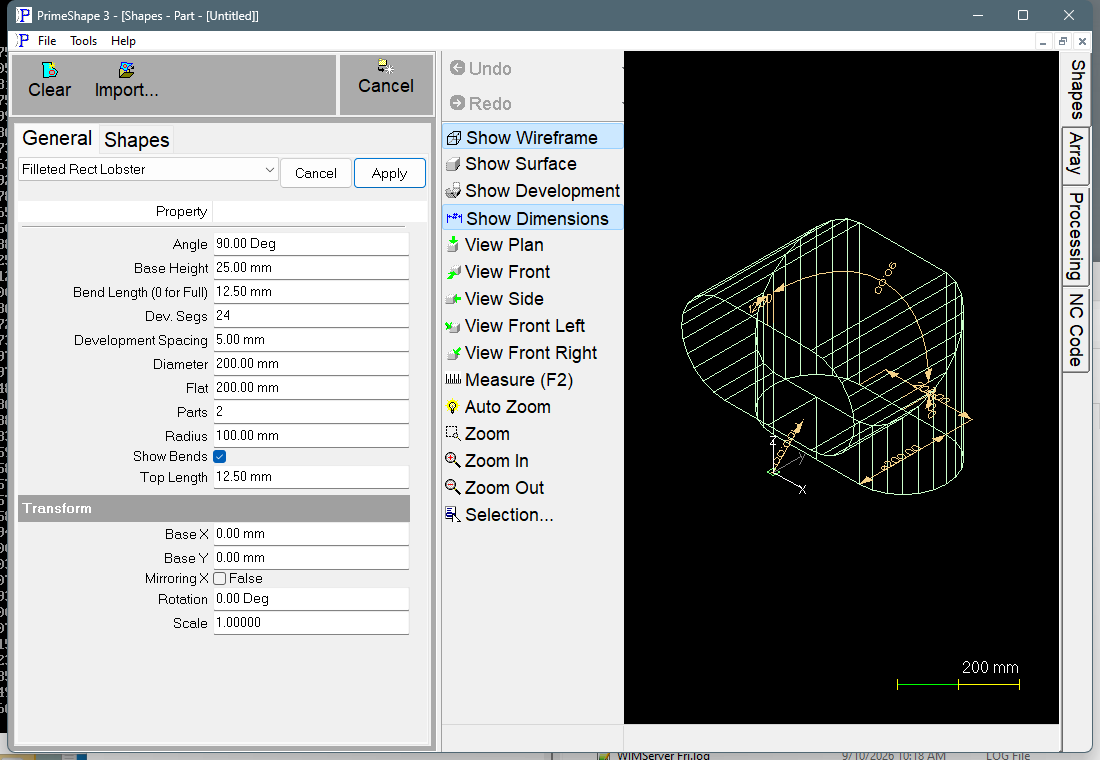
Filleted Rect Lobster in PrimeShape: the property page (left) and the shape as a wireframe with its dimensions (right).
How the bend is defined
The cross-section of the duct is Diameter deep and Flat + Diameter wide. The two flat faces are the inside (throat) and outside of the bend; the half-round sides, of diameter Diameter, are the cheeks.
The bend turns about a line through the shape origin, parallel to the flat faces. Radius is measured from that line to the inside flat face, so the centre line of the duct is at Radius + Diameter/2 and the outside face at Radius + Diameter. The bend starts on the plane through the origin square to the base piece, and turns through Angle.
The bend is made of Parts straight pieces. The angle is shared out evenly: each joint between two pieces is a mitre on the plane that halves the angle between them, and the step from one piece to the next is Angle / (Parts - 1). The middle pieces each cover one full step; the first and last pieces each cover half a step. The first piece is extended straight back by Base Height before the start of the bend, and the last piece is extended straight on by Top Length after the end of the bend, so the two ends of the elbow are square to the duct.
With Parts at 2 there are no middle pieces: the elbow is two pieces joined by a single mitre.
Flat patterns and insert point
Each piece is divided round its girth into flat strips and unrolled into its own closed outline, so a bend of Parts pieces gives Parts separate patterns. The strips are:
•each half-round side split into Dev. Segs / 2 strips, and
•when Flat is more than 0, the outside flat face as one strip and the inside flat face as two half-width strips.
The seam of every pattern (the line where the folded piece closes) is along the middle of the inside (throat) face. The pieces are laid out in order from the base piece to the top piece, one below the other in the -Y direction, with a gap of Development Spacing between one pattern and the next. Every pattern has its seam on the Y axis (X = 0) of the shape. The insert point is the shape origin (0, 0). The highest point of the first (base) pattern is at Y = 0. The outline of a mitred piece usually rises above its seam, so the top end of the first pattern's seam sits below the origin by that rise and is not necessarily at Y = 0.
Bend lines
With Show Bends on, a bend line is added on every fold between two strips of a pattern, including the folds where a flat face meets a half-round side. The seam, where the pattern closes, is not marked. They are marking entities, not cuts, and alternate lines run in opposite directions so the marking tool zig-zags across the pattern. If Bend Length is more than 0, each bend line longer than 2.1 x Bend Length is shortened to two marks of that length, one at each end, instead of a full line across the plate; shorter bend lines are left full length.
Properties
The property page lists the shape's own properties in the order of the table below, then the Transform group. The shape is 3D, so there is no Polar Array group. Defaults are shown for metric and (in brackets) imperial units.
Property |
Description |
Default |
Top Length |
Length of the straight extension of the last piece beyond the end of the bend. Length units. |
12.5 mm (0.5 in) |
Base Height |
Length of the straight extension of the first piece before the start of the bend. Length units. |
25 mm (1 in) |
Diameter |
Depth of the duct between the inside and outside flat faces, which is also the diameter of the half-round sides. Length units. |
200 mm (8 in) |
Flat |
Width of the flat faces, between the two half-round sides. 0 (or a negative value) gives a round duct. Length units. |
200 mm (8 in) |
Radius |
Inside radius of the bend: from the line the bend turns about to the inside flat face. Length units. |
100 mm (4 in) |
Parts |
Number of straight pieces in the bend, which is also the number of flat patterns produced. Whole number, minimum 2. |
2 |
Angle |
Total angle the duct turns through, from the base piece to the top piece. Angle units. |
90° |
Development Spacing |
Gap left between one flat pattern and the next in the layout. Length units. |
5 mm (about 0.2 in) |
Dev. Segs |
Number of flat strips used for the two half-round sides together; each side gets half. The value is rounded down to an even number when the shape is built, and the smallest value used is 4. The property page accepts 3, but the build then uses 4. The rounded value is stored back in the property when the shape is built. More segments give a smoother pattern edge and more bend lines. Whole number. |
24 |
Show Bends |
On: add the bend lines between strips to the patterns as marking. Off: the patterns are the outlines only. |
On |
Bend Length (0 for Full) |
Length of the bend marks at each end of a bend line. 0 marks the full bend line from edge to edge. Bend lines no longer than 2.1 x this value are always marked full length. Length units, 0 or more. Used only when Show Bends is on. |
12.5 mm (0.5 in) |
The dimensions drawn on the 3D view are Base Height, Top Length, Diameter, Radius, Angle and Flat.
Notes and limits
•The patterns are built on the surfaces given by Diameter, Flat and Radius; there is no plate thickness or neutral-axis allowance. Enter the sizes you want the patterns laid out on.
•The half-round sides are made of straight segments, one per strip, so a low Dev. Segs value gives a visibly faceted mitre edge on the pattern.
•Angle, Radius, Diameter, Flat, Top Length, Base Height and Development Spacing are not range-checked by the shape. Use an Angle greater than 0 and less than 180°, and a Diameter greater than 0, and check the 3D view before cutting.
•The shape has no aliases (no former names).
•If the shape cannot be built from the values entered, the 3D view is cleared and the property page shows Warning: Cannot build shape from these parameters. Change the values until the warning goes away.
The Filleted Rect Lobster also has the Transform properties (Base X, Base Y, Rotation, Scale, Mirroring X), listed after its own properties. Like the other Thin Walled Developments it has no Polar Array properties.