The Flange shape is a flat ring: an outside diameter (OD) and a bore (ID) in the centre, with a set of holes spaced evenly round a pitch circle (PCD). It is used for pipe and shaft flanges, bolted rings and spacers. The holes can be round, straight slots or slots curved along the PCD, and the bore can carry one or more keyways.
It appears in the shapes library under Round Shapes and Flanges.
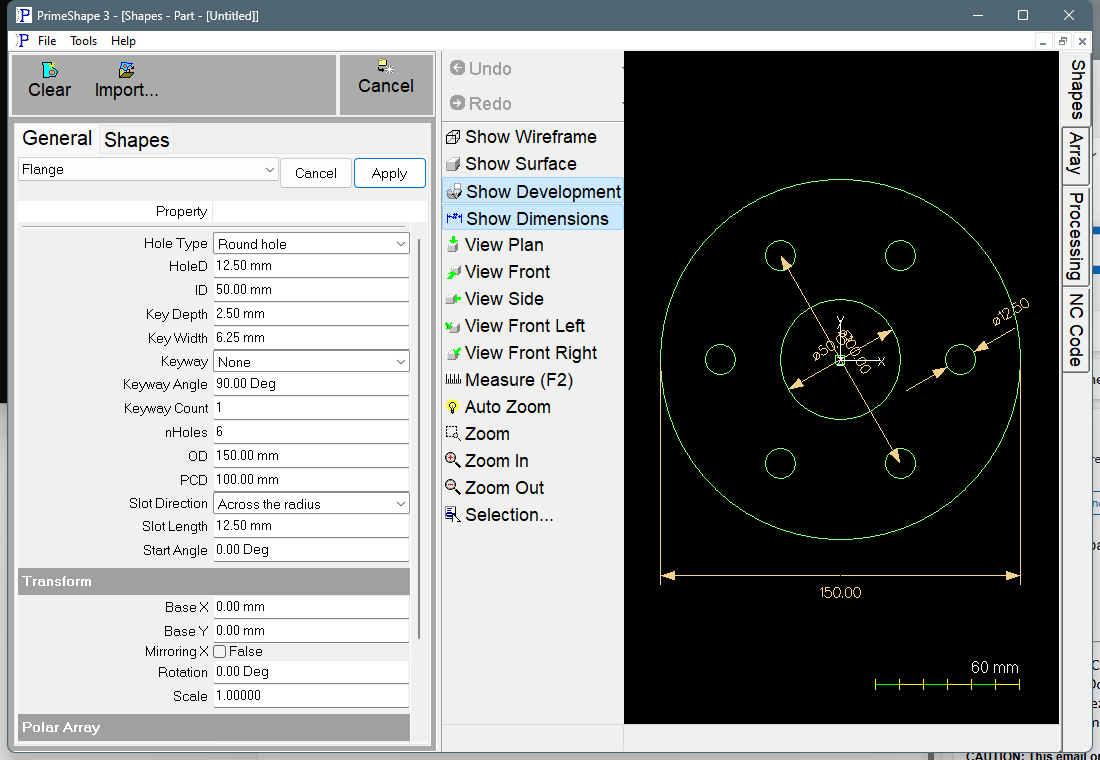
Flange in PrimeShape: the property page (left) and the shape with its dimensions (right).
Insert point and direction
The centre of the flange is the insert point (Base X, Base Y). The bore and the outside circle are centred on it, and so is the pitch circle, which is dimensioned but not drawn as geometry. The first hole is on the PCD at Start Angle, measured anticlockwise from +X, and the rest follow anticlockwise at 360° / nHoles apart. With the defaults the first hole is on the +X axis.
The bore and each hole or slot are built anticlockwise; the outside circle is built clockwise. Each hole or slot is a closed profile of its own. With a keyway the bore is one closed path running out along one wall of each keyway, across its square end, back along the other wall, then round the bore to the next keyway.
The dimensions shown are HoleD (on the first hole; on the far end of a slot), ID, OD and PCD. Slot Length is dimensioned on the first slot for straight slots only; a curved slot's length is along the PCD and is not dimensioned. Start Angle is dimensioned from the X axis to the first hole, the short way round, when it is not 0 and there are holes on a PCD greater than 0. With a keyway, Key Width is dimensioned across the end of the first keyway and Key Depth along its centre line.
Properties
The shape's own properties are listed below in the order the property page shows them. The Transform and Polar Array groups follow on the page; they are described at the end of this topic.
Property |
Description |
Default |
PCD |
Pitch circle diameter: the diameter of the circle the hole centres sit on (mm or inch). Must be greater than 0 when the holes are slots. |
100 mm (4 in) |
HoleD |
Diameter of each round hole, or the width of each slot (mm or inch). 0 gives a point at each hole centre instead of a hole. Must not be negative. |
12.5 mm (0.5 in) |
nHoles |
Number of holes, spaced evenly round the full PCD (360° / nHoles apart). 0 gives a ring with no holes. Must not be negative; at most 1000 when the holes are slots. |
6 |
Start Angle |
Angle of the first hole centre, anticlockwise from +X (degrees). The other holes follow anticlockwise. Negative values are allowed. |
0° (first hole on +X) |
Hole Type |
Shape of each hole. Round hole – plain round holes of diameter HoleD; Slot – straight slots, HoleD wide, with round ends; Curved slot – slots that follow the PCD, HoleD wide, with round ends. |
Round hole |
Slot Length |
Length of each slot from the centre of one end to the centre of the other (mm or inch). For a straight slot it is a straight distance; for a curved slot it is measured along the PCD. A Slot Length of 0 or less gives round holes whatever Hole Type is set to. Not used for Round hole. |
12.5 mm (0.5 in) |
Slot Direction |
Which way a straight slot lies. Across the radius – square to the line from the flange centre to the hole centre (tangent to the PCD); Along the radius – on the line from the flange centre through the hole centre. Each slot is centred on its hole centre. Used for Slot only. |
Across the radius |
ID |
Inside diameter: the bore in the centre of the flange (mm or inch). 0 gives a point at the centre instead of a bore. Must be greater than 0 when Keyway is set. |
50 mm (2 in) |
OD |
Outside diameter of the flange (mm or inch). Must be greater than 0. |
150 mm (6 in) |
Keyway |
Adds keyways cut outward from the bore (ID). None – plain bore; Custom – Key Width and Key Depth as entered; Metric (DIN 6885) – width and depth taken from DIN 6885-1 for the ID; Inch (ANSI B17.1) – width from ANSI B17.1 (square key) for the ID, depth worked out from it. |
None |
Key Width |
Width across the keyway (mm or inch). Must be greater than 0 and less than ID. Used as entered for Custom; replaced by the standard value for Metric and Inch. |
6.25 mm (0.25 in) |
Key Depth |
How far the keyway goes beyond the bore, measured on the keyway centre line from the bore to the end of the keyway (mm or inch). Must be greater than 0. Used as entered for Custom; replaced by the standard value for Metric and Inch. |
2.5 mm (0.1 in) |
Keyway Angle |
Direction of the first keyway centre line, anticlockwise from +X (degrees). It is independent of Start Angle. |
90° (straight up) |
Keyway Count |
Number of keyways, spaced evenly round the bore starting at Keyway Angle. Minimum 1, maximum 1000. |
1 |
Slot Length and Slot Direction have no effect while Hole Type is Round hole. Key Width, Key Depth, Keyway Angle and Keyway Count have no effect while Keyway is None. Parts saved before Start Angle, Hole Type and the keyway were added open with Start Angle 0, round holes and no keyway, so they keep their original geometry.
Standard keyways
With Metric (DIN 6885) or Inch (ANSI B17.1) the keyway size is looked up from the ID each time the shape is built, and written back into Key Width and Key Depth so you can see the values used.
•Metric covers bores over 6 mm up to 500 mm. Both width and depth come from the table.
•Inch covers bores over 5/16 in up to 6 1/2 in. The table gives the key width. The keyseat is half the square key deep at its side walls; Key Depth is that depth on the centre line, i.e. half the key width less the height of the bore arc across the keyway.
Checks the shape does not make
For round holes there is no check that the holes lie between the ID and the OD, or that neighbouring holes do not overlap: a PCD or HoleD that puts holes through the bore, past the outside edge or into each other still builds. Check the drawing before processing. (The overlap check below applies to slots only, so that older parts with touching round holes still load.)
When the shape cannot be built
If the values cannot make a valid shape, the shape is flagged as broken: a broken-shape marker is shown at the insert point, the property page shows Warning: Cannot build shape from these parameters, and the dimensions are not built. Geometry built before the failing check can still be in the shape, so do not cut from a broken flange. This happens when:
•OD is 0;
•the holes are slots (Hole Type Slot or Curved slot with a Slot Length greater than 0) and PCD is 0 or less;
•the holes are curved slots with Slot Length above 0 and HoleD is not less than PCD;
•the holes are slots and nHoles is more than 1000;
•a curved slot is too long for the PCD: Slot Length is the full PCD circumference or more, or more than half of it with the two ends within HoleD of each other behind the slot;
•slots overlap or touch each other (for straight slots every pair is checked, not only neighbours) – reduce Slot Length, HoleD or nHoles, or increase PCD;
•a keyway runs into the holes on the PCD (checked by radius, so it applies at every Keyway Angle and Start Angle; a slot along the radius reaches half its Slot Length further in);
•a keyway breaks through the OD;
•Keyway is set and ID is 0 or less;
•Keyway is Metric or Inch and the ID is outside the range of the table;
•Keyway Count is less than 1 or more than 1000;
•Key Width is 0 or less, or is not less than the ID;
•Key Depth is 0 or less;
•there is more than one keyway and neighbouring keyways overlap – use fewer or narrower keyways.
Every 2D shape also has the Transform properties (Base X, Base Y, Rotation, Scale, Mirroring X) and the Polar Array properties, listed after the shape's own properties. The Polar Array copies the whole flange; it is separate from the holes the flange places on its own PCD.