The Keyboard Map shows every PrimeCut hotkey on one drawn keyboard. Open it from Help > Keyboard Map.... The shortcuts are also listed by editor in List of Keyboard and Mouse Shortcuts.
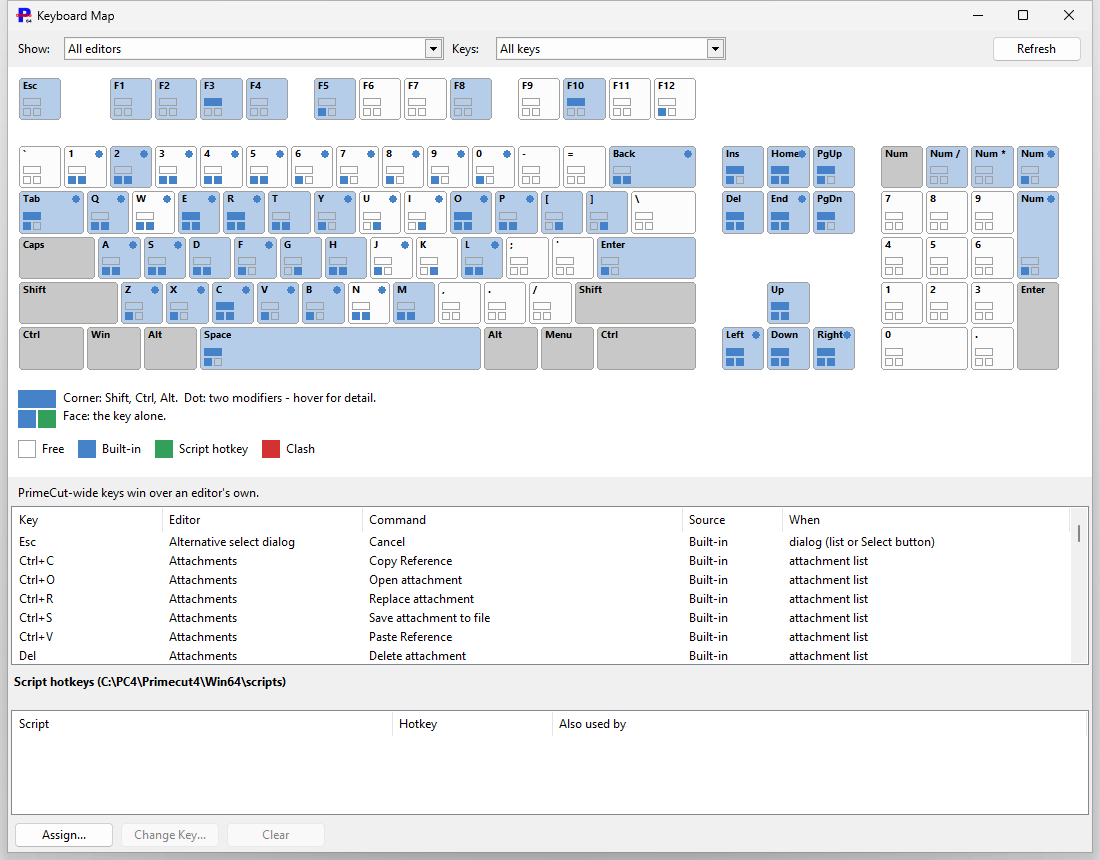
Reading the keyboard
•The key face shows the key on its own.
•Three corner markers show the key with one modifier: Shift (top), Ctrl (bottom left) and Alt (bottom right). A marker is filled when that combination is taken.
•A dot at the top right means a two-modifier combination (for example Ctrl+Shift) is taken.
•The colour says what uses the key: a built-in key or a script hotkey. Red marks a script hotkey that clashes with another use. A key that is free is left unfilled (Free in the legend).
•Hover over a key to see everything on it; click it to list its combinations in the table below, with the editor, command, source and when it applies.
Use Show to filter by editor (the PrimeCut-wide keys, which work in every editor, are always included) and Keys to filter by source. PrimeCut-wide keys win over an editor's own keys.
Giving a script a hotkey
Script hotkeys need Enable scripting and macros in Global Settings > Automation. With scripting on, the Keyboard Map also shows a Script hotkeys table.
1.Open Help > Keyboard Map... and click Assign... under the Script hotkeys table.
2.Pick a script (.pcs). It must be inside the script folder named in the table heading.
3.Press the combination: Ctrl, Alt or Shift plus a key, or a function key F1-F12. Anything that already uses it is shown in red.
4.Click OK. If the key clashes with a PrimeCut shortcut you are asked to confirm; PrimeCut's own shortcut wins there, so the script only runs where the key is free.
Press the hotkey to run the script. Use Change Key... or Clear to change or remove it. One key can run only one script. Script hotkeys are saved per Windows user on this PC.