The L Cut is two straight cuts meeting at a right angle – a cut along one axis, then a cut along the other – as one open path from a single pierce. It is used both as a plain geometric primitive and as a plate stripping cut, where the two cuts sever a rectangle from a plate.
It appears in the shapes library under Basic Shapes, Primitives and Tools.
Insert point and cut direction
With Origin set to Cut start the insert point is where the cut begins. The cut always finishes at X Cut, Y Cut from its start point, and the corner sits on whichever leg is cut first:
•Y first, then X – the cut runs along Y for the Y Cut length, turns, and runs along X for the X Cut length. The corner is directly above or below the start.
•X first, then Y – the cut runs along X first, then along Y. The corner is directly left or right of the start.
Both orders start and finish at the same points; Cut Order moves the corner only. The other Origin settings move the whole cut so that a corner of its bounding box sits on the insert point instead (see the table).
Properties
Property |
Description |
Default |
X Cut |
Length of the leg that runs along X (mm or inch). A negative value runs the leg to the left (–X). 0 removes the leg. |
100 mm (4 in) |
Y Cut |
Length of the leg that runs along Y (mm or inch). A negative value runs the leg downwards (–Y). 0 removes the leg. |
100 mm (4 in) |
Cut Order |
Which leg is cut first: Y first, then X or X first, then Y. This sets where the corner is; the start and finish points do not change. |
Y first, then X |
Origin |
Which point of the shape sits on the insert point. Cut start puts the start of the cut there. Bottom left, Bottom right, Top left and Top right put that corner of the rectangle spanned by the cut (from its start point to X Cut, Y Cut) on the insert point. The cut path and its direction are the same; only its position changes. |
Cut start |
The dimensions drawn on the shape are X Cut (on the leg that runs along X) and Y Cut (on the leg that runs along Y).
Negative and zero lengths
Because X Cut and Y Cut both accept negative values, the L can be pointed into any of the four quadrants without rotating it. The range of each value is symmetrical about zero: the minimum is the negative of the edit control maximum. The bounding-box corners used by Origin follow the signs, so Bottom right is always the lowest, right-most corner of the cut, whichever quadrant it is in.
If one of the two legs is 0 the shape is built as a single straight cut from the start to the finish. If both legs are 0 the cut path has zero length. No value is rejected by the shape itself. If building the shape raises an error, the property page shows a red bar reading "Warning: Cannot build shape from these parameters" and the shape may have no cut path, so check the values before cutting.
Stripping a plate
The Origin setting is what makes the L Cut convenient for stripping. Set X Cut and Y Cut to the size of the rectangle you want to remove, then set Origin to the corner of the plate you are cutting away from – the shape hangs off that point, and the rectangle it severs is the bounding box of the cut.
For example, to strip a 100 x 100 rectangle off the bottom right corner of a plate, set X Cut and Y Cut to 100 and Origin to Bottom right, then place the shape on that corner of the plate.
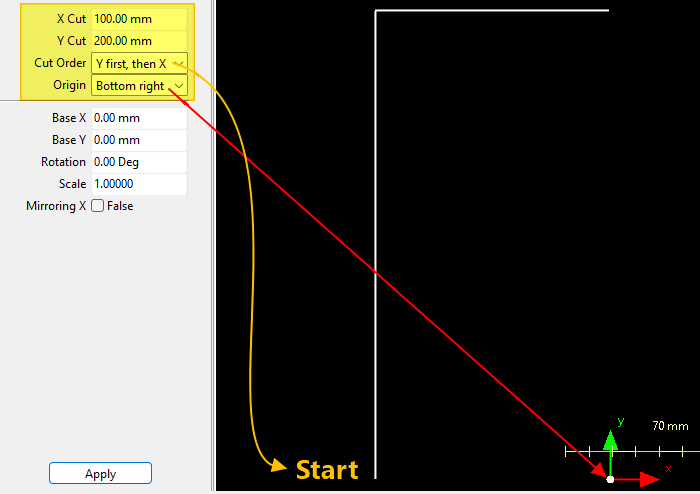
Y first then X: Cut will start at bottom as shown and cut Y first then X.
Origin set to Bottom Right to aid plate stripping.
Both legs are one open path, cut from a single pierce without lifting the torch at the corner.
Every 2D shape also has the Transform properties (Base X, Base Y, Rotation, Scale, Mirroring X) and the Polar Array properties, listed after the shape's own properties.