The Link Plate is a flat plate made of two round bosses joined together, with an optional hole in each boss. The bosses can be different sizes. It covers parts such as chain links, connecting links, cam plates and lollipop or teardrop shaped plates. With a Waist Radius set, the sides curve inwards between the bosses instead of running straight.
It appears in the shapes library under Round Shapes, Lifting Lugs and Other Shapes.
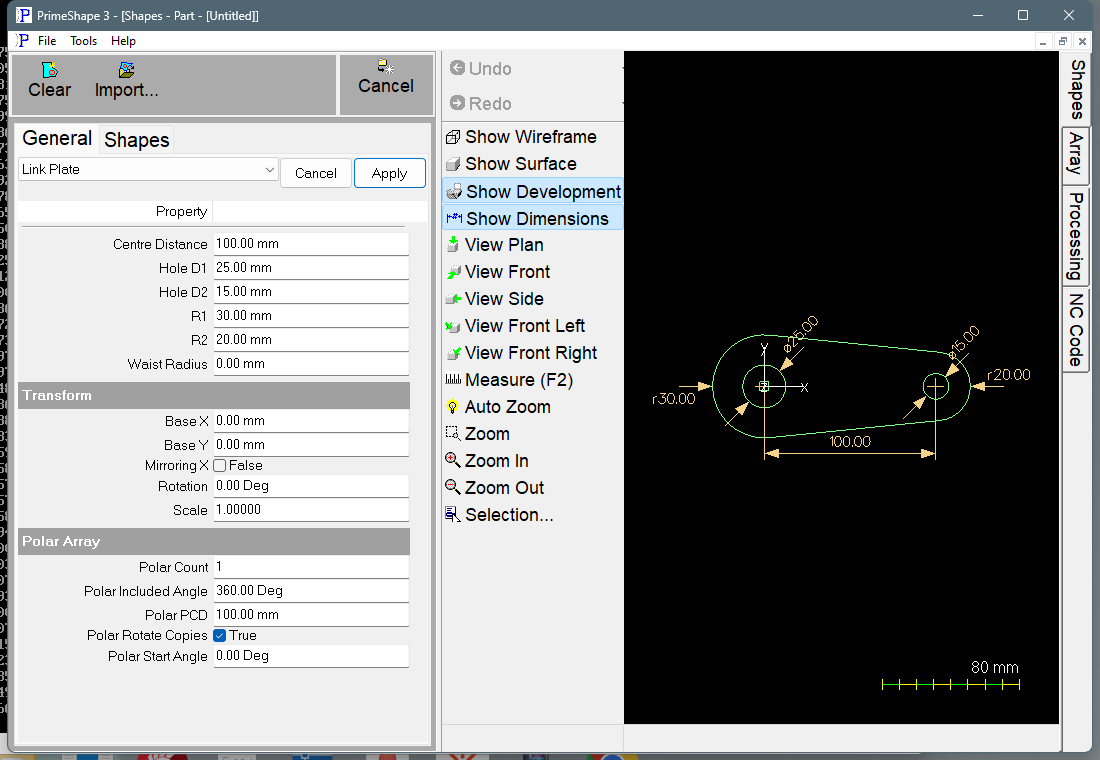
Link Plate in PrimeShape: the property page (left) and the shape with its dimensions (right).
Insert point and orientation
Boss 1 (radius R1, hole D1) is centred on the insert point. Boss 2 (radius R2, hole D2) is centred Centre Distance away along the positive X axis. The plate is symmetric about the X axis through the two centres. Use Rotation to point the plate in another direction.
The outside is a single closed path: round the far side of boss 2, back along the upper side, round the far side of boss 1 and back along the lower side. Each hole is a separate circle.
Properties
Property |
Description |
Default |
Centre Distance |
Distance from the centre of boss 1 (on the insert point) to the centre of boss 2, along X (mm or inch). Must be greater than zero and greater than the difference between R1 and R2. |
100 mm (4 in) |
R1 |
Radius of boss 1, the boss centred on the insert point (mm or inch). 0 gives a pointed end at the insert point. Cannot be negative. |
30 mm (1.2 in) |
R2 |
Radius of boss 2, the boss at Centre Distance along X (mm or inch). 0 gives a pointed end. Cannot be negative. |
20 mm (0.8 in) |
Hole D1 |
Diameter of the hole in boss 1, centred on the insert point (mm or inch). 0 = no hole. Must be smaller than the boss (less than 2 × R1). |
25 mm (1 in) |
Hole D2 |
Diameter of the hole in boss 2 (mm or inch). 0 = no hole. Must be smaller than the boss (less than 2 × R2). |
15 mm (0.6 in) |
Waist Radius |
0 joins the bosses with two straight lines tangent to both. A value above 0 replaces each straight side with a concave arc of this radius, tangent to both bosses, so the plate necks in between them (mm or inch). Cannot be negative. |
0 (straight sides) |
Without a waist, the sides are the two outside tangent lines of the bosses. Setting R1 or R2 to 0 makes that end a sharp point where the two sides meet, which gives a teardrop.
The dimensions drawn on the shape are named after the properties; a dimension for a value that is 0 (a hole, a boss or the waist) is hidden.
Limits
The property page shows Warning: Cannot build shape from these parameters when any of these is true. No outline or dimensions are built, and a broken-shape marker is drawn at the insert point instead. The page does not name the rule that failed:
•Centre Distance is 0 or less.
•R1 or R2 is negative, or both are 0.
•Centre Distance is not more than the difference between R1 and R2 (one boss lies inside the other).
•Hole D1 or Hole D2 is negative.
•Hole D1 is not smaller than 2 × R1, or Hole D2 is not smaller than 2 × R2.
•Both holes are set and Centre Distance is not more than (Hole D1 + Hole D2) / 2 – the holes would touch or overlap.
•Waist Radius is negative.
•Waist Radius is too small to reach both bosses: an arc of that radius cannot touch both bosses from outside. It must be more than (Centre Distance – R1 – R2) / 2.
•Waist Radius is too small for the neck to open: the upper and lower waist arcs would meet or cross between the bosses, so the waist closes up. Raise the Waist Radius to clear it.
A waist arc touches each boss from outside, so it never cuts into a hole. With the default sizes (Centre Distance 100, R1 30, R2 20) the Waist Radius must be more than 25 to reach both bosses, and at least about 38 for the arcs to stay clear of the centre line. Between 25 and about 38 the waist closes up and the shape shows the warning. Above about 38 any larger value builds.
Every 2D shape also has the Transform properties (Base X, Base Y, Rotation, Scale, Mirroring X) and the Polar Array properties, listed after the shape's own properties.