The Pole Base with Hole is a rectangular base plate with an open slot cut in from each of its four corners and one round hole through the plate. The slots run diagonally, at 45° to the edges, towards the middle of the plate. The round hole is centred on the plate by default and can be moved off centre with the two offsets. Where each slot meets the outside edges the corner is rounded with the fillet radius.
It appears in the shapes library under Rectangular Shapes and Gussets. The same plate with a polygon hole instead of a round one is the Pole Base with polygonal hole.
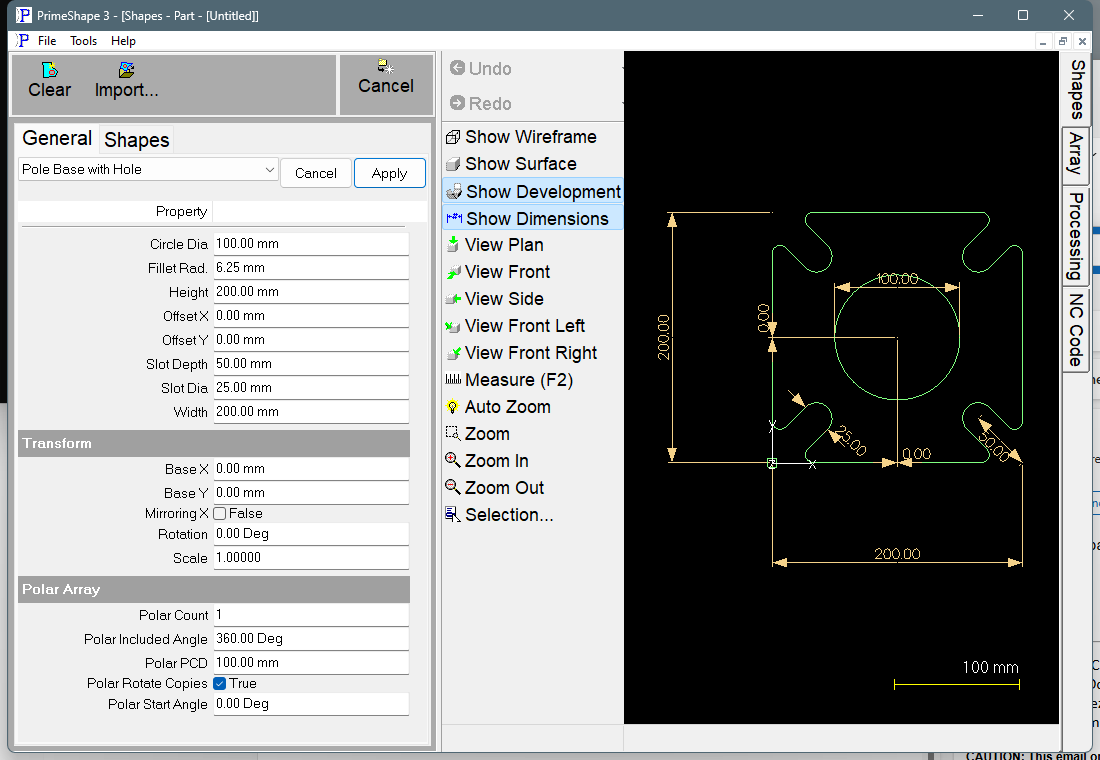
Pole Base with Hole in PrimeShape: the property page (left) and the shape with its dimensions (right).
Insert point and orientation
The insert point is the bottom left corner of the plate (the corner the bottom left slot opens into). Width is built to the right along X and Height upwards along Y. Each slot starts at a corner and runs along the 45° diagonal into the plate. With both offsets at 0 the centre of the hole is at the centre of the plate, (Width / 2, Height / 2) from the insert point; the offsets are added to that position.
Properties
Lengths are in the current units (mm or inches). The defaults shown are for a new shape; the inch defaults are used when the program is set to inches. The properties appear in this order on the property page.
Property |
Description |
Default |
Circle Dia |
Diameter of the round hole. If Circle Dia is 0 no hole is cut; a single point is placed at the hole centre instead. The property page does not accept a negative value. |
100 mm (4 in) |
Offset X |
Moves the hole centre along X from the centre of the plate. Positive moves it right, negative moves it left. The slots do not move. Negative values are allowed. |
0 |
Offset Y |
Moves the hole centre along Y from the centre of the plate. Positive moves it up, negative moves it down. The slots do not move. Negative values are allowed. |
0 |
Width |
Overall width of the plate, along X, measured from the left edge to the right edge. The property page does not accept a negative value. |
200 mm (8 in) |
Height |
Overall height of the plate, along Y, measured from the bottom edge to the top edge. The property page does not accept a negative value. |
200 mm (8 in) |
Slot Depth |
How far each slot reaches into the plate: the distance along the diagonal from the plate corner to the centre of the round end of the slot. The round end is a semicircle of radius Slot Dia / 2, so the slot ends Slot Dia / 2 further in. The same value is used for all four slots. |
50 mm (2 in) |
Slot Dia |
Width of each slot, which is also the diameter of its round end. Set it to the bolt diameter plus clearance. |
25 mm (1 in) |
Fillet Rad. |
Radius of the eight fillets where the slot sides meet the outside edges. At 0 the corners are effectively sharp: the shape still puts a very small fillet there (0.01 long along each edge) rather than none. |
6.25 mm (0.25 in) |
The dimensions drawn on the shape are Width, Height, Slot Depth (on the bottom right slot), Slot Dia (on the bottom left slot), Circle Dia (as a diameter) and the two offsets, measured from the centre of the plate to the centre of the hole. Fillet Rad. is not dimensioned.
Limits
The shape code does not check the sizes against each other. Keep these conditions yourself:
•The property page accepts 0 or more for Circle Dia, Width, Height, Slot Depth, Slot Dia and Fillet Rad. (the edit box minimum is 0; the maximum is 2147483647). Offset X and Offset Y accept negative values.
•Each slot and its fillets use 0.707 × Slot Dia + 2.414 × Fillet Rad. of each edge, measured from the corner. Both ends of an edge are used, so twice that amount must be less than the smaller of Width and Height.
•Slot Depth must be at least Slot Dia / 2. Below that the round end of the slot reaches past the outside edge of the plate.
•The hole must stay inside the plate: Circle Dia / 2 + |Offset X| must be less than Width / 2, and Circle Dia / 2 + |Offset Y| must be less than Height / 2.
•The hole must not overlap any slot. The shape does not check this.
Check the part outline after changing the slot sizes, the fillet radius, Circle Dia or the offsets. If the limits above are broken, the outline can overlap itself or cut through the hole.
Cannot build shape
If the shape fails to build from its current values, the property page shows the red bar Warning: Cannot build shape from these parameters between the shape's own properties and the Transform group. The properties stay on the page. Check the values against the limits above.
Every 2D shape also has the Transform properties (Base X, Base Y, Rotation, Scale, Mirroring X) and the Polar Array properties, listed after the shape's own properties.