The Shifted Filleted Rect To Filleted Rect Transition is the flat pattern (development) of a transition piece between two rectangular openings with rounded (filleted) corners: a rectangular base and a smaller or larger rectangular top, both horizontal, with the centre of the top moved sideways from the centre of the base. Cut the pattern from thin plate and fold or roll it along the bend lines to make offset duct reducers, hoppers and chutes between two rounded-rectangle openings.
It appears in the shapes library under Thin Walled Developments. The shape is defined as a 3D part. The part that is cut is its flat pattern (development), a 2D outline built from the faces of that 3D part. For a top centred over the base use the Filleted Rect To Filleted Rect Transition, and for a top that is also tilted or turned use the Arbitrary Filleted Rect To Filleted Rect Transition.
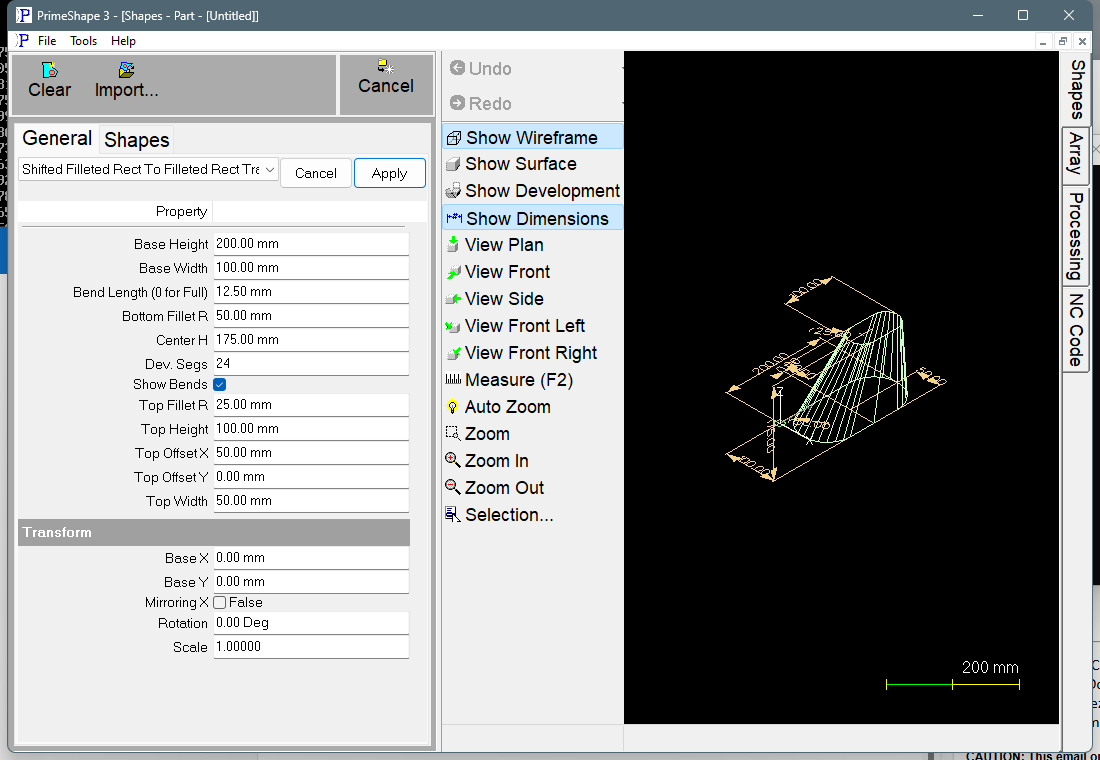
Shifted Filleted Rect To Filleted Rect Transition in PrimeShape: the property page (left) and the shape as a wireframe with its dimensions (right).
How the part is defined and developed
The base lies in the XY plane with one corner of its rectangle on the shape origin: Base Width along +X and Base Height along +Y, with each corner rounded by Bottom Fillet R. The top (Top Width along X, Top Height along Y, corners rounded by Top Fillet R) is horizontal and Center H above the base. Its centre is Top Offset X and Top Offset Y away from the centre of the base. The top is not turned or tilted in this shape: its sides stay parallel to the sides of the base.
The surface is made of two kinds of face, built side by side around the part:
•Flat sides – one face on each side, joining the straight part of the base side to the straight part of the matching top side. A side is left out when both of those straight parts have zero length (the fillet radius is half that side at both ends), as it is on the Base Width sides and the Top Width sides with the default values.
•Corner strips – at each corner the base fillet and the top fillet are each divided into the same number of steps, and matching points are joined by narrow faces. Each corner takes a quarter of the development segments. If one of the two fillet radii is 0, that corner is a fan of triangles meeting at the sharp corner point. If both radii are 0 the corner is a plain sharp fold with no strips.
The faces are unrolled one after another into a single flat outline. The pattern has one seam, the straight line where the folded part closes. The seam runs from the middle of the base side at +X (one of the Base Height sides) to the middle of the top side at +X, so that flat side is split in two halves, one at each end of the pattern. In the flat pattern the seam is laid along the X axis with its top end on the insert point (0, 0) and its base end along +X. The outline is: one seam, the developed top edge, the other seam, and the developed base edge, as one closed path.
Each face is unrolled as a flat four-sided piece, keeping its top and base edge lengths. With the top shifted, a corner strip is generally slightly twisted, so on the rounded corners the pattern is an approximation that gets closer to the true surface as Dev. Segs is increased.
Bend lines
With Show Bends on, a bend line is added on every fold between two faces – one line fewer than the number of faces, because the seam is the outline. They are marking entities, not cuts, and alternate bend lines run in the opposite direction. If Bend Length is more than 0, each bend line is shortened to two marks of that length, one at each end, instead of a full line across the plate; a line shorter than 2.1 times Bend Length is left at full length.
The lines at the ends of the flat sides are sharp folds; the lines inside a corner strip are the gentle bends that form the rounded corner.
Properties
The property page lists the transition properties first, then the development properties, then the Transform group.
Property |
Description |
Default |
Top Width |
Size of the top opening along X. Length units, minimum 1. |
50 mm (2 in) |
Top Height |
Size of the top opening along Y. Length units, minimum 1. |
100 mm (4 in) |
Top Fillet R |
Corner radius of the top opening. 0 gives sharp corners. Must not be more than half the smaller of Top Width and Top Height. Length units. The property page sets no minimum and the build does not check the sign, so enter 0 or more. |
25 mm (1 in) |
Top Offset X |
Distance along X from the centre of the base to the centre of the top. A positive value moves the top towards the +X side (the seam side), a negative value towards –X. 0 centres the top over the base in X. Length units. |
50 mm (2 in) |
Top Offset Y |
Distance along Y from the centre of the base to the centre of the top. Positive moves the top towards +Y, negative towards –Y. Length units. |
0 |
Center H |
Vertical height from the base to the top opening (the height of the part, not a slant length). Length units. The property page sets no minimum and the build does not check the sign, so enter 0 or more. |
175 mm (7 in) |
Base Width |
Size of the base opening along X. Length units, minimum 1. |
100 mm (4 in) |
Base Height |
Size of the base opening along Y. Length units, minimum 1. The seam is on the middle of one of the sides of this length. |
200 mm (8 in) |
Bottom Fillet R |
Corner radius of the base opening. 0 gives sharp corners. Must not be more than half the smaller of Base Width and Base Height. Length units. The property page sets no minimum and the build does not check the sign, so enter 0 or more. |
50 mm (2 in) |
Dev. Segs |
Number of strips the four rounded corners are divided into for the development, shared equally between the corners. The value used is rounded down to a multiple of 4, with a minimum of 8 (for example 26 is used as 24, and 3 to 11 as 8). More segments give smoother corners in the pattern and more bend lines. Not used when Bottom Fillet R and Top Fillet R are both 0 (all corners are then sharp folds). Whole number, minimum 3. |
24 |
Show Bends |
On: add the bend lines between faces to the pattern as marking. Off: the pattern is the outline only. |
On |
Bend Length (0 for Full) |
Length of the bend marks at each end of a bend line. 0 marks the full bend line from edge to edge. Length units, 0 or more. Used only when Show Bends is on. |
12.5 mm (0.5 in) |
The dimensions drawn on the 3D view are Center H, Base Width, Base Height, Top Offset X, Top Offset Y, Top Width, Top Height, Bottom Fillet R and Top Fillet R.
Notes and limits
•The shape cannot be built if Bottom Fillet R is more than half the smaller of Base Width and Base Height, or if Top Fillet R is more than half the smaller of Top Width and Top Height. A radius of exactly half is allowed and makes those ends fully round (a slot shape), as with the default values.
•The pattern is built on the surface defined by the sizes entered; there is no plate thickness or neutral-axis allowance. Enter the sizes you want the pattern laid out on (for example mean sizes for a part made from thick plate).
•The rounded edges of the pattern are made of straight segments, one per corner strip, so a low Dev. Segs value gives visibly faceted corners.
•If the shape cannot be built from the values entered, the 3D view is cleared and the property page shows Warning: Cannot build shape from these parameters. Change the values until the warning goes away.
•The shape has no aliases (no former names).
The Shifted Filleted Rect To Filleted Rect Transition also has the Transform properties (Base X, Base Y, Rotation, Scale, Mirroring X), listed after its own properties. Like the other Thin Walled Developments it has no Polar Array properties.