The Angled Gusset (Parallel Chamfers) is a solid five-sided gusset plate for a joint whose two members meet at any angle, not only 90°. It has two straight legs – a base leg and a side leg – that meet at the insert point at the angle you set. Each leg ends in a chamfer edge, and a single straight edge joins the outer ends of the two chamfer edges. Each chamfer edge runs parallel to the other leg, so the plate is a parallelogram with the corner opposite the insert point cut off. All edges are straight lines with no corner radius. The companion shape, Angled Gusset (Perpendicular Chamfers), has the same properties, but each chamfer edge is square to its own leg instead.
It appears in the shapes library under Gussets. It has no other names.
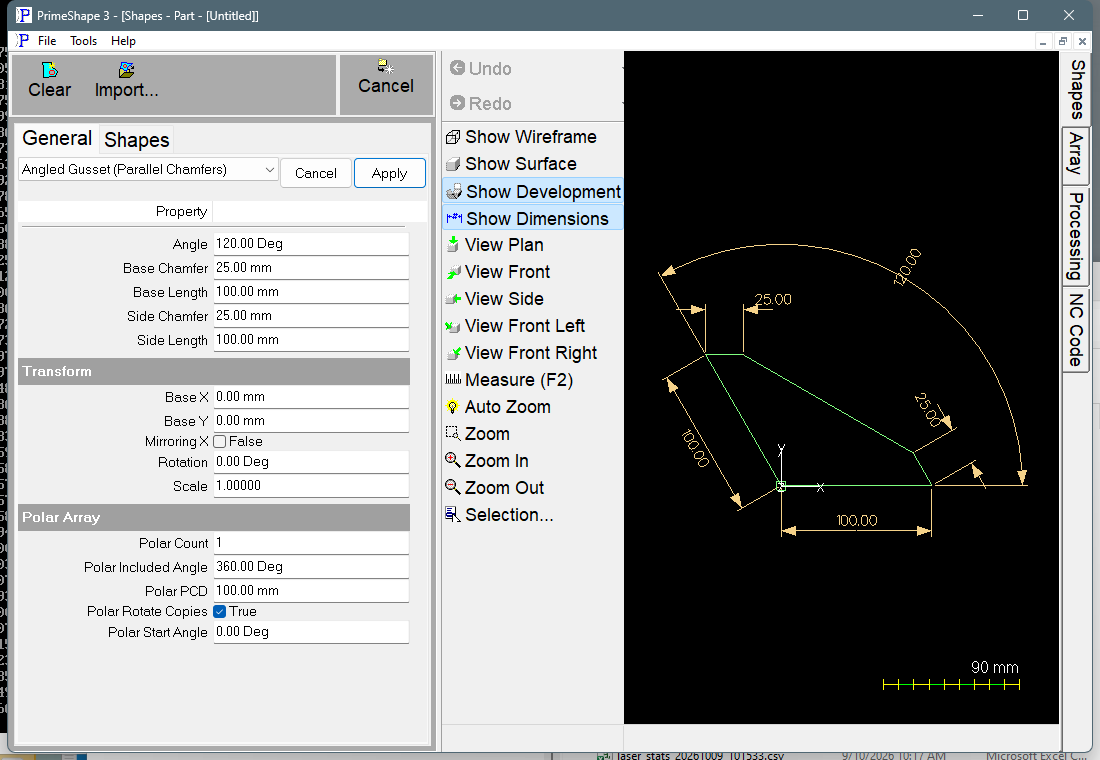
Angled Gusset (Parallel Chamfers) in PrimeShape: the property page (left) and the shape with its dimensions (right).
Insert point and direction
The insert point (Base X, Base Y) is the corner where the base leg and the side leg meet, and it lies on the outline. The base leg runs Base Length along +X from the insert point. The side leg runs Side Length from the insert point at Angle, measured anticlockwise from +X. With the default 120° it leans up and to the left.
The outline is one closed polyline with five corners, built from the insert point in this order:
•Out along the side leg to its end.
•The side chamfer edge starts there and runs Side Chamfer in +X, parallel to the base leg. This direction does not change with Angle.
•The closing edge joins the end of the side chamfer edge to the end of the base chamfer edge.
•The base chamfer edge runs back from the end of the base leg, Base Chamfer long, in the direction of the side leg (at Angle), parallel to the side leg.
•Back along the base leg to the insert point, which closes the outline.
With Angle between 0° and 180° the outline runs clockwise from the insert point; between 180° and 360° it runs anticlockwise. With the default values the corners are at (0, 0), (−50, 86.6), (−25, 86.6), (87.5, 21.65) and (100, 0) mm relative to the insert point. The Angle dimension is drawn at the insert point between the two legs, Base Length and Base Chamfer below and beside the base leg, and Side Length and Side Chamfer beside the side leg. To turn or flip the gusset, use Rotation or Mirroring X (see Transform).
Properties
Property |
Description |
Default |
Angle |
Angle between the base leg and the side leg, measured anticlockwise from the base leg (which runs along +X) to the side leg. Angle units (degrees). Any value is accepted; it is reduced to the range 0° to less than 360° before the shape is built. Angles above 180° put the side leg below the base leg. |
120° |
Base Length |
Length of the base leg: the distance along +X from the insert point to the start of the base chamfer edge. Length units. Cannot be negative. |
100 mm (4 in) |
Side Length |
Length of the side leg: the distance from the insert point to the start of the side chamfer edge, along the direction set by Angle. Length units. Cannot be negative. |
100 mm (4 in) |
Base Chamfer |
Length of the chamfer edge at the end of the base leg. This edge runs parallel to the side leg, in the direction of Angle, and closes the outline with the side chamfer edge. Length units. Cannot be negative. |
25 mm (1 in) |
Side Chamfer |
Length of the chamfer edge at the end of the side leg. This edge runs parallel to the base leg, in +X, and closes the outline with the base chamfer edge. Length units. Cannot be negative. |
25 mm (1 in) |
The shape has no Parallel Chamfers option: the chamfers are always parallel. The defaults are the metric values above, or the inch values in brackets when working in inches.
Chamfer sizes and the parallelogram
Because each chamfer is parallel to the other leg, the full parallelogram is formed by Base Length and Side Length. Side Chamfer equal to Base Length, together with Base Chamfer equal to Side Length, gives the full parallelogram with no corner cut off. Smaller chamfers cut more of the far corner away. A chamfer of 0 leaves a zero-length edge, and the closing edge then runs directly from the end of the side leg or the base leg.
Limits
•Base Length, Side Length, Base Chamfer and Side Chamfer cannot be negative; the property page does not accept values below 0. A value of 0 is accepted and collapses that edge to a point.
•An Angle of 0° or 180° (or any whole multiple of 180°) lays the side leg on the line of the base leg, so the profile collapses to a line. Use an angle clearly between 0° and 180°, or between 180° and 360° for a gusset that opens the other way.
•Side Chamfer should be no more than Base Length, and Base Chamfer no more than Side Length. A larger chamfer carries its edge past the far corner of the parallelogram, so the outline extends beyond the corner instead of cutting it off, and for some combinations the closing edge crosses another edge and the outline is self-intersecting, which is not a valid part.
•The shape does not check these relationships. Check the drawing after large changes to the chamfers or the Angle.
•The shape code does not check these values itself. If building the shape raises an exception, the property page shows a red bar at the top of the property list reading "Warning: Cannot build shape from these parameters".
Every 2D shape also has the Transform properties (Base X, Base Y, Rotation, Scale, Mirroring X) and the Polar Array properties, listed after the shape's own properties.