The Base Plate is a rectangular plate with filleted corners, an optional cutout in the middle and a ring of holes on a pitch circle (PCD) round the plate centre – the bolt-down plate at the foot of a column, pole or post. The cutout can be round or a regular polygon. The holes can be round holes, straight slots or slots curved along the PCD. Each hole can also be opened out to the plate edge by a radial Slot Gap with filleted mouths, so the plate can be slid onto bolts that are already in place.
It appears in the shapes library under Rectangular Shapes, Gussets and Flanges.
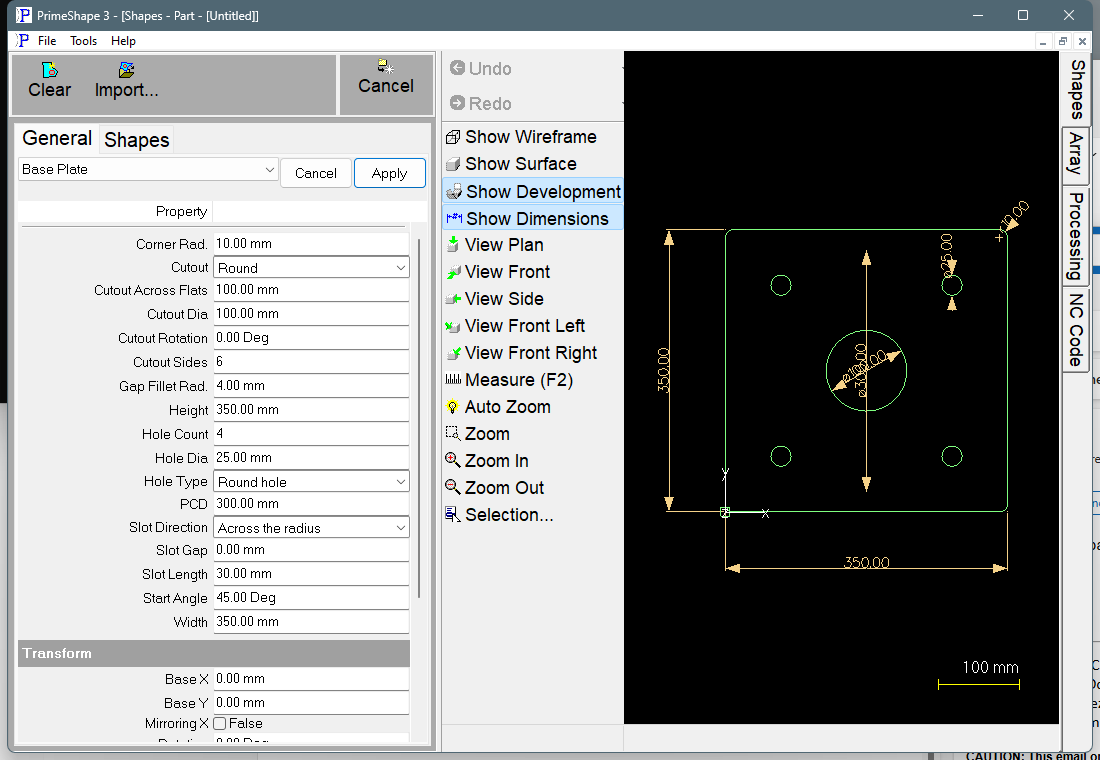
Base Plate in PrimeShape: the property page (left) and the shape with its dimensions (right).
Insert point and orientation
The insert point is the bottom left corner of the plate (the corner of the Width x Height rectangle, also when Corner Rad. rounds the plate corner off). Width is built to the right along X and Height upwards along Y.
The cutout and the PCD are both centred on the plate centre, (Width / 2, Height / 2) from the insert point. The first hole is at Start Angle, measured anticlockwise from the X axis as seen from the plate centre; the other holes follow anticlockwise, evenly spaced round the full circle (360° / Hole Count apart).
With Slot Gap set, each gap runs from its hole straight out along the radius through the hole centre, away from the plate centre, to the plate edge. The plate outline then runs in along each gap, round the hole and back out, so the plate and all its holes are cut as one profile. Without a Slot Gap the holes and the cutout are separate inside profiles.
Properties
Lengths are in the current units (mm or inches); angles are in degrees. The defaults are for a new shape and are shown in mm, with the inch value in brackets.
Property |
Description |
Default |
Width |
Overall width of the plate, along X. Must be greater than 0. |
350 mm (14 in) |
Height |
Overall height of the plate, along Y. Must be greater than 0. |
350 mm (14 in) |
Corner Rad. |
Radius of the fillet on all four plate corners. 0 gives sharp corners. A negative value is used as 0, and a value more than half the smaller of Width and Height is limited to that half (the plate then has fully rounded ends). |
10 mm (0.4 in) |
Cutout |
The cutout in the middle of the plate: None, Round (sized by Cutout Dia) or Polygon (sized by Cutout Sides, Cutout Across Flats and Cutout Rotation). |
Round |
Cutout Dia |
Diameter of the round cutout. 0 or less gives no cutout. Used only when Cutout is Round. |
100 mm (4 in) |
Cutout Sides |
Number of sides of the polygon cutout, 3 or more. Used only when Cutout is Polygon. |
6 |
Cutout Across Flats |
Size of the polygon cutout, as for the Hexagon and N - Gon shapes: with an even number of sides it is the distance across flats; with an odd number of sides it is the distance from the middle of one flat to the opposite corner. 0 or less gives no cutout. Used only when Cutout is Polygon. |
100 mm (4 in) |
Cutout Rotation |
Turns the polygon cutout about the plate centre, anticlockwise. At 0 the first corner is at 180° (directly left of the centre), so a hexagon has its flats at the top and bottom. Negative values are allowed. Used only when Cutout is Polygon. |
0° |
Hole Type |
The shape of the holes on the PCD: Round hole, Slot (a straight slot, laid as Slot Direction) or Curved slot (a slot bent along the PCD). Every slot is centred on its hole position. A slot with a Slot Length of 0 is cut as a round hole. |
Round hole |
Hole Count |
Number of holes on the PCD, from 0 to 1000. 0 gives no holes. |
4 |
PCD |
Pitch circle diameter the hole centres lie on, centred on the plate centre. Must be greater than 0 when there are holes, and greater than Hole Dia for curved slots (Hole Type Curved slot with a Slot Length above 0). |
300 mm (12 in) |
Start Angle |
Angle of the first hole, anticlockwise from the X axis as seen from the plate centre. The default of 45° puts four holes on the diagonals towards the corners. Negative values are allowed. |
45° |
Hole Dia |
Diameter of the round holes, or the width of the slots (which is also the diameter of their round ends). Cannot be negative. With a Hole Dia of 0 a point is placed at each hole centre instead of a hole, and Slot Gap has no effect. |
25 mm (1 in) |
Slot Length |
Length of each slot from the centre of one end arc to the centre of the other, so the overall length of a straight slot is Slot Length + Hole Dia. For a curved slot it is measured along the PCD. Cannot be negative; 0 gives round holes. Not used for round holes. |
30 mm (1.2 in) |
Slot Direction |
Which way a straight slot lies: Across the radius (at right angles to the line from the plate centre, along the PCD) or Along the radius (lying on the line from the plate centre through the hole). Used only when Hole Type is Slot. |
Across the radius |
Slot Gap |
Width of the radial gap that opens each hole out to the plate edge. 0 leaves the holes closed. Cannot be negative, and must be narrower than Hole Dia. Has no effect when there are no holes or Hole Dia is 0. |
0 |
Gap Fillet Rad. |
Radius of the fillet on each side of a slot gap where it meets the plate edge. 0 gives sharp mouth corners. Cannot be negative. Used only when Slot Gap is greater than 0. |
4 mm (0.16 in) |
The dimensions drawn on the shape are named after these properties, and clicking one edits that value. Width and Height are drawn on the plate edges, Corner Rad. on a corner no slot gap cuts into, Cutout Dia across a round cutout or Cutout Across Flats across a polygon cutout, PCD between the first two holes, Hole Dia and Slot Length on the first hole, and Slot Gap and Gap Fillet Rad. on the first hole's gap. A dimension that does not apply to the current settings (for example Cutout Dia with a Polygon cutout, or Slot Length for a curved slot) is hidden.
Limits
The shape is checked every time it is built. If any of these conditions is broken the shape is not built (the one exception is noted at the cutout check), and the property page shows a red Warning: Cannot build shape from these parameters line. The page does not say which condition failed, so check the values against this list:
•Width and Height must be greater than zero.
•Hole Count must be 0 to 1000.
•Hole and slot sizes cannot be negative – Hole Dia, Slot Length, Slot Gap and Gap Fillet Rad.
•PCD must be greater than zero when there are holes, and PCD must be bigger than Hole Dia for curved slots (Hole Type Curved slot with a Slot Length above 0).
•Slot Length is too long to curve round the PCD – a curved slot would go all the way round the PCD, or it turns through more than half a circle and its two ends come within Hole Dia of each other.
•The holes overlap - reduce Hole Dia or Hole Count, or increase PCD – neighbouring round holes touch or cross.
•The slots overlap - reduce Slot Length, Hole Dia or Hole Count – two slots touch or cross. Curved slots are checked against their neighbours; straight slots are checked against every other slot, as a long one can reach past its neighbours.
•The holes overlap the cutout – a hole or slot touches, crosses or lies inside the round or polygon cutout. Curved slots must stay outside the circle through the polygon's corners.
•The cutout needs at least 3 sides – checked when Cutout is Polygon. This check runs after the plate and holes have been built, so with fewer than 3 sides they are left without the cutout.
•Slot Gap must be narrower than Hole Dia – checked when a slot gap is open (Slot Gap above 0, with Hole Count and Hole Dia above 0).
•Slot Gap must be narrower than the holes – the gap has to enter each hole through its side.
•Slot Gap does not reach the plate edge – the gap, run out along the radius from its hole, must meet the plate edge on both sides.
•The holes must be inside the plate to open them with a Slot Gap – the gap has to run from the hole out to the edge.
•Gap Fillet Rad. is too big – the mouth fillet fits neither on the plate edge where the gap meets it nor on the edge next to it (it can land on a corner arc when the gap meets the plate near a corner), or it would run into the hole.
•The slot gaps overlap - reduce Slot Gap, Gap Fillet Rad. or Hole Count – one gap, with its fillets, reaches into the next along the plate edge.
Closed holes are not checked against the plate edge, and the cutout is not checked against the plate edge or the corner fillets. Make sure the PCD and hole size leave enough material between the holes and the edge for the material and process you will cut with.
Every 2D shape also has the Transform properties (Base X, Base Y, Rotation, Scale, Mirroring X) and the Polar Array properties, listed after the shape's own properties.