Chain Cut Rectangles cuts rectangles or squares in pairs. The two parts of each pair sit side by side and share one common line, and the pairs are repeated in rows up the shape. The whole set is one open path cut from a single pierce: each common line is cut once, and a link cut, as long as the Gap, joins each row to the next. Use it to cut a batch of identical rectangular parts with fewer pierces than cutting each part on its own.
It appears in the shapes library under Basic Shapes, Rectangular Shapes and Tools.
Insert point and the cut path
The insert point is the pierce. The common lines of all the pairs lie on the vertical line through the insert point, and the rows are stacked upward from it. Lead In is the straight lead from the pierce up to the bottom of the first pair's common line.
Cut First sets which part of each pair is cut first. Left part (the default) puts the first part of each pair to the left of the common line. Right part puts it to the right, which mirrors the whole path about the common line.
From the pierce the path:
1.runs the lead in straight up from the pierce to the bottom of the first common line (no lead in if Lead In is 0)
2.cuts round the outside of the first part: along the bottom, up the outer side and back along the top, to the top of the common line
3.cuts the common line down to the bottom
4.cuts round the outside of the second part the same way, back to the top of the common line
5.for each further pair, cuts straight up the link to the bottom of the next pair, then repeats the steps above for that pair
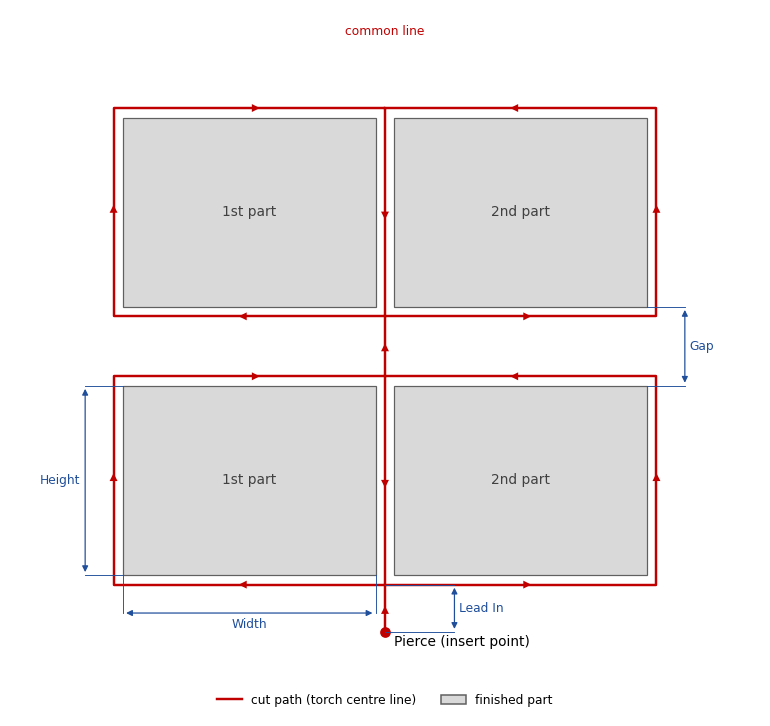
The path ends at the top of the common line of the last pair. It is made of straight lines only. Any leg of zero length (a Lead In of 0, or a link when Gap equals the kerf, 2 x Kerf Offset) is left out.
Properties
Property |
Description |
Default |
Width |
Width of each finished part, along X (mm or inch). Every part is the same size. The property page does not set a minimum, so use a value above 0. |
100 mm (4 in) |
Height |
Height of each finished part, along Y (mm or inch). Every part is the same size. The property page does not set a minimum, so use a value above 0. |
100 mm (4 in) |
Repeat Count |
Number of pairs, stacked upward along Y. Each pair is two parts, so the shape cuts 2 x Repeat Count parts. The minimum is 1; the property page enforces it. |
2 |
Gap |
Distance between rows (mm or inch), from the top edge of the parts in one pair to the bottom edge of the parts in the next. A Gap below the kerf (2 x Kerf Offset), including a negative value, is treated as the kerf, so a row never cuts into the row below. At a Gap equal to the kerf the rows touch and there is no link cut. Not used when Repeat Count is 1. |
25 mm (1 in) |
Lead In |
Length of the straight lead (mm or inch) from the pierce at the insert point up to the bottom of the first pair's common line. 0 puts the pierce on the bottom of the common line. The property page does not set a minimum; a negative value moves the pierce and the path below the insert point. |
10 mm (0.4 in) |
Kerf Offset |
Kerf offset of the cutting process (mm or inch): the distance from the torch centre to the cut edge, which is half the kerf width. Enter the same value as the Kerf Offset on the materials (process data) page for the material and thickness you will cut. It is built into the path; see Kerf below. The minimum is 0. |
0 |
Cut First |
Which part of each pair is cut first: Left part or Right part. Right part builds the mirror image of the path about the common line. |
Left part |
The dimensions shown on the shape are the Width and Height of the first part, the Lead In, and the Gap between the first two rows (hidden when Repeat Count is 1). The Width and Height dimensions measure the finished part, not the cut path.
Kerf
The kerf is built into the path. The outside edges of the path sit one Kerf Offset outside the parts, the two parts of a pair are one kerf (2 x Kerf Offset) apart, and the common line runs down the middle of that kerf. Every part edge is therefore one Kerf Offset inside the torch line that cuts it, and the parts come out at the Width and Height entered. On the torch line the path is 2 x (Width + 2 x Kerf Offset) wide and each pair is (Height + 2 x Kerf Offset) tall.
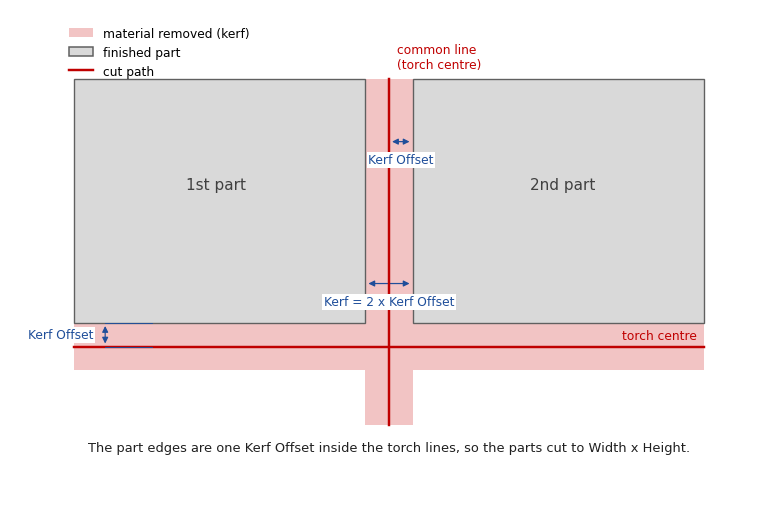
The path is cut as drawn. The shape sets the cutting tool hint, no kerf offset and no lead in or lead out. One part of each pair is cut clockwise and the other anticlockwise, so a controller kerf offset would put one part outside the path and the other inside it, and that part would come out a full kerf undersize. The cutting tool hint stops an open path being given the open path tool, which is often a marking tool.
Set Kerf Offset to the Kerf Offset of the material and process you will cut with, as shown on the materials (process data) page. At Kerf Offset 0 (the default) the path is drawn on the part outlines, so the finished parts come out smaller by one Kerf Offset on each side. A part saved before Kerf Offset was added stored the full kerf width as Kerf; it opens with Kerf Offset set to half of it, so it cuts the same.
Notes
•Plasma will cut differently on one side compared to the other- "scrap side" usually to the left of the cut direction will be more tapered
•If the build raises an error, the property page shows the warning Warning: Cannot build shape from these parameters. The shape has no other error checks of its own.
•Only Repeat Count (minimum 1), and the Gap and Kerf Offset limits described above, are enforced in the code. Width, Height and Lead In are not range-checked.
•A Width or Height of 0 removes the cuts that have no length, so the result is no longer a set of closed parts.
•The defaults are in millimetres in metric and in inches (4 in, 1 in, 0.4 in) in imperial.
•The shape has no aliases (no former names).
Every 2D shape also has the Transform properties (Base X, Base Y, Rotation, Scale, Mirroring X) and the Polar Array properties, listed after the shape's own properties.