The Cross Plate is a solid plus-shaped plate: a horizontal arm and a vertical arm crossing at their centres, each arm with its own width. The four inside (re-entrant) corners and the eight arm end corners can be filleted, and an optional round hole can be cut in the centre. It is also known as a Plus Plate, Plus Shape or Cruciform, and searching the shapes library for any of those names finds it.
The Cross Plate is the cuttable counterpart of the Marking Cross, which is two marking lines and not a closed profile.
It appears in the shapes library under Basic Shapes and Other Shapes.
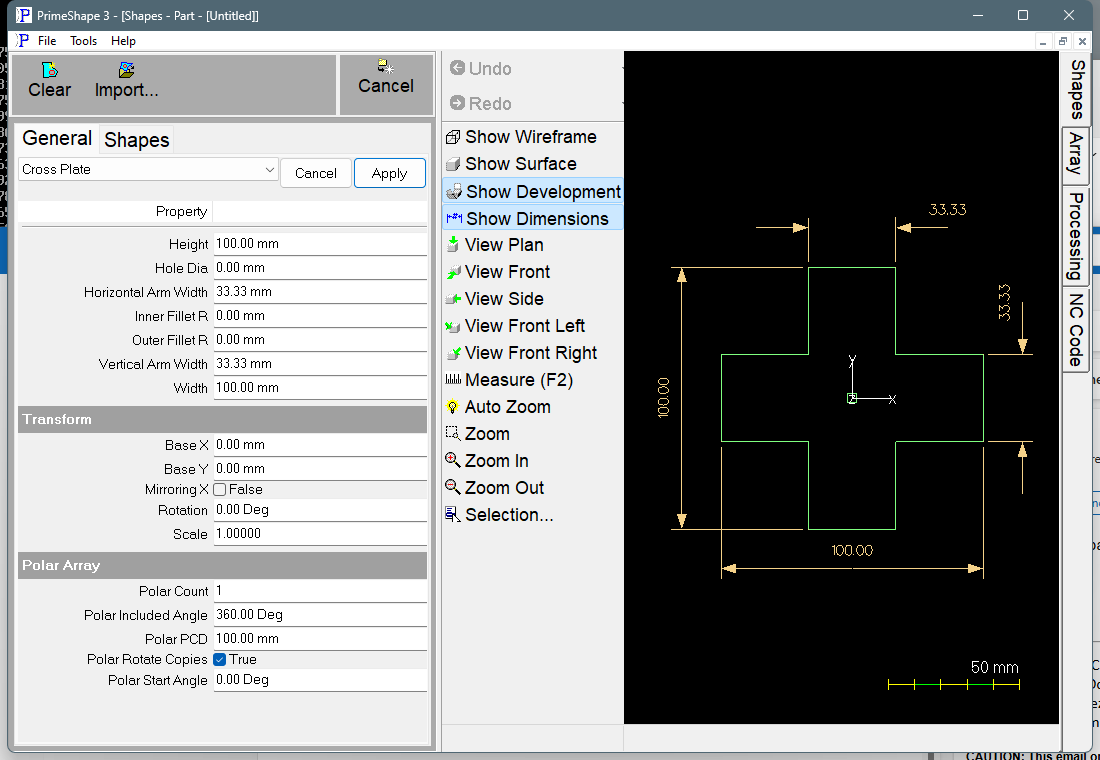
Cross Plate in PrimeShape: the property page (left) and the shape with its dimensions (right).
Insert point and orientation
The insert point is the centre of the cross, where the two arms meet. The horizontal arm runs along X, Width / 2 to each side of the insert point; the vertical arm runs along Y, Height / 2 above and below it. The centre hole, when there is one, is also centred on the insert point.
The outline is one closed profile with twelve corners, built anticlockwise starting from the bottom of the right arm end. The centre hole is a separate inside profile.
Properties
Lengths are in the current units (mm or inches). The defaults shown are for a new shape; the inch defaults are used when the program is set to inches.
Property |
Description |
Default |
Width |
Overall length of the horizontal arm, end to end, along X. Must be greater than 0. |
100 mm (4 in) |
Height |
Overall length of the vertical arm, end to end, along Y. Must be greater than 0. |
100 mm (4 in) |
Horizontal Arm Width |
Width of the horizontal arm, measured across it (along Y). Must be greater than 0 and less than Height. |
33.33 mm (1.333 in) – one third of the default Height |
Vertical Arm Width |
Width of the vertical arm, measured across it (along X). Must be greater than 0 and less than Width. |
33.33 mm (1.333 in) – one third of the default Width |
Inner Fillet R |
Radius of the fillet on the four inside corners, where the arms meet. 0 gives sharp corners. Cannot be negative. |
0 |
Outer Fillet R |
Radius of the fillet on the eight outside corners at the ends of the arms. 0 gives sharp corners. Cannot be negative. A radius of half the Horizontal Arm Width gives a fully rounded left or right arm end, and half the Vertical Arm Width gives a fully rounded top or bottom arm end. |
0 |
Hole Dia |
Diameter of the round hole at the centre of the cross. 0 gives no hole. Cannot be negative. |
0 |
The dimensions drawn on the shape are named after these properties. Width is drawn below the bottom arm, Height to the left of the left arm, Horizontal Arm Width across the right arm end, Vertical Arm Width across the top arm end, and the two fillet radii on the top right of the cross. Hole Dia is drawn across the centre hole. Inner Fillet R, Outer Fillet R and Hole Dia are hidden while they are 0, and the fillet dimensions are also hidden when the fillets do not fit.
Limits
The shape is checked every time it is built. If any of these conditions is broken the shape is not built and the property page shows the red bar “Warning: Cannot build shape from these parameters”. The bar does not name the condition that failed, so check the values against this list:
•Width and Height must be greater than zero.
•Arm widths must be greater than zero.
•Vertical Arm Width must be less than the Width.
•Horizontal Arm Width must be less than the Height.
•Inner Fillet R and Outer Fillet R cannot be negative.
•Hole Dia cannot be negative.
•Inner Fillet R or Outer Fillet R is too large for the cross – the fillets at the two ends of one edge together need more than the length of that edge. For example, two Outer Fillet R across an arm end cannot add up to more than the arm width, and an Inner Fillet R plus an Outer Fillet R along the side of an arm cannot add up to more than the length of that side.
•Hole Dia is too large for the cross – the centre hole would touch or cross the outline, including the inner fillets. With sharp inside corners the hole radius must be less than the distance from the centre to an inside corner. An Inner Fillet R fills part of the notch with material, which moves the outline further from the centre, so the largest hole that fits is larger than with sharp corners. The arms overlap in a rectangle Vertical Arm Width x Horizontal Arm Width. A hole with a diameter larger than the narrower of Vertical Arm Width and Horizontal Arm Width reaches out of the centre square into the arms. That is allowed as long as the check above passes.
Every 2D shape also has the Transform properties (Base X, Base Y, Rotation, Scale, Mirroring X) and the Polar Array properties, listed after the shape's own properties.