The Curved Slot shape is a single slot bent along an arc: two concentric arcs joined by a round end cap at each end. It is one closed profile. Use it for an adjustment slot that lets a part rotate about a pivot, a kidney slot on a flange or plate, or any slot that must follow a pitch circle. To place several slots round one circle, use the Polar Array properties.
It appears in the shapes library under Round Shapes and Other Shapes.
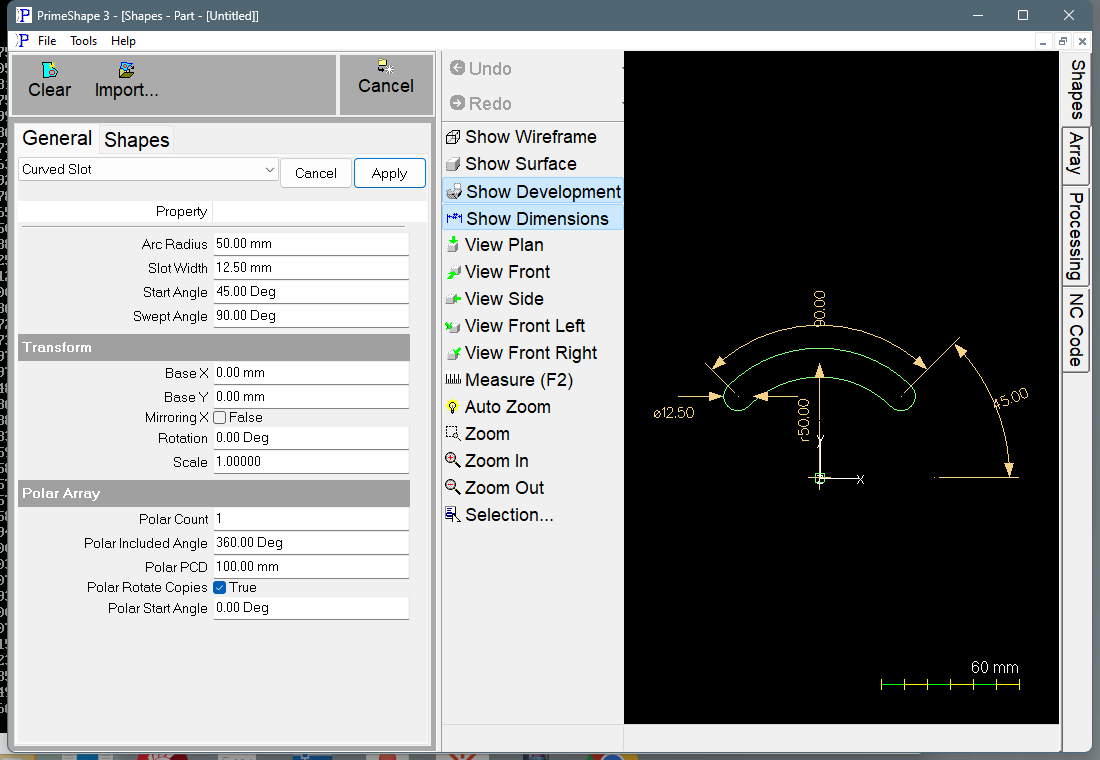
Curved Slot in PrimeShape: the property page (left) and the shape with its dimensions (right).
Insert point and direction
The insert point (Base X, Base Y) is the centre of the arc the slot follows. The slot itself does not touch the insert point – its centre line is a circle of Arc Radius round it.
Angles are measured anticlockwise from the +X axis. The centre of the first end cap is at the Start Angle; the slot then runs anticlockwise for the Swept Angle to the centre of the second end cap. The outer edge of the slot is at Arc Radius + Slot Width / 2 and the inner edge at Arc Radius – Slot Width / 2.
The profile is cut anticlockwise: along the outer arc from the first end to the second, round the second end cap, back along the inner arc, and round the first end cap.
The length of the slot centre line, from one end-cap centre to the other, is Arc Radius × Swept Angle (in radians). The overall length along the centre line, end cap to end cap, is that plus one Slot Width. With the defaults (Arc Radius 50 mm, Swept Angle 90°) the centre-line length is about 78.5 mm and the end caps are centred at 45° and 135°.
Each dimension drawn on the shape is named after the property it shows. The Arc Radius dimension runs from the insert point to the centre line half way along the slot. The Slot Width dimension is drawn across the second end cap. The Swept Angle dimension runs from the first end-cap centre to the second. The Start Angle dimension runs from the +X axis to the first end-cap centre the short way round, and is hidden when the Start Angle is 0° or a whole number of turns.
Properties
Property |
Description |
Default |
Arc Radius |
Radius of the slot centre line, from the insert point (mm or inch). Must be greater than 0 and more than half the Slot Width. |
50 mm (2") |
Slot Width |
Width of the slot across its arcs, which is also the diameter of the round end caps (mm or inch). Must be greater than 0 and less than twice the Arc Radius. |
12.5 mm (0.5") |
Start Angle |
Angle of the first end-cap centre, measured anticlockwise from +X about the insert point (degrees). Negative values are allowed and turn the start clockwise from +X. |
45° |
Swept Angle |
Angle the slot runs through, anticlockwise from the first end-cap centre to the second (degrees). The editor stops at 360°. A negative value is not stopped by the editor; the shape is refused when it is built (see When the shape cannot be built). A Swept Angle of 0 gives a round hole instead of a slot. |
90° |
Limits
•A Swept Angle of 0 gives a round hole of diameter Slot Width, centred on the arc at the Start Angle.
•At 180° or less the slot cannot run into itself and no overlap check applies; the editor limit is 360°. Past 180° the two ends come round towards each other behind the slot, and the shape is refused once the straight distance between the end-cap centres, 2 × Arc Radius × sin(Swept Angle / 2), is no more than the Slot Width – at that point the end caps touch. With the default Arc Radius and Slot Width this happens at about 345.6°.
•A Swept Angle of 360° is always refused: the slot would close on itself. Use the Ring shape for a complete annulus.
When the shape cannot be built
If the values cannot make a valid shape, the shape is not drawn, a broken-shape marker is shown at the insert point, and the property page shows Warning: Cannot build shape from these parameters. The property page does not say which value caused it, so check the list below. This happens when:
•Arc Radius is 0 or negative.
•Slot Width is 0 or negative.
•Slot Width is equal to or greater than twice the Arc Radius – the inner edge of the slot would reach or pass the arc centre.
•Swept Angle is negative.
•Swept Angle is 360°, or is over 180° and the end caps meet as described under Limits.
Every 2D shape also has the Transform properties (Base X, Base Y, Rotation, Scale, Mirroring X) and the Polar Array properties, listed after the shape's own properties.