The Flashing is a flat rectangular plate with the hole a round pipe makes where it passes through the plate at an angle. Use it to cut a flashing or cover plate for a pipe, flue or duct that goes through a sloping or flat surface at a known angle: you enter the plate size, where the pipe crosses the plate, the pipe diameter and its two angles, and the shape works out the hole. Only the plate is developed; the pipe itself is drawn in the 3D view but not cut.
It appears in the shapes library under Thin Walled Developments.
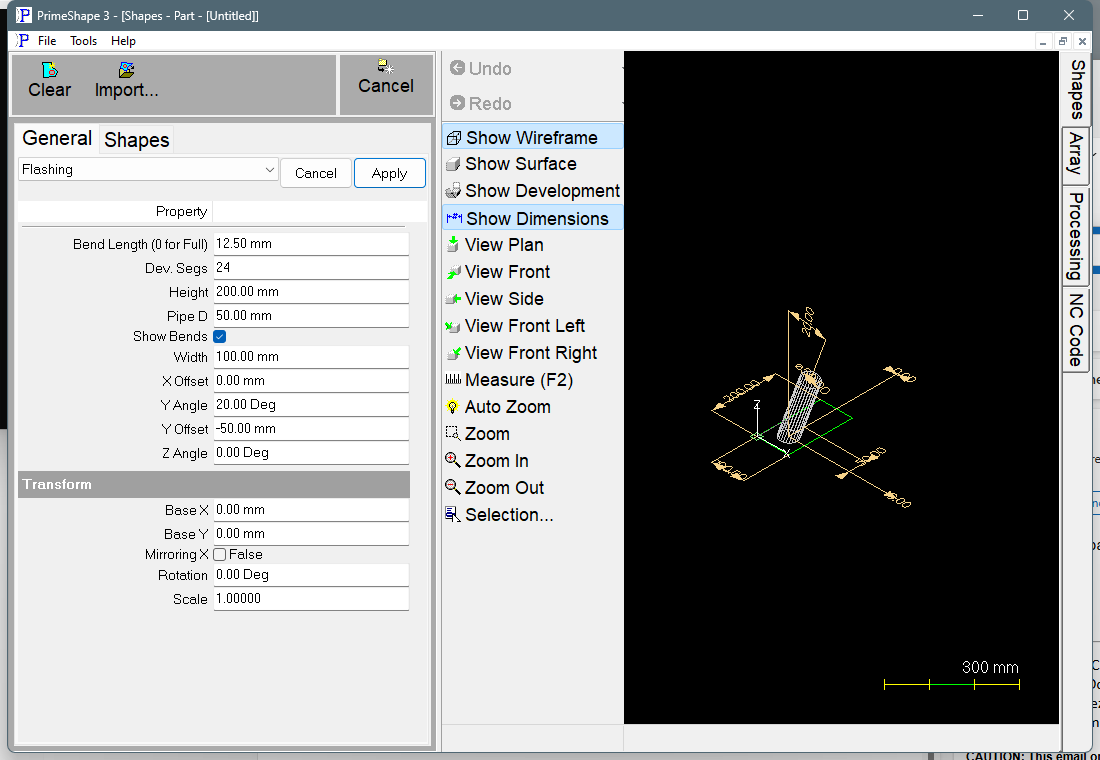
Flashing in PrimeShape: the property page (left) and the shape as a wireframe with its dimensions (right).
Insert point and how the shape is built
The insert point is the bottom left corner of the plate. The plate runs Width along +X and Height along +Y from there, and lies flat in the plane of the sheet.
The pipe axis crosses the plate at the plate centre moved by X Offset and Y Offset. With both angles at 0 the pipe stands square to the plate and the hole is a circle of Pipe D. Y Angle tilts the pipe away from square to the plate, and Z Angle turns the direction of that tilt round the plate, measured from the +X axis. A tilted pipe makes a hole that is longer in the direction of the tilt (about Pipe D divided by the cosine of Y Angle) and still Pipe D across it.
The pipe is modelled as a prism with Dev. Segs flat sides. The hole is a closed polygon with one corner where each edge between two sides meets the plate, so it has Dev. Segs straight sides and its corners lie on the true pipe outline.
The shape produces two closed profiles: the rectangular plate outline and the hole.
Properties
Property |
Description |
Default |
Width |
Width of the plate, along X (mm or inch). The property page sets no minimum. |
100 mm (4 in) |
Height |
Height of the plate, along Y (mm or inch). The property page sets no minimum. |
200 mm (8 in) |
X Offset |
Distance along X from the centre of the plate to the point where the pipe axis crosses the plate (mm or inch). Negative values move the hole to the left. |
0 |
Y Offset |
Distance along Y from the centre of the plate to the point where the pipe axis crosses the plate (mm or inch). Negative values move the hole down. |
–50 mm (–2 in) |
Z Angle |
Direction the pipe leans, measured round the plate from the +X axis (degrees). It turns the hole round its centre; it does not change the hole's size. |
0° |
Y Angle |
Angle of the pipe away from square to the plate (degrees). 0 is a pipe at right angles to the plate (round hole). The larger the angle, the longer the hole. A negative angle tilts the pipe the other way. Close to 90° the pipe lies nearly along the plate and the hole outline goes wrong (see Notes). |
20° |
Pipe D |
Diameter of the pipe that passes through the plate (mm or inch). The corners of the hole lie on this diameter; enter the outside diameter of the pipe plus any clearance you want. |
50 mm (2 in) |
Dev. Segs |
Number of flat sides the pipe is divided into, and so the number of straight sides of the hole. More sides give a smoother hole. The least allowed is 3. |
24 |
Show Bends |
Shared by all Thin Walled Developments. The Flashing has no bend lines, so this setting has no effect on it. |
True |
Bend Length (0 for Full) |
Shared by all Thin Walled Developments. The Flashing has no bend lines, so this setting has no effect on it. |
12.5 mm (0.5 in) |
The dimensions drawn on the shape are Width, Height, X Offset and Y Offset (from the plate centre to the hole centre), Z Angle, Y Angle and Pipe D.
Notes
•The shape models a length of pipe that starts max(Width, Height) above the plate and runs 2 × (Width + Height) long, so the length depends on the plate size. If the pipe is tilted so far that the top of one of its edges is not above the plate, those corners of the hole are taken from the far end of the pipe edge instead, and the hole outline is wrong. This happens when max(Width, Height) × cos(Y Angle) is less than Pipe D/2 × sin(Y Angle) – with the default sizes, at a Y Angle above about 83° – and always at 90°. The shape does not show the "Cannot build shape from these parameters" warning in this case, so check the hole shape in the drawing when Y Angle is steep.
•The shape does not check that the hole is inside the plate. A large Pipe D, a large Y Angle or large offsets can put the hole across the plate edge or outside the plate altogether, and the shape still builds. Check the hole position before cutting.
•The sides of the hole are straight between corners that lie on the pipe outline, so between corners the hole is slightly smaller than the pipe. Increase Dev. Segs, or add clearance to Pipe D, for a closer or easier fit.
•A Pipe D of 0 gives a hole of no size.
•X Offset and Y Offset accept negative values down to the negative of the edit control maximum, so the range is symmetrical about zero.
•If the hole cannot be built, the property page shows Warning: Cannot build shape from these parameters, the pipe is removed from the 3D view and the hole is not added. The plate outline may still be present, so do not cut from the shape while the warning shows.
•The defaults are in millimetres in metric and in inches (4 in, 8 in, –2 in, 2 in, 0.5 in) in imperial.
•The shape has no aliases (no former names).
The Flashing also has the Transform properties (Base X, Base Y, Rotation, Scale, Mirroring X), listed after the shape's own properties. Like the other Thin Walled Developments it has no Polar Array properties.