The Pipe-Cone Intersection models a round pipe (the branch) joining the side of a thin-walled truncated cone (the trunk), and produces the flat pattern of one of the two parts: either the pipe, with its end shaped to fit the cone wall, or the cone, with the opening for the pipe cut into it. The pipe enters the cone at the angle set by Join Angle and can be offset sideways from the cone axis. Make the pipe pattern and the cone pattern as two separate shapes with the same values, one with Show Cone set to False and one with it set to True.
It appears in the shapes library under Thin Walled Developments. The shape window shows the 3D model of both parts as well as the flat pattern; the part that is being developed is drawn in green and the other in grey. Only the flat pattern is cut.
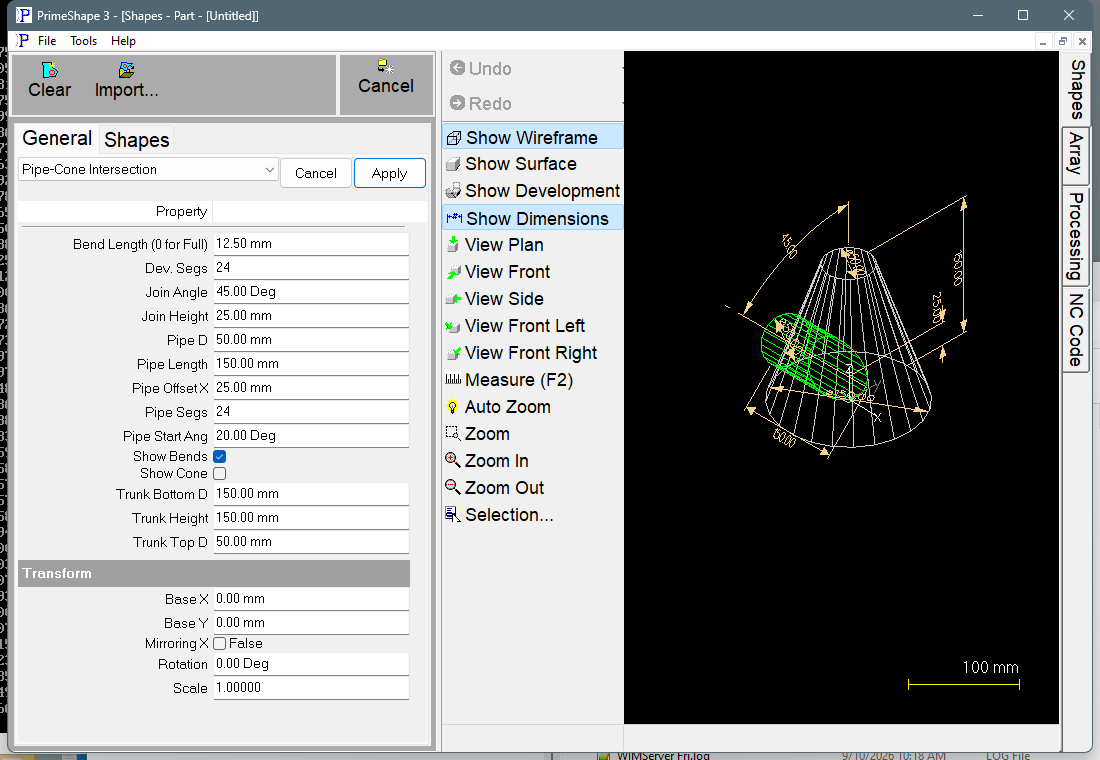
Pipe-Cone Intersection in PrimeShape: the property page (left) and the shape as a wireframe with its dimensions (right).
How the shape is built
The trunk is modelled in 3D with its bottom circle (Trunk Bottom D) at height 0, centred on the origin, and its top circle (Trunk Top D) at Trunk Height directly above. It is divided into Dev. Segs flat facets round its circumference.
The pipe axis passes through the point that is Pipe Offset X to the side of the trunk axis at Join Height, and is tilted away from the vertical by Join Angle. The free end of the pipe is Pipe Length from that point, measured along the pipe axis. The pipe is divided into Pipe Segs flat facets, and each facet is trimmed where it meets the trunk wall. When the join point is inside the trunk, as it normally is, the finished pipe is shorter than Pipe Length along its axis.
•Show Cone False – the pipe facets are laid out flat side by side. One edge of the pattern is the square free end of the pipe, the other is the curved end that fits the trunk wall, and the two straight sides are the two edges of the pipe seam. Pipe Start Ang sets where that seam falls round the pipe.
•Show Cone True – the trunk facets are laid out flat. The trunk is turned so that its seam runs through the middle of the opening, and the opening is split between the two seam edges of the pattern: each seam edge has a notch that is half of the opening. The pattern is one closed outline: top edge, seam edge, bottom edge, seam edge.
Insert point
The flat pattern starts from one seam edge, which lies along the X axis. For the pipe (Show Cone False) the end of that edge that meets the trunk is on the insert point and the free end is further along X. For the trunk (Show Cone True) the top end of that edge (Trunk Top D) is on the insert point and the bottom end is further along X. The facets are laid out from there one after another, and the pattern closes with the second seam edge.
Properties
Property |
Description |
Default |
Trunk Top D |
Diameter of the top circle of the trunk, at Trunk Height. Length units. |
50 mm (2 in) |
Trunk Bottom D |
Diameter of the bottom circle of the trunk, at height 0. Length units. |
150 mm (6 in) |
Trunk Height |
Vertical distance between the bottom and top circles of the trunk. Length units. |
150 mm (6 in) |
Pipe D |
Diameter of the branch pipe. Length units. |
50 mm (2 in) |
Pipe Length |
Distance along the pipe axis from the join point (Join Height, Pipe Offset X) to the free end of the pipe. When the join point is inside the trunk, as it normally is, this is longer than the finished pipe. Length units. |
150 mm (6 in) |
Pipe Start Ang |
Rotates the pipe facets round the pipe axis, which moves where the pipe seam (the two straight ends of the pipe pattern) falls. Degrees. |
20° |
Pipe Offset X |
Sideways offset of the pipe axis from the trunk axis, square to the plane in which the pipe is tilted. 0 makes the pipe axis cross the trunk axis. Length units. |
25 mm (1 in) |
Pipe Segs |
Number of flat facets the pipe is divided into. The pipe pattern is built from this many straight-sided strips, and the opening in the trunk pattern has this many points. Minimum 3. |
24 |
Join Height |
Height above the bottom of the trunk at which the pipe axis passes through the join point. Length units. |
25 mm (1 in) |
Join Angle |
Angle between the pipe axis and the vertical trunk axis. 90° makes the pipe horizontal; smaller angles point the pipe more steeply upwards, closer to the trunk axis direction. Degrees. |
45° |
Show Cone |
Selects which part is developed. False gives the flat pattern of the pipe; True gives the flat pattern of the trunk with the opening for the pipe. |
False |
Dev. Segs |
Number of flat facets the trunk is divided into. The trunk pattern is built from this many straight-sided strips, so its top and bottom edges are chains of straight lines, not arcs. In the pipe pattern the curved end is trimmed by these same trunk facets, so a higher value gives a closer fit to the trunk wall. Minimum 3. |
24 |
Show Bends |
True draws a bend line between each pair of neighbouring facets of the part being developed (the pipe or the trunk) as marking. False draws the outline only. |
True |
Bend Length (0 for Full) |
Length of the bend marks. Each bend line longer than 2.1 x this value is replaced by two marks of this length, one at each end. 0 marks the full length of every bend line. Minimum 0. Length units. |
12.5 mm (0.5 in) |
The dimensions drawn on the shape are Trunk Height, Trunk Bottom D, Trunk Top D, Pipe D, Pipe Offset X, Pipe Length, Join Height and Join Angle.
Limits and errors
If the shape cannot be built, the property page shows Warning: Cannot build shape from these parameters, the 3D view is cleared and a broken-shape symbol is drawn at the insert point. Change the values until the warning goes away.
The shape does not check that the pipe actually meets the trunk wall all the way round. If the pipe is wider than the trunk at the join, is offset so far that it misses the trunk, or meets the trunk above its top or below its bottom, the pattern can be built with no error but will not fit. Check the 3D view before cutting: the end of the pipe should lie on the trunk wall all the way round.
The edges of both patterns are straight chords across each facet. Increase Pipe Segs and Dev. Segs for a smoother fit on large parts.
This shape also has the Transform properties (Base X, Base Y, Rotation, Scale, Mirroring X), listed after the shape's own properties. Like the other 3D development shapes it has no Polar Array group.