The Gusset (Sloped, Left Notch) is a flat stiffening plate for welding into a joint. It has a full-height right edge and a horizontal top edge at the right, a sloped edge falling to the left, and a notch cut out of the bottom left corner – for example to clear a flange, a weld or another member in that corner. The profile is a single closed outline of straight lines. This shape was formerly called Gusset 2.
It appears in the shapes library under Gussets.
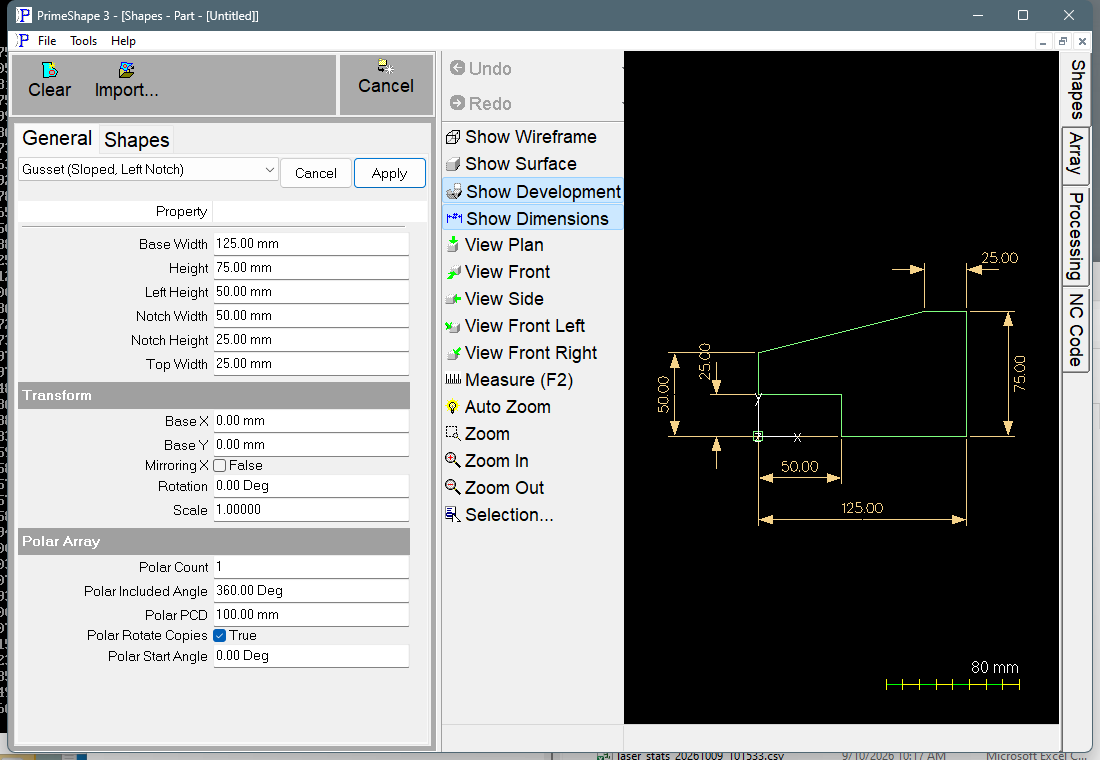
Gusset (Sloped, Left Notch) in PrimeShape: the property page (left) and the shape with its dimensions (right).
Insert point and direction
The insert point is the bottom left corner of the shape's bounding box. This point is inside the notch, so it is not on the profile. The shape extends Base Width to the right (+X) and Height upward (+Y) from it. The right edge is square to the top and bottom edges; the notch is at the bottom left.
The profile is built clockwise, starting at the bottom of the left edge (X = 0, Y = Left Height − Notch Height): up the left edge, along the sloped edge to the top edge, across the top, down the right edge, left along the bottom edge to the notch, up the side of the notch, and back across the top of the notch to the start.
Properties
Property |
Description |
Default |
Height |
Overall size along Y, from the bottom edge to the top edge (mm or inch). This is the length of the right edge. |
75 mm (3 in) |
Base Width |
Overall size along X, from the left edge to the right edge (mm or inch). The bottom edge itself is Base Width − Notch Width long, because the notch takes the rest. |
125 mm (5 in) |
Top Width |
Length of the horizontal top edge, measured back from the right edge (mm or inch). The sloped edge ends at the left end of the top edge. |
25 mm (1 in) |
Left Height |
Height of the top of the left edge above the bottom edge (mm or inch). The sloped edge starts here. This is not the length of the left edge – the left edge is Notch Height long and ends at Left Height. |
50 mm (2 in) |
Notch Height |
Height of the vertical side of the notch, measured up from the bottom edge (mm or inch). The same value is also the length of the left edge, so the bottom of the left edge is at Left Height − Notch Height. |
25 mm (1 in) |
Notch Width |
Width of the notch along the bottom, from the left edge of the shape to the vertical side of the notch (mm or inch). Shown on the drawing as Notch Base Width. |
50 mm (2 in) |
Defaults follow the drawing units: the metric values above, or the inch values in brackets when working in inches.
The sloped edge runs from the top of the left edge (X = 0, Y = Left Height) to the left end of the top edge (X = Base Width − Top Width, Y = Height). Its slope is set entirely by these values; there is no angle property.
The notch
The notch is bounded by two lines: its vertical side, from (Notch Width, 0) up to (Notch Width, Notch Height), and its top, from there back to the bottom of the left edge at (0, Left Height − Notch Height).
The top of the notch is horizontal only when Left Height is exactly twice Notch Height, as it is with the defaults. With any other values it slopes: upward to the left when Left Height is more than twice Notch Height, downward to the left when it is less. To get a notch with a horizontal top at a given height, set Left Height to twice that height.
The dimension labelled Notch Height on the drawing is measured from the bottom edge to the bottom of the left edge, so it shows Left Height − Notch Height. It matches the Notch Height property only when Left Height is exactly twice Notch Height.
Limits
The shape does not check its values against each other. The red banner Warning: Cannot build shape from these parameters on the property page appears only if building the geometry raises an error. The code has no check that raises one for any particular combination of values, so keep the values within these limits yourself:
•Notch Width must be less than Base Width, and Notch Height less than Left Height. Otherwise the notch reaches the right edge or the left edge drops below the bottom edge.
•Left Height should be no more than Height, and Top Width no more than Base Width. Beyond those values the sloped edge runs downward or the top edge overhangs the left edge.
•The top corner of the notch (Notch Width, Notch Height) must stay below the sloped edge. Otherwise the profile crosses itself and will not cut correctly.
•All values should be positive. Negative values are not rejected, and the profile they give is not a usable gusset.
Older builds of PrimeShape and PrimeCut had a fault where Notch Width changed the notch height instead, and the notch width always stayed at its default. A part saved by one of those builds opens with the notch width at the default, so it builds exactly as it did before.
Every 2D shape also has the Transform properties (Base X, Base Y, Rotation, Scale, Mirroring X) and the Polar Array properties, listed after the shape's own properties.