The Gusset (Two Chamfered Corners) is a flat plate outline with a square bottom edge, two vertical sides, and both top corners cut off by a straight chamfer. The left side runs from the bottom edge up to Height − Left Cham. H., and the right side runs from the bottom edge up to Height − Right Cham. H., so neither side reaches the full Height unless its chamfer height is 0. Each chamfer has its own height and width, so the two top corners can be cut to different sizes. The outline is one closed path of six straight lines. This shape was formerly called Gusset 3. The old name is kept as a search alias, so a lookup by Gusset 3 still finds the shape.
It appears in the shapes library under Gussets.
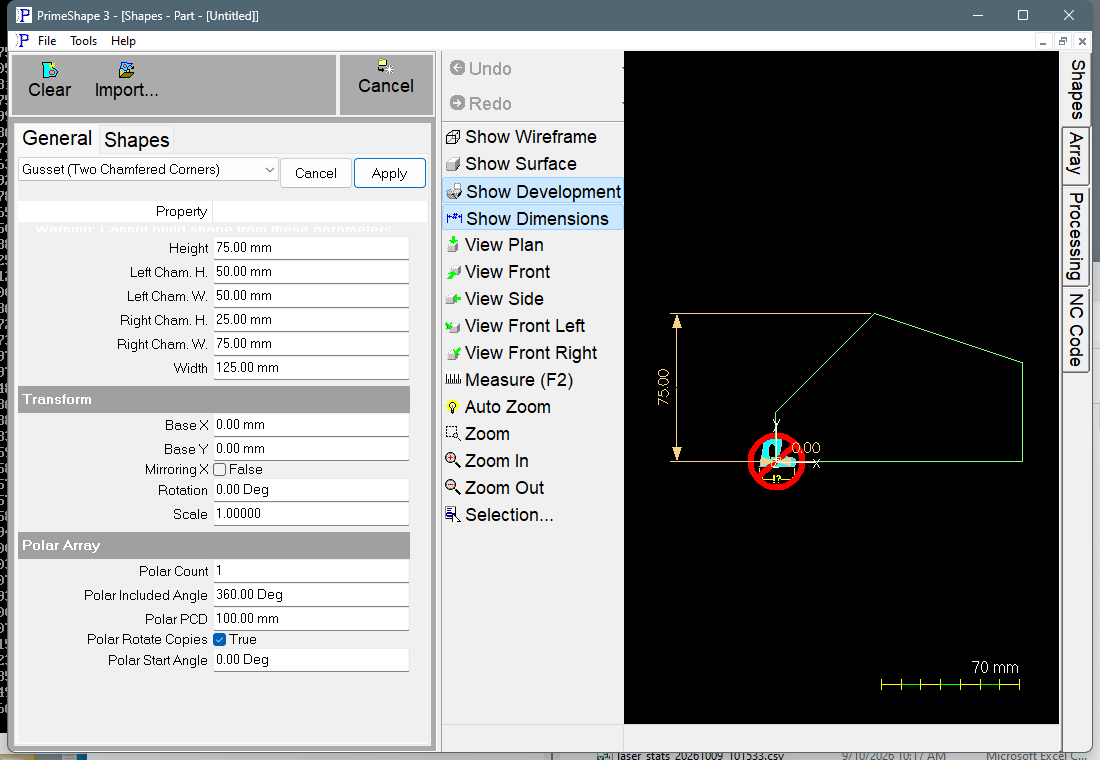
Gusset (Two Chamfered Corners) in PrimeShape: the property page (left) and the shape with its dimensions (right).
Insert point and direction
The insert point is the bottom left corner of the outline, at X = 0, Y = 0. The shape extends Width in +X and Height in +Y from it. The bottom corners and the two vertical sides are square; the chamfers are on the top left and top right corners. The shape has no Origin setting. To move it, use the Transform properties.
The outline starts at the insert point and runs clockwise: up the left edge, along the left chamfer, along the top edge, down the right chamfer, down the right edge, and back along the bottom edge to the start.
Properties
Property |
Description |
Default |
Height |
Overall size along Y, from the bottom edge to the top edge (mm or inch). |
75 mm (3 in) |
Width |
Overall size along X, from the left edge to the right edge (mm or inch). This is the length of the bottom edge. |
125 mm (5 in) |
Left Cham. H. |
Vertical size of the top left chamfer, measured down from the top edge (mm or inch). The left edge runs from Y = 0 to Y = Height − Left Cham. H. |
50 mm (2 in) |
Left Cham. W. |
Horizontal size of the top left chamfer, measured in from the left edge (mm or inch). The top edge starts at X = Left Cham. W. |
50 mm (2 in) |
Right Cham. H. |
Vertical size of the top right chamfer, measured down from the top edge (mm or inch). The right edge runs from Y = 0 to Y = Height − Right Cham. H. |
25 mm (1 in) |
Right Cham. W. |
Horizontal size of the top right chamfer, measured in from the right edge (mm or inch). The top edge ends at X = Width − Right Cham. W. |
75 mm (3 in) |
The dimensions drawn on the shape are Height, Width, and the height and width of each chamfer. The chamfer H. dimension is the vertical span of that chamfer, and the chamfer W. dimension is its horizontal span. Neither is the slanted length of the chamfer edge.
The top edge is Width − Left Cham. W. − Right Cham. W. long. With the default values the two chamfer widths add up to Width, so the top edge has zero length and the two chamfers meet at a point. Reduce either chamfer width to get a flat top. The outline still keeps both vertices at that point, so one segment has zero length.
Limits and errors
The shape does not check its values against each other. The outline is built from the values as entered, so these combinations give an outline that is not a simple gusset:
•Left Cham. W. plus Right Cham. W. greater than Width: the top edge runs backwards and the two chamfers cross, giving a self-crossing outline.
•Left Cham. H. or Right Cham. H. greater than Height: that chamfer ends below the bottom edge (Y less than 0).
•Negative values: the chamfer points move outside the Width and Height box, giving a mirrored or self-crossing outline.
•A chamfer with one value at 0 and the other above 0 is not a true chamfer. Left Cham. H. at 0 makes the left chamfer lie along the top edge; Left Cham. W. at 0 makes it lie along the left edge. Either way the outline has an extra vertex on a straight edge.
•Both values of a chamfer at 0 leaves that corner square, with a zero-length segment in the outline.
If building the outline raises an error, the property page shows the red banner Warning: Cannot build shape from these parameters, the outline is not built, and a broken-shape symbol is drawn at the insert point instead. The shape has no range checks of its own, so the cases above do not raise this banner unless the build fails.
Every 2D shape also has the Transform properties (Base X, Base Y, Rotation, Scale, Mirroring X) and the Polar Array properties, listed after the shape's own properties.