The Trapezium With Base is a flat plate with a straight bottom edge, two vertical sides and a straight top edge, with each top corner cut off by a straight chamfer. The left and right chamfers are set separately, so the part can be symmetric or lopsided. With large chamfers it is a trapezium standing on a rectangular base; with small ones it is a rectangle with two cropped corners. Use it for gussets, stiffeners and brackets with chamfered top corners.
It appears in the shapes library under Basic Shapes and Gussets.
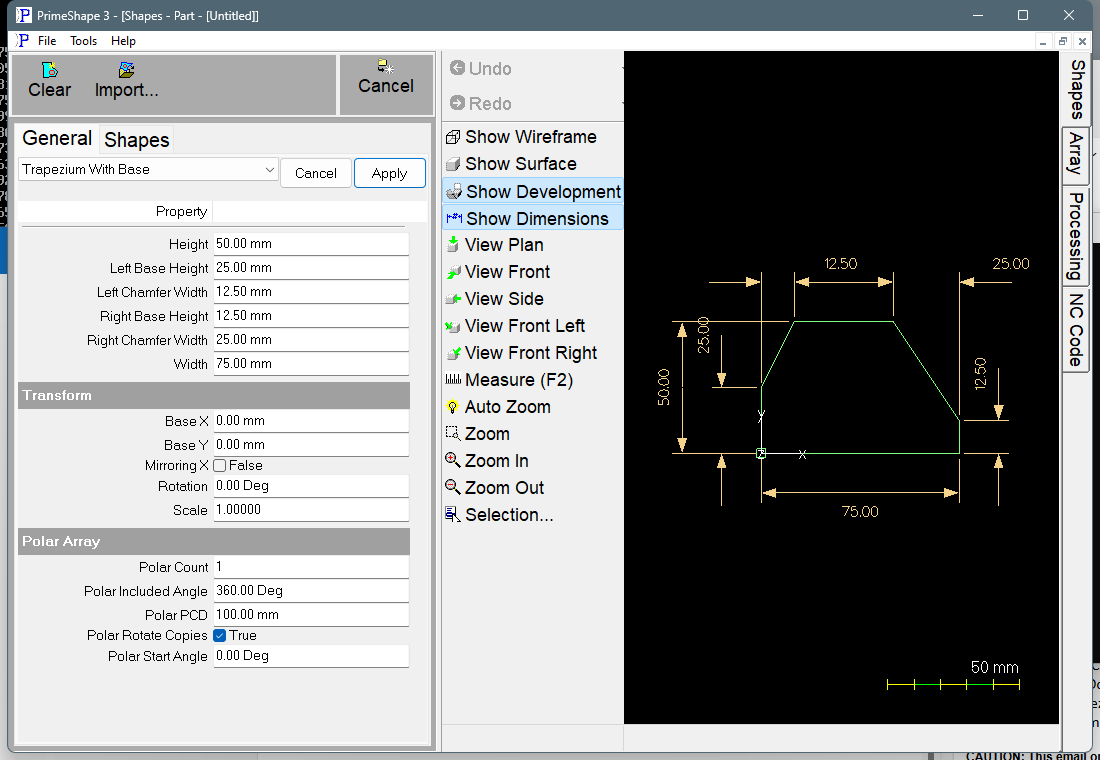
Trapezium With Base in PrimeShape: the property page (left) and the shape with its dimensions (right).
Insert point and orientation
The insert point is the bottom left corner of the plate. The plate is built to the right along X and upwards along Y. It is one closed outline with six straight edges and sharp corners, running from the insert point up the left side, along the left chamfer, across the top, down the right chamfer, down the right side and back along the bottom:
•The left side runs from (0, 0) up to (0, Left Base Height).
•The left chamfer runs from there to (Left Chamfer Width, Height).
•The top edge runs to (Width − Right Chamfer Width, Height).
•The right chamfer runs down to (Width, Right Base Height).
•The right side runs down to (Width, 0), and the bottom edge closes the outline back to the insert point.
So each chamfer is Chamfer Width across and (Height − Base Height) high on its own side. The length of the top edge is Width − Left Chamfer Width − Right Chamfer Width.
Properties
Lengths are in the current units (mm or inches). The defaults shown are for a new shape; the inch defaults are used when the program is set to inches.
Property |
Description |
Default |
Width |
Overall width of the plate along X. This is the length of the bottom edge. |
75 mm (3 in) |
Height |
Overall height of the plate along Y, from the bottom edge to the top edge. |
50 mm (2 in) |
Left Base Height |
Height of the vertical left side, from the bottom edge to where the left chamfer starts. |
25 mm (1 in) |
Right Base Height |
Height of the vertical right side, from the bottom edge to where the right chamfer starts. |
12.5 mm (0.5 in) |
Left Chamfer Width |
Horizontal width of the left chamfer, measured along X from the left side to where the chamfer meets the top edge. |
12.5 mm (0.5 in) |
Right Chamfer Width |
Horizontal width of the right chamfer, measured along X from the right side to where the chamfer meets the top edge. |
25 mm (1 in) |
The dimensions drawn on the shape are Height, Width, Left Base Height, Right Base Height, Left Chamfer Width and Right Chamfer Width.
Limits
The shape does not check its values before building. If building the outline raises an error, the error is caught and the shape is flagged as broken: the outline is not added, a broken-shape marker is drawn at its insert point, and the property page shows a red bar reading "Warning: Cannot build shape from these parameters". The dimensions are not rebuilt, so they keep the values from the last good build. An error while building the dimensions also flags the shape as broken. Keep these conditions yourself:
•Left Chamfer Width + Right Chamfer Width must not be more than Width. If it is, the top edge runs backwards and the two chamfers cross, so the outline crosses itself.
•Left Base Height and Right Base Height should not be more than Height. If one is, that chamfer slopes downwards to the top edge and the side sticks up above it as a spike.
•Enter positive values for Width and Height. A negative value is not rejected. A negative Width builds the plate to the left of the insert point. A negative Height puts the top edge below the bottom edge, so the outline is no longer the plate described above.
•To leave a corner square, set its Chamfer Width to 0. The side then runs straight up to the top edge. Setting its Base Height equal to Height as well makes that chamfer edge zero length.
Check the part outline after changing the chamfers. An outline that crosses itself is not a valid part outline.
Every 2D shape also has the Transform properties (Base X, Base Y, Rotation, Scale, Mirroring X) and the Polar Array properties, listed after the shape's own properties.