The Triangle Gusset is a right angle triangle plate with a triangular cut-out in the middle, leaving a band of even width along all three sides. You set the two sides that meet at the 90° corner and the width of the band (Offset). The cut-out has the same shape as the outside, its sides parallel to the outer sides. All edges are straight lines with no corner radius. Use it for lightened gussets and corner braces where the centre material is not needed. For a solid gusset use the Right Angle Triangle shape.
It appears in the shapes library under Gussets and Triangles.
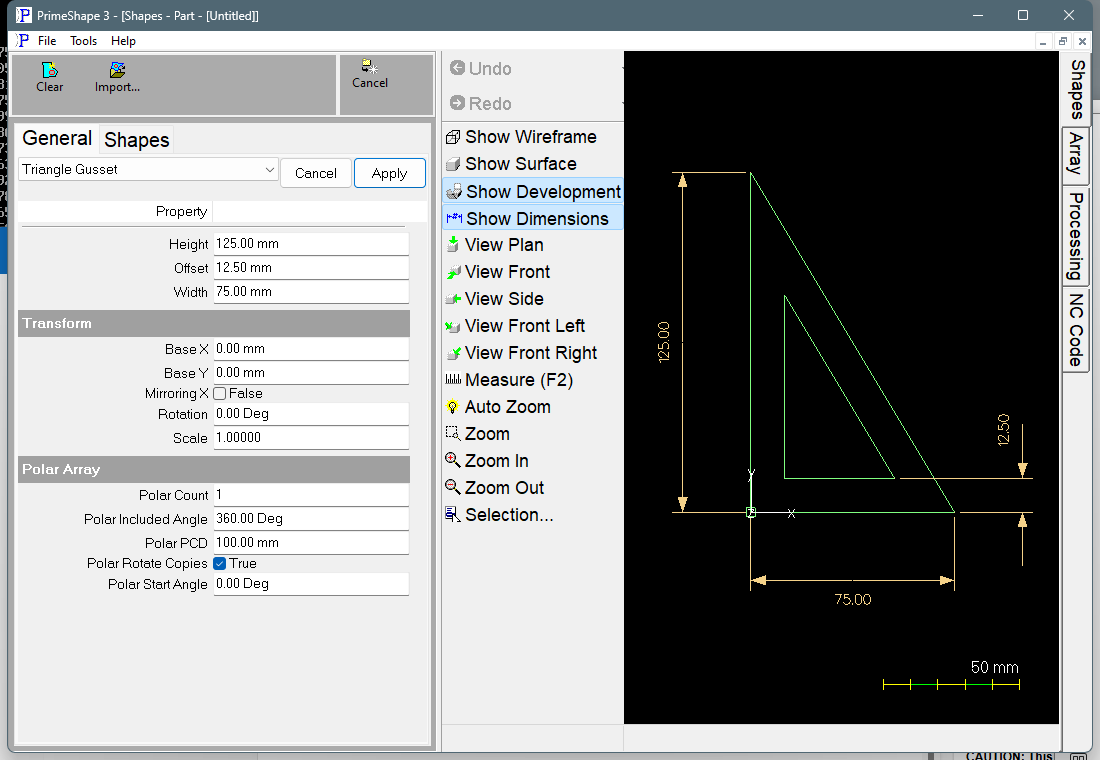
Triangle Gusset in PrimeShape: the property page (left) and the shape with its dimensions (right).
Insert point and direction
The insert point (Base X, Base Y) is the outer right-angle corner. The shape is built to the right and upward from there:
•The outer vertical side runs straight up (+Y) from the insert point for the Height.
•The outer horizontal side runs along +X from the insert point for the Width.
•The outer hypotenuse joins the top of the vertical side to the right-hand end of the horizontal side.
•The cut-out is the outer triangle moved inward by the Offset on every side. Its right-angle corner is at (Offset, Offset) from the insert point; its vertical and horizontal sides are an Offset in from the outer ones, and its hypotenuse is an Offset in from the outer hypotenuse, measured square to that edge.
The shape is made of two closed outlines: the outer triangle and the inner cut-out. The Height dimension is drawn beside the vertical side, the Width dimension along the base, and the Offset dimension at the right-hand (acute) corner, measured vertically between the outer and inner base lines. To put the right angle in another corner, use Rotation or Mirroring X (see Transform).
Properties
Property |
Description |
Default |
Offset |
Width of the solid band between the outer edge and the cut-out, measured square to each edge, the same on all three sides (mm or inch). The property page rejects values below 5 times the geometry tolerance (g_ComponentTol), so enter a real band width. |
12.5 mm (0.5 in when working in inches) |
Width |
Length of the outer horizontal side, measured along +X from the insert point (mm or inch). Cannot be negative. |
75 mm (3 in when working in inches) |
Height |
Length of the outer vertical side, measured along +Y from the insert point (mm or inch). Cannot be negative. |
125 mm (5 in when working in inches) |
Limits
•The Offset must be less than the radius of the circle that fits inside the outer triangle: (Width + Height − hypotenuse) / 2, where hypotenuse = √(Width² + Height²). With the default Width and Height this is about 27.1 mm. The shape does not check this. At that value the cut-out shrinks to a point, and above it the cut-out is drawn inverted, crossing the outer edge, which is not a valid part. Check the drawing after making the Offset larger or the triangle smaller.
•Width and Height cannot be negative; the property page rejects values below 0. Enter both as positive values. A Width or Height of 0 makes the cut-out calculation divide by zero (it divides by Width and by Height). The error is caught, so the cut-out is not added and the warning bar shows; do not use the part.
•If the shape cannot be built from the entered values, the error is caught rather than raised. The property page then shows a red Warning: Cannot build shape from these parameters line, and the geometry may be incomplete. Do not cut a part while that line is shown.
Every 2D shape also has the Transform properties (Base X, Base Y, Rotation, Scale, Mirroring X) and the Polar Array properties, listed after the shape's own properties.