The Hexagon and N - Gon are regular polygons: every side is the same length and every corner is the same angle. Both are centred on the insert point. The Hexagon always has six sides. The N - Gon has any number of sides from 3 upwards (3 for a triangle, 5 for a pentagon, 8 for an octagon).
Both appear in the shapes library under Other Shapes. They share the same size and rotation properties; the N - Gon also has Num. of sides.
A six-sided regular polygon.
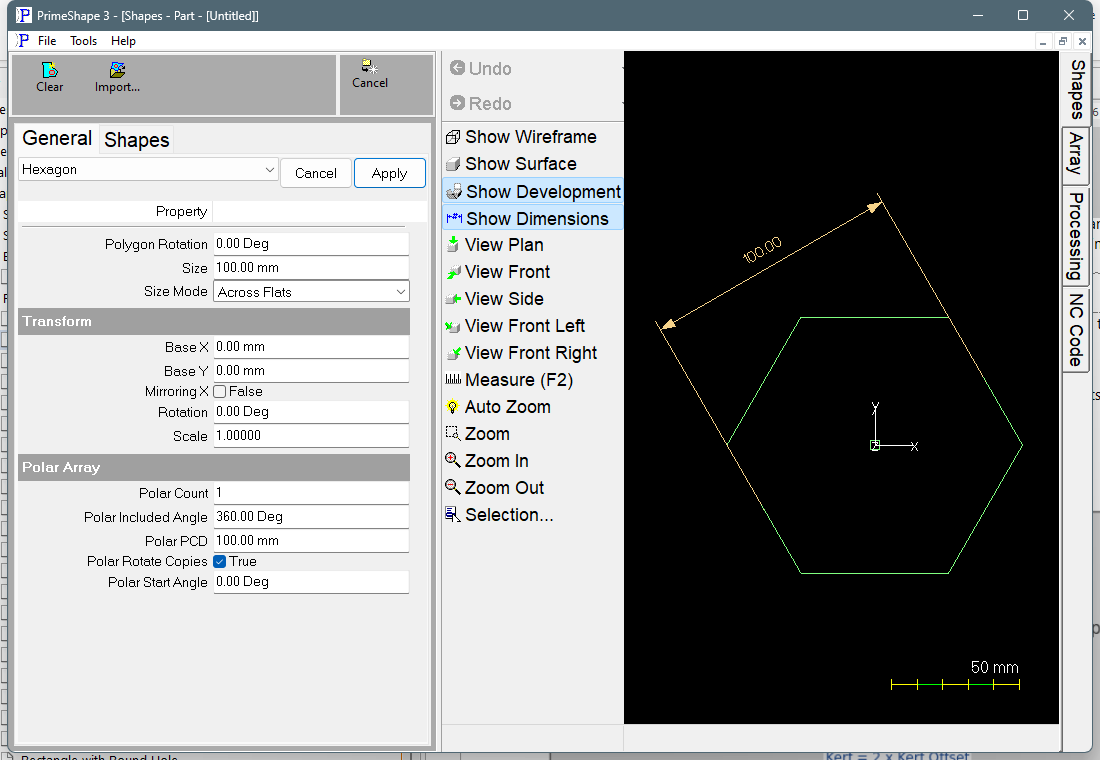
Hexagon in PrimeShape: the property page (left) and the shape with its dimensions (right).
Insert point and orientation. The insert point is the centre of the hexagon. At Polygon Rotation 0 the corners point left and right along X, and there is a flat at the top and at the bottom. The outline is one closed path, built anticlockwise from the left-hand corner.
Property |
Description |
Default |
Size Mode |
What the Size value measures. Across Flats: from the middle of one flat, through the centre, to the middle of the opposite flat (the spanner size of a hex nut). Across Corners: from one corner, through the centre, to the opposite corner (the diameter of the circle through the corners). Side: the length of one side. For a hexagon this is also the circumscribing radius (the distance from the centre to a corner). |
Across Flats |
Size |
The size of the hexagon, measured as Size Mode sets (mm or inch). The dimension drawn on the shape follows Size Mode, so it always shows the value being entered. A Size of 0 builds a single point (see Notes and limits). |
100 mm (4 in) |
Polygon Rotation |
Turns the hexagon about its centre, in degrees. A positive angle turns it anticlockwise. The property page does not limit the value. At 0 the corners point left and right. |
0° |
For a hexagon the three sizes are fixed relative to each other: Across Corners = 2 × Side, and Across Flats = √3 × Side = 0.866 × Across Corners. With the defaults, Across Flats 100 gives Across Corners 115.47 and Side 57.74.
A regular polygon with a chosen number of sides.
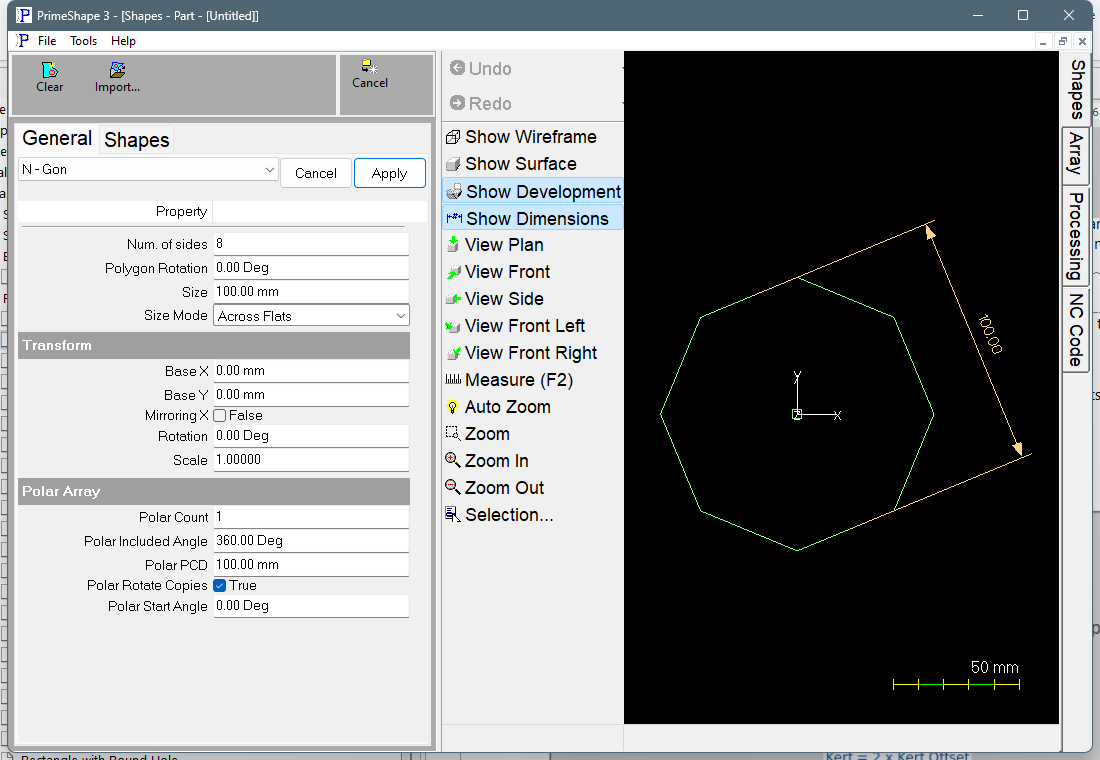
N - Gon in PrimeShape: the property page (left) and the shape with its dimensions (right).
Insert point and orientation. The insert point is the centre of the polygon. At Polygon Rotation 0 a corner points straight up along Y, whatever the number of sides. The outline is one closed path, built anticlockwise from the top corner.
Property |
Description |
Default |
Num. of sides |
The number of sides, a whole number. The property page does not accept less than 3. |
8 |
Size Mode |
What the Size value measures. Across Flats: from the middle of one flat, through the centre, to the middle of the opposite flat. On a polygon with an odd number of sides there is no opposite flat, so it runs to the opposite corner (see Odd numbers of sides). Across Corners: the diameter of the circle through all the corners. Side: the length of one side. |
Across Flats |
Size |
The size of the polygon, measured as Size Mode sets (mm or inch). The dimension drawn on the shape follows Size Mode, so it always shows the value being entered. A Size of 0 builds a single point (see Notes and limits). |
100 mm (4 in) |
Polygon Rotation |
Turns the polygon about its centre, in degrees. A positive angle turns it anticlockwise. The property page does not limit the value. At 0 a corner points straight up. |
0° |
Odd numbers of sides
A polygon with an odd number of sides (a triangle, a pentagon and so on) has no flat opposite each flat; every flat faces a corner. For these shapes, Across Flats is measured from the middle of a flat, through the centre, to the opposite corner, and the dimension is drawn that way. Across Corners is still the diameter of the circle through the corners, so on an odd-sided polygon it is not a corner-to-corner distance.
Notes and limits
•A Size of 0 builds a single point at the centre instead of an outline. The Size dimension is then drawn with zero length on the centre.
•Size has no minimum on the property page, and apart from the Size of 0 case the code does not test the value.
•The N - Gon needs at least 3 sides. The property page does not accept fewer, so this only happens with a value from an old file or a script. The shape is then not built, and the property page shows a red row reading Warning: Cannot build shape from these parameters.
•With Size Mode set to Side, the Size dimension is drawn on the side half way round from the first corner. On a Hexagon at Polygon Rotation 0 this is the top right side.
•Polygon Rotation sets the position of the corners in the shape's own definition. The Transform Rotation turns the finished shape, and is applied after Polygon Rotation.
Parts made in earlier versions
Before Size Mode was added, the Hexagon was sized by its Side property and the N - Gon by its Circumscribing Radius property. Those properties are no longer shown. Parts saved with an earlier version open at the same size:
•an old Hexagon opens in Side mode with its old Side value as the Size;
•an old N - Gon opens in Across Corners mode, with Size set to twice its old Circumscribing Radius.
Change Size Mode afterwards if you prefer to work across flats.
Parts saved with this version also store the old size value, so an earlier version opens them at the same size. An earlier version does not know Polygon Rotation and draws the polygon at rotation 0. If a part must look the same in an earlier version, use the Transform Rotation instead.
Every 2D shape also has the Transform properties (Base X, Base Y, Rotation, Scale, Mirroring X) and the Polar Array properties, listed after the shape's own properties.