The Notched Ring shape is a round part with an optional round hole in the middle and a number of straight-sided notches cut in from the outside edge. The notches are spaced evenly round the ring, and their bottom corners can be filleted. Use it for notched flanges, locating rings, slotted end plates and similar parts. With no notches it is a plain ring.
It appears in the shapes library under Round Shapes and Flanges.
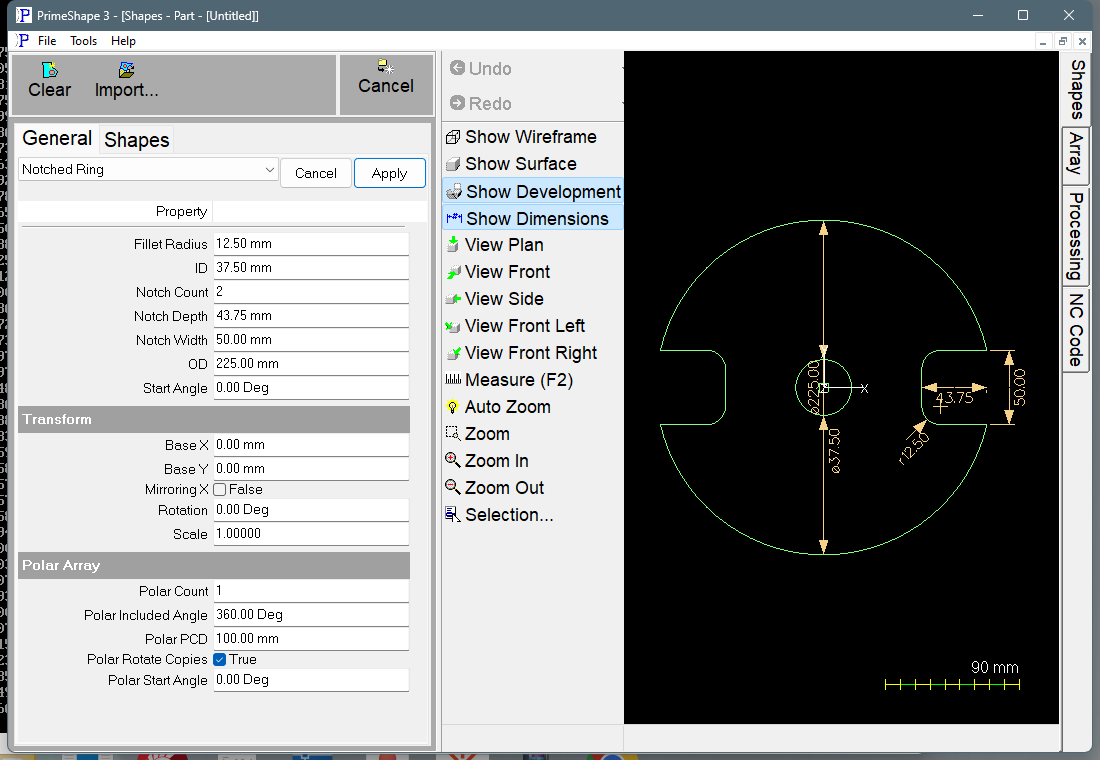
Notched Ring in PrimeShape: the property page (left) and the shape with its dimensions (right).
Insert point and direction
The centre of the ring is the insert point (Base X, Base Y). The OD and the ID are both centred on it.
The first notch is centred on a line from the ring centre at the Start Angle, measured anticlockwise from +X; with the default Start Angle of 0 it points along +X. The other notches follow anticlockwise, 360° / Notch Count apart. Each notch has parallel sides, Notch Width apart, centred on its centre line.
With notches, the outside edge is one closed path, built anticlockwise: in along one side of a notch, round its bottom fillet, across the bottom, round the other fillet, out along the other side, then round the OD to the next notch. The ID, when there is one, is a separate circle.
The dimensions shown on the shape are named after their properties, so clicking one edits that value. OD is dimensioned on the edge between the first two notches and ID on the opposite side. Notch Width is dimensioned across the mouth of the first notch, Notch Depth along its centre line, and Fillet Radius on one of its bottom corners. Start Angle is shown from the X axis to the first notch, the short way round, when it is not 0. The Notch Width, Notch Depth, Fillet Radius and Start Angle dimensions are hidden when there are no notches, and the Fillet Radius dimension is also hidden when the fillet is 0.
Properties
Property |
Description |
Default |
Fillet Radius |
Radius of the fillets in the two bottom corners of each notch (mm or inch). 0 gives sharp corners. It cannot be more than half the Notch Width or more than the Notch Depth. The corners where the notch sides meet the OD are always sharp. |
12.5 mm (0.5 in) |
ID |
Inside diameter – the diameter of the centre hole (mm or inch). 0 gives no centre hole. Must be smaller than OD. |
37.5 mm (1.5 in) |
Notch Count |
Number of notches, spaced evenly round the ring. 0 to 1000; 0 gives a plain ring. |
2 |
Notch Depth |
How far each notch goes in (mm or inch), measured along the notch centre line from the mouth – the line across the notch where its sides meet the OD – to the notch bottom. It is not measured from the outermost point of the OD. 0 gives a plain ring. |
43.75 mm (1.75 in) |
Notch Width |
Width across each notch, between its two parallel sides (mm or inch). 0 gives a plain ring. Must be less than OD. |
50 mm (2 in) |
OD |
Outside diameter – the diameter of the outer edge (mm or inch). Must be greater than 0. |
225 mm (9 in when working in inches) |
Start Angle |
Direction of the centre line of the first notch, anticlockwise from +X (degrees). Negative values are allowed. |
0° |
The notches are only built when Notch Count, Notch Width and Notch Depth are all greater than 0. If any of them is 0 the shape is a plain ring (or a plain disk when ID is 0), and Notch Width, Notch Depth, Fillet Radius and Start Angle have no effect.
When the shape cannot be built
If the values cannot make a valid shape, the shape is not drawn, a broken-shape marker is shown at the insert point, and the property page shows Warning: Cannot build shape from these parameters. This happens when:
•OD is 0 or less;
•ID is negative, or is not smaller than OD;
•Notch Count is less than 0 or more than 1000;
•Notch Width, Notch Depth or Fillet Radius is negative;
•Notch Width is not less than OD;
•the notch bottom reaches the ID, or reaches the ring centre when there is no ID – reduce Notch Depth or ID;
•Fillet Radius is more than half the Notch Width or more than the Notch Depth;
•there is more than one notch and neighbouring notches overlap or meet – use fewer, narrower or shallower notches.
The checks on Notch Width, the notch bottom, Fillet Radius and overlapping notches are only made while notches are being built (Notch Count, Notch Width and Notch Depth all greater than 0).
Every 2D shape also has the Transform properties (Base X, Base Y, Rotation, Scale, Mirroring X) and the Polar Array properties, listed after the shape's own properties.