The Partial Disk shape is a circular segment: a disk cut off by one straight chord. It is one closed profile made of the straight chord and a single arc. Use it for a disk with a flat on one side, a D-shaped part, or the small cap cut off a round blank.
It appears in the shapes library under Round Shapes.
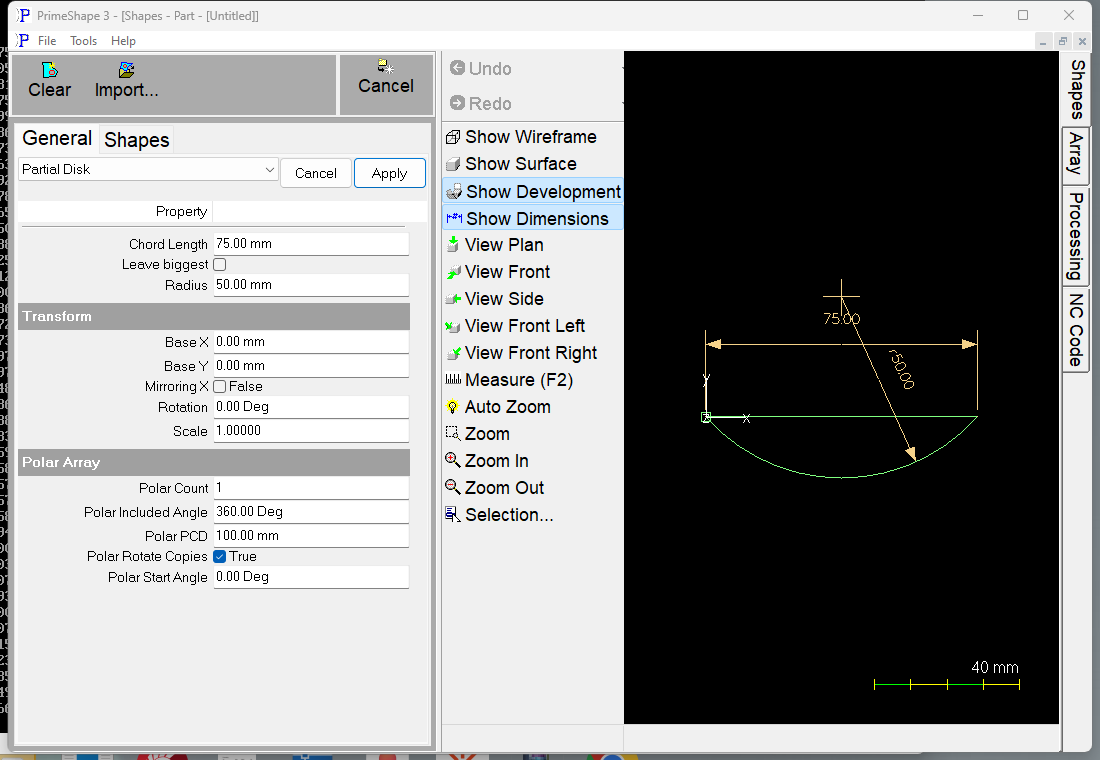
Partial Disk in PrimeShape: the property page (left) and the shape with its dimensions (right).
Insert point and direction
The insert point (Base X, Base Y) is the left end of the chord. The chord runs from the insert point along +X for the Chord Length, and the arc joins its two ends.
•With Leave biggest off, the part is the smaller segment. It lies below the chord (–Y), and the centre of the circle is on the other side of the chord, outside the part.
•With Leave biggest on, the part is the larger segment. It lies above the chord (+Y) and contains the centre of the circle.
In both cases the centre of the circle is at X = Chord Length / 2 and Y = √(Radius² – (Chord Length / 2)²) from the insert point. The two settings are the two pieces you get when you cut that circle along the chord.
The profile starts at the insert point, cuts the chord to its right-hand end, then cuts the arc back to the insert point. Use Rotation (see Transform) to point the flat in another direction.
The Chord Length dimension is drawn along the chord. The Radius dimension is drawn from the centre of the circle to the arc.
The height of the smaller segment, from the chord to the furthest point of the arc, is Radius – √(Radius² – (Chord Length / 2)²). The height of the larger segment is Radius + √(Radius² – (Chord Length / 2)²). With the defaults (Radius 50 mm, Chord Length 75 mm) these are about 16.9 mm and 83.1 mm.
Properties
Property |
Description |
Default |
Chord Length |
Length of the straight edge (the chord), measured along +X from the insert point (length). No more than twice the Radius. 0 is accepted without a warning but does not give a usable part. A Chord Length equal to twice the Radius gives a half disk. |
75 mm (3 in when working in inches) |
Leave biggest |
Which side of the chord is kept (on/off). Off keeps the smaller segment, below the chord. On keeps the larger segment, above the chord. |
Off |
Radius |
Radius of the circle the segment is cut from (length). Must be at least half the Chord Length. 0 gives a single point (see Limits). |
50 mm (2 in when working in inches) |
Limits
•If the Radius is 0 the shape is a single point at the insert point, whatever the Chord Length.
•A Chord Length of exactly twice the Radius gives a half disk. Leave biggest then only chooses whether it lies below or above the chord.
•Radius and Chord Length cannot be negative: the property page refuses a negative value as out of range.
When the shape cannot be built
If the values cannot make a valid shape, a broken-shape marker is shown at the insert point and the property page shows Warning: Cannot build shape from these parameters. This happens when the Chord Length is greater than twice the Radius (and the Radius is not 0) – a chord cannot be longer than the diameter of its circle. Increase the Radius or shorten the Chord Length.
Every 2D shape also has the Transform properties (Base X, Base Y, Rotation, Scale, Mirroring X) and the Polar Array properties, listed after the shape's own properties.