The Right Angle Branch shape develops a thin walled tee: a straight cylindrical trunk with a cylindrical branch pipe joined to its side at 90°, the branch axis passing through the trunk axis. You enter the sizes of the finished tee and choose which of the two parts to cut – the trunk blank with the opening for the branch, or the branch blank with the saddle-shaped end that fits against the trunk. Cut the shape twice, once with each setting of Base/Branch, to get both parts. The 3D view shows the formed tee.
It appears in the shapes library under Thin Walled Developments. For a branch at another angle, offset from the trunk axis, or joined to a cone use Pipe-Cone Intersection; for an offset branch on a large trunk use Side Pipe Join. To bevel the cut edges for welding see Pipe Tools.
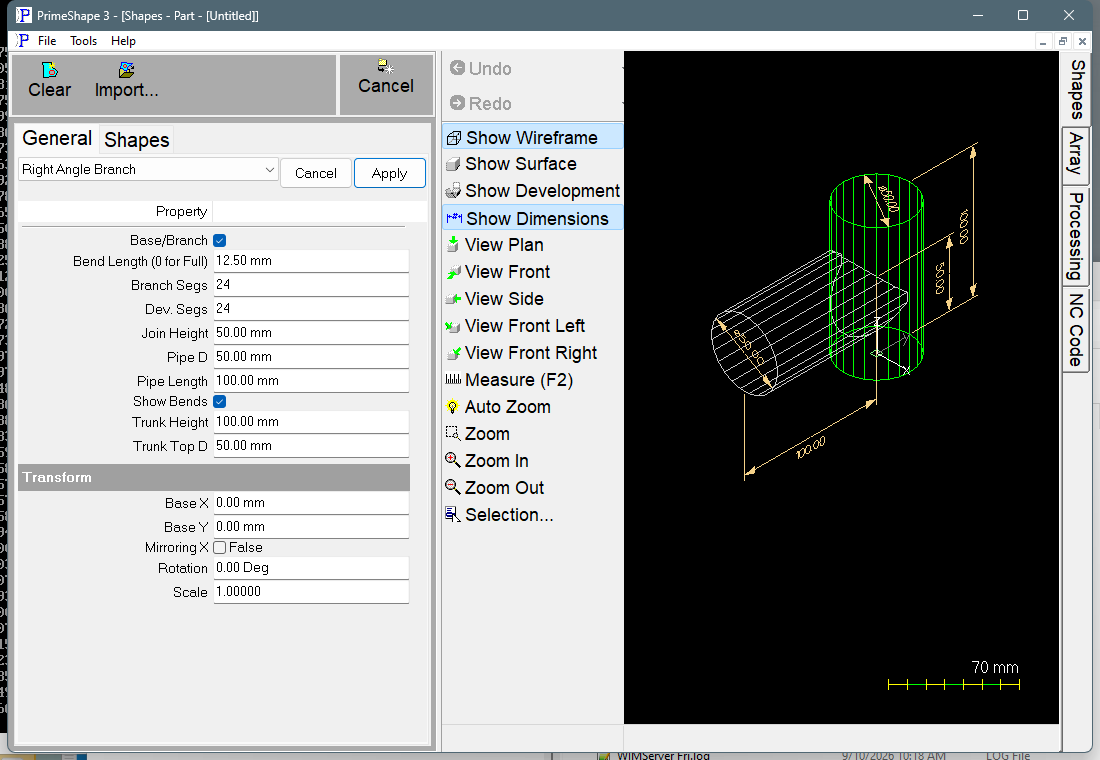
Right Angle Branch in PrimeShape: the property page (left) and the shape as a wireframe with its dimensions (right).
How the shape is built
In 3D the trunk stands on the XY plane: its bottom edge is at Z = 0 and its top edge at Z = Trunk Height, centred on the Z axis. The trunk is a straight cylinder of diameter Trunk Top D (the same diameter is used top and bottom). The branch is horizontal; its axis crosses the trunk axis at Z = Join Height and runs out sideways for Pipe Length, measured from the trunk centre line to the open end of the branch. Both round walls are approximated by flat facets: Dev. Segs facets for the trunk and Branch Segs facets for the branch.
The selected part is unrolled facet by facet into one closed outline. The seam edges run along X and the circumference is laid out along Y. The insert point is at one end of the first seam edge, on a corner of the blank. Fold lines between the facets are added as marking lines when Show Bends is on.
•Base/Branch True – the trunk blank. The trunk seam is turned so that it passes through the middle of the branch opening, and the opening is cut as two notches, one in each seam edge, as part of the outside profile. When the blank is rolled and the seam closed, the two notches form the hole for the branch. There is no separate internal hole contour.
•Base/Branch False – the branch blank. One end is square (the open end of the branch); the other is the saddle curve where the branch meets the trunk wall.
Because the facets are chords of the circle, each developed circumference is slightly shorter than π × D (about 0.3 % short with 24 segments). Increase Dev. Segs or Branch Segs to bring it closer.
Properties
Property |
Description |
Default |
Trunk Top D |
Diameter of the trunk (mm or inch). Despite the name it sets the whole trunk; the bottom diameter is made equal to it, so the trunk is always a straight cylinder. The shape has no material thickness setting, so enter the diameter at which the blank should be developed – normally the mean (neutral axis) diameter of the wall. |
50 mm (2") |
Trunk Height |
Length of the trunk along its axis (mm or inch). This is the width of the trunk blank. |
100 mm (4") |
Pipe D |
Diameter of the branch pipe (mm or inch). It sets the size of the opening in the trunk and the circumference of the branch blank. Keep it no larger than Trunk Top D. The shape does not check this. |
50 mm (2") |
Pipe Length |
Length of the branch, measured from the trunk centre line to the open end of the branch (mm or inch) – not from the trunk wall. The branch blank is trimmed back to the trunk wall, so it is shorter than this. |
100 mm (4") |
Branch Segs |
Number of flat facets the branch wall is divided into. It sets the number of strips in the branch blank and the number of points along the opening in the trunk blank. More segments give a smoother saddle and opening. The least allowed is 3. |
24 |
Join Height |
Height of the branch axis above the bottom edge of the trunk (mm or inch). The default puts the branch half way up the trunk. |
50 mm (2") |
Base/Branch |
Which part is developed. True cuts the trunk (base) blank with the branch opening; False cuts the branch blank with the saddle end. The 3D view shows the whole tee either way. |
True |
Dev. Segs |
Number of flat facets the trunk wall is divided into. Each facet is one strip of the trunk blank, with a fold line between each pair. For brake forming, this is the number of bends plus one. The least allowed is 3. |
24 |
Show Bends |
True adds the fold lines of the developed part to the blank as marking lines, so they are processed with the marking tool. Alternate lines are reversed so the marking runs back and forth across the blank. False cuts the outline only. |
True |
Bend Length (0 for Full) |
Length of the fold-line marks (mm or inch). A value above 0 replaces each fold line with two short marks of this length, one at each edge of the blank; a fold line shorter than 2.1 × Bend Length is left full length. 0 marks every fold line full length. Only used when Show Bends is True. Cannot be negative. |
12.5 mm (1/2") |
The dimensions shown on the shape are Trunk Height, Trunk Top D, Pipe D, Pipe Length and Join Height.
Notes
•The join angle is fixed at 90° and the branch axis always passes through the trunk axis. These are not on the property page.
•Branch Segs and Dev. Segs cannot be set below 3, and Bend Length cannot be negative. These are the only limits the shape sets on its own properties. The diameters, Trunk Height, Pipe Length and Join Height have no limits, and the shape does not check that the parts fit together. The fit rules below are not enforced, but a tee needs them: keep Pipe D no larger than Trunk Top D; make Pipe Length greater than the trunk radius (Trunk Top D / 2) so the open end of the branch is clear of the trunk wall; and keep the branch within the trunk, with Join Height minus half of Pipe D not below 0 and Join Height plus half of Pipe D not above Trunk Height. Check the 3D view and the blank before cutting.
•If the blank cannot be built from the values entered, the property page shows Warning: Cannot build shape from these parameters and the 3D view is cleared. Correct the values to rebuild it.
•The defaults for the diameters and lengths are in millimetres in metric and in inches (2", 4") in imperial. The Bend Length default is 12.5 mm in metric and 1/2 in in imperial.
•The shape has no aliases (no former names).
The Right Angle Branch also has the Transform properties (Base X, Base Y, Rotation, Scale, Mirroring X), listed after the shape's own properties. They place the flat blank. Thin walled developments have no Polar Array properties.