The Right Cone is the flat pattern (development) of a truncated cone whose top and bottom circles are parallel and on the same centre line – a concentric reducer, hopper or cone section. You enter the two diameters and the height between them; the shape works out the 3D cone and unrolls its side wall into a flat profile that can be cut from plate and rolled or press-braked into the cone. Bend lines can be marked on the pattern to guide the forming.
It appears in the shapes library under Thin Walled Developments. For a cone whose top is offset or tilted relative to the bottom, use Shifted Cone or Circle To Circle Transition instead.
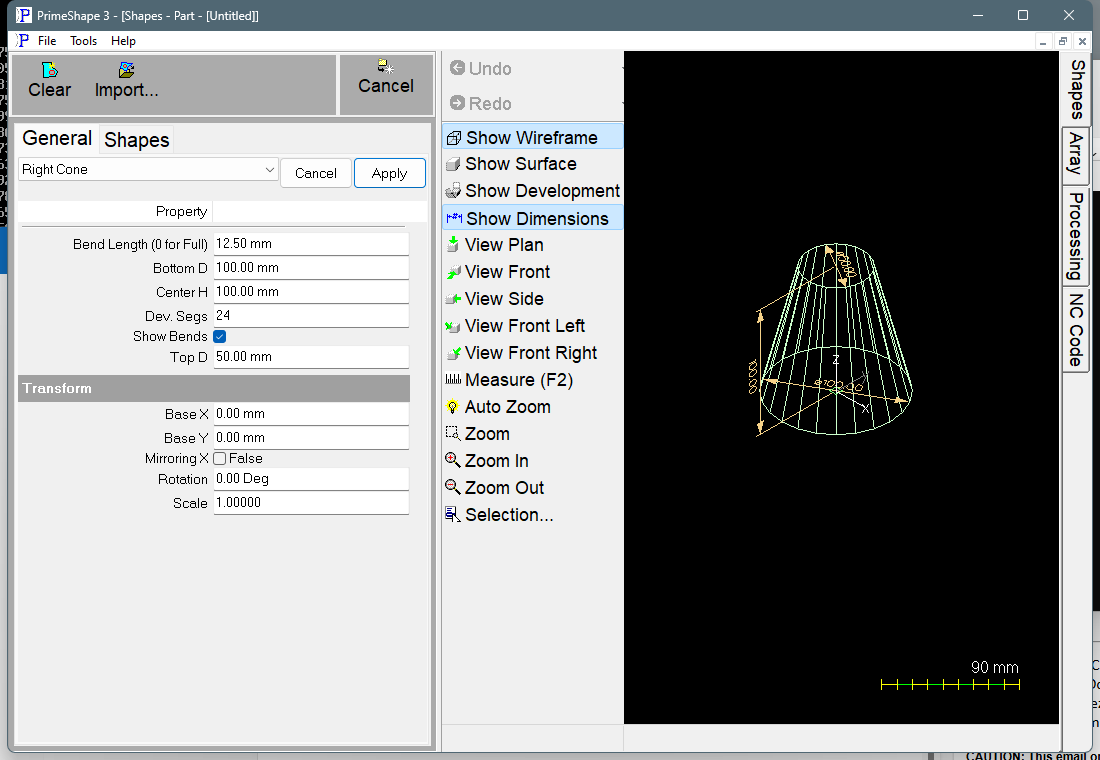
Right Cone in PrimeShape: the property page (left) and the shape as a wireframe with its dimensions (right).
How the shape is built
In 3D the bottom circle (Bottom D) lies at Z = 0 centred on the shape origin, and the top circle (Top D) lies Center H above it on the same axis. The side wall is divided round the circumference into Dev. Segs flat facets, and the facets are laid out flat one after another to make the development.
The flat pattern is a single closed profile:
•the outer edge is the bottom (large) circle unrolled, and the inner edge is the top (small) circle unrolled. Both are made of straight segments, one per facet, not true arcs – more Dev. Segs gives a smoother edge
•the two straight ends are the seam, where the edges meet when the part is formed. Each is the slant length of the cone wall
The first seam starts with its top (small diameter) end on the shape origin and runs along +X to its bottom (large diameter) end, one slant length away. The rest of the pattern fans out from that edge. Base X and Base Y move this point.
The diameters are used exactly as entered – the shape has no plate thickness setting. Enter the diameters of the surface you want the development to match (for example the mean diameter of the wall when forming thick plate).
Properties
Property |
Description |
Default |
Top D |
Diameter of the top (small) end of the cone (mm or inch). No minimum is set on the property page, but a Top D of 0 does not build. See the notes below. |
50 mm (2 in) |
Bottom D |
Diameter of the bottom (large) end of the cone (mm or inch). If it is smaller than Top D the two values are swapped when the shape is built, so the bottom is always the larger end; the swapped values are stored, so the property page then shows them the other way round. |
100 mm (4 in) |
Center H |
Vertical height of the cone, measured along the centre line from the bottom circle to the top circle (mm or inch). This is not the slant length of the wall. |
100 mm (4 in) |
Dev. Segs |
Number of flat facets the cone wall is divided into round its circumference. Each facet becomes one straight segment on the top and bottom edges of the pattern, and the joints between facets are the bend lines. The least allowed is 3. |
24 |
Show Bends |
When on, a bend line is added at every joint between facets (Dev. Segs – 1 lines; the seam is not marked). Bend lines are marking geometry, not cuts. When off, only the profile is produced. |
On |
Bend Length (0 for Full) |
Length of the bend marks (mm or inch). With a value above 0, each bend line longer than 2.1 x this length is replaced by two short marks of this length, one at each edge of the pattern; shorter bend lines are left full length. 0 marks every bend line full length. Cannot be negative. Only used when Show Bends is on. |
12.5 mm (0.5 in) |
The dimensions drawn on the shape are Center H, Bottom D and Top D.
Notes and limits
•A Top D of 0 (a cone that comes to a point) is not a valid input and does not give a pointed pattern. The development code skips the top edge of every facet, so the outline is built with no top edge and the build fails. A Bottom D of 0 is swapped to become Top D by the rule above, so it has the same problem. This has been read from the source but not run on a machine. If the build fails for any reason, the property page shows Warning: Cannot build shape from these parameters and the 3D preview is cleared.
•If Top D and Bottom D are equal the result is the development of a plain cylinder – a rectangle Center H high.
•The top and bottom edges are straight-segment approximations of arcs. Check that Dev. Segs gives a smooth enough edge for the part size; a large cone may need more than the default 24.
•The development has no allowance for plate thickness, seam gap or weld preparation.
The Right Cone also has the Transform properties (Base X, Base Y, Rotation, Scale, Mirroring X), listed after the shape's own properties. Like the other 3D development shapes it has no Polar Array properties.