The Right Rect To Rect Transition is the flat pattern (development) of a thin sheet-metal piece that joins two rectangles of different size. The top rectangle is centred directly over the bottom rectangle. The part has four flat sides, like a hopper, a rectangular duct reducer or a truncated pyramid. The shape unfolds the four sides into one 2D profile. That profile is cut from flat plate and folded along the four corners. Optional bend lines are marked on the profile.
It appears in the shapes library under Thin Walled Developments. Use the Shifted Rect To Rect Transition when the top rectangle is not centred over the bottom one.
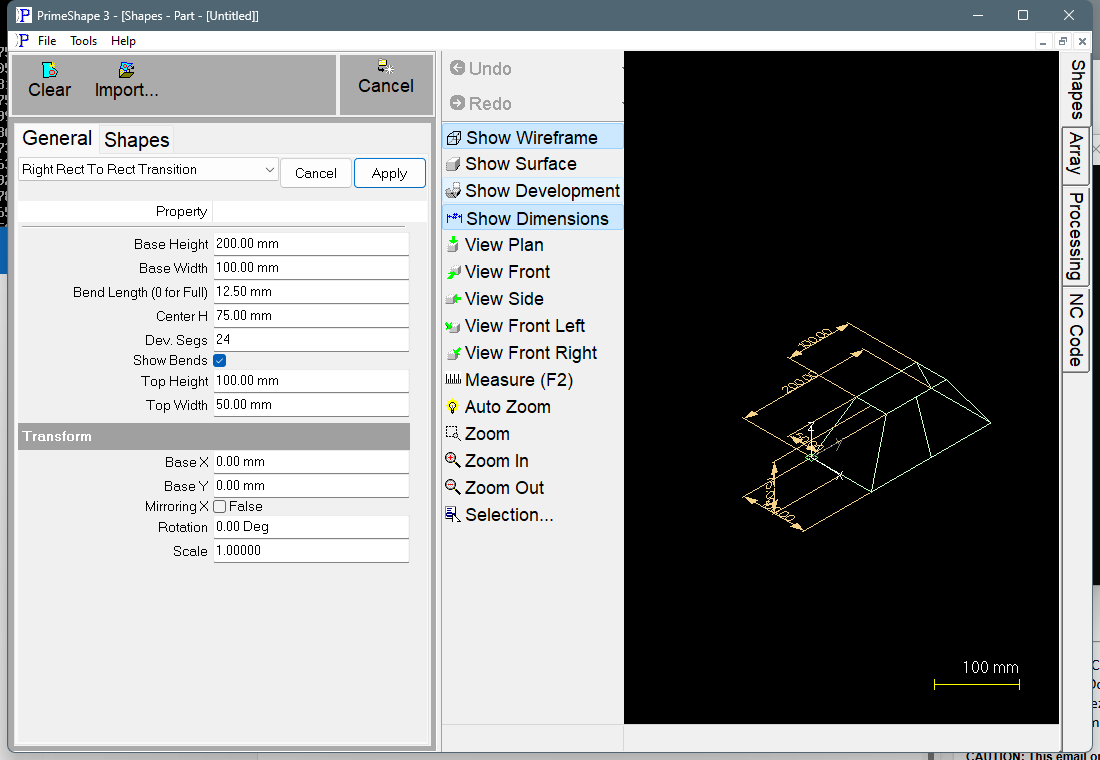
Right Rect To Rect Transition in PrimeShape: the property page (left) and the shape as a wireframe with its dimensions (right).
How the part is defined
The 3D part is set up in its own X, Y, Z axes:
•The bottom rectangle lies flat at Z 0, with one corner at X 0, Y 0. Base Width runs along X and Base Height along Y.
•The top rectangle lies flat at Z = Center H. Top Width runs along X and Top Height along Y. Its centre is directly above the centre of the bottom rectangle.
•Each of the four sides is a flat face that joins one edge of the bottom rectangle to the matching edge of the top rectangle.
The shape has no plate thickness property. The pattern is built exactly on the sizes entered, so enter the sizes on which you want the development taken (for example the inside or mean sizes of the finished part).
Insert point and the flat pattern
The insert point is the origin (0, 0) of the pattern. The side at X = Base Width is split at its middle into two halves. The pattern is one closed profile: a line at one end of the strip, the top edges of the four sides, a line at the other end, and the bottom edges. The two halves of the split side sit at the two ends of the strip. The first seam line lies along the X axis, from the insert point to a point on X at the seam length. The other sides unfold one after another to the same side of that line.
The seam is where the two halves meet when the part is folded, so it is the joint of the finished part. It is not marked as a bend.
When Show Bends is on, the four corner fold lines are added as marking lines. These show where to fold the plate.
Properties
The shape's own properties are listed first, in the order the property page shows them.
Property |
Description |
Default |
Top Width |
Size of the top rectangle along X (mm or inch). Minimum 1. |
50 mm (2") |
Top Height |
Size of the top rectangle along Y (mm or inch). Minimum 1. |
100 mm (4") |
Base Width |
Size of the bottom rectangle along X (mm or inch). Minimum 1. |
100 mm (4") |
Base Height |
Size of the bottom rectangle along Y (mm or inch). Minimum 1. |
200 mm (8") |
Center H |
Height of the top rectangle above the bottom rectangle, along Z (mm or inch). The property page sets no minimum. |
75 mm (3") |
The development properties come next. They are common to all 3D shapes and come from the 3D shape base, so they are not specific to this shape.
Property |
Description |
Default |
Dev. Segs |
Minimum 3. This shape always unfolds into its four flat sides, so the value is not used. |
24 |
Show Bends |
When ticked, the four corner fold lines are added to the pattern as marking lines. When cleared, only the cut profile is produced. |
On |
Bend Length (0 for Full) |
Length of the bend marks (mm or inch). A bend line longer than 2.1 times this length is marked only at its two ends, with a mark of this length at each end. Shorter bend lines are marked full length. 0 marks every bend line full length. Used only when Show Bends is on. Cannot be negative. |
12.5 mm (metric); 0.5 in (imperial) |
In the 3D view the shape shows dimensions for Center H, Base Width, Base Height, Top Width and Top Height.
Notes
•The minimums in the tables are the only limits the property page sets. If the part cannot be built from the values entered, the property page shows the red line Warning: Cannot build shape from these parameters, and the 3D sides are removed.
•The top rectangle may be larger than the bottom one. The values are not swapped, so the sides then slope outwards going up.
•The defaults are in millimetres in metric and in inches in imperial.
•The shape has no aliases (no former names).
This shape also has the Transform properties (Base X, Base Y, Rotation, Scale, Mirroring X), listed after the development properties. They place the flat pattern in the drawing. This is a 3D development shape, so it has no Polar Array properties.