The Side Pipe Join is a thin walled development of a branch pipe joined at right angles into the side of a larger trunk pipe, with the branch axis offset sideways from the trunk axis. PrimeCut builds both pipes in 3D and cuts the flat pattern of one of them: either the trunk, with the hole the branch fits into, or the branch, with its saddle-shaped end that fits against the trunk. Make one part of each to fabricate the join from rolled or folded plate.
It appears in the shapes library under Thin Walled Developments. For a branch whose axis meets the trunk axis, use Right Angle Branch.
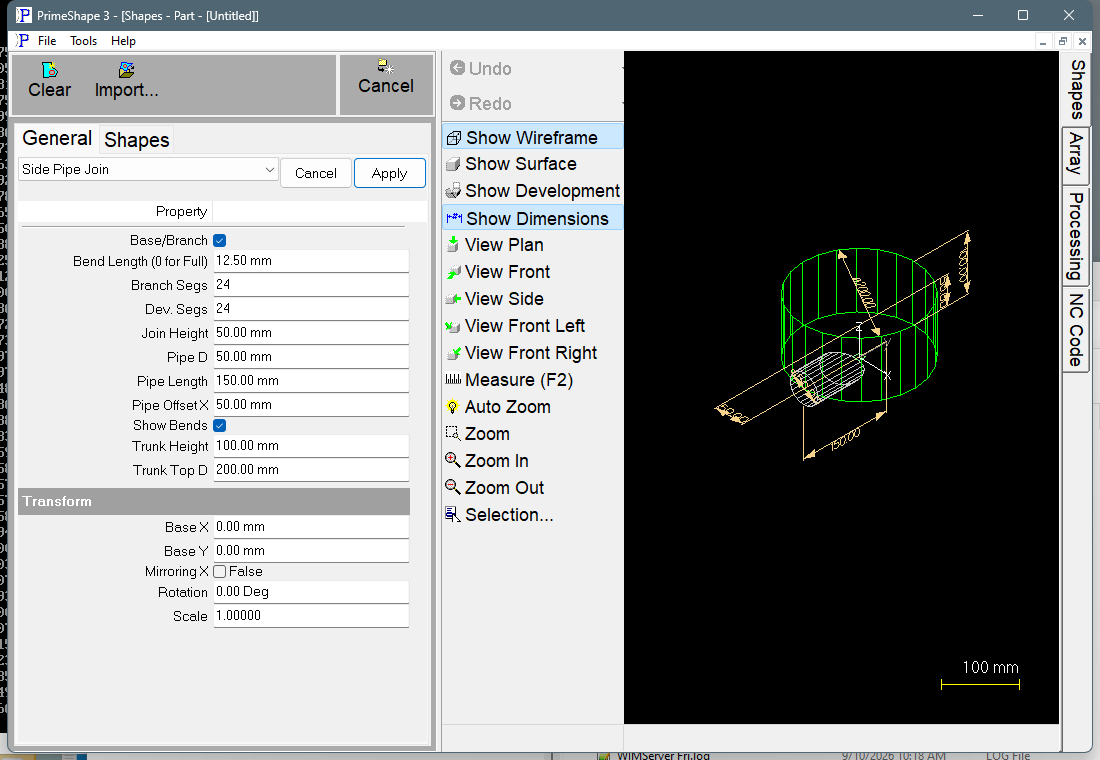
Side Pipe Join in PrimeShape: the property page (left) and the shape as a wireframe with its dimensions (right).
How the shape is built
In 3D the trunk is a cylinder of diameter Trunk Top D standing on the XY plane with its axis along Z, from Z = 0 to Z = Trunk Height. The branch is a cylinder of diameter Pipe D lying horizontal, at right angles to the trunk axis. Its axis is at height Join Height above the bottom of the trunk and is offset by Pipe Offset X from the trunk axis, along X. Pipe Length is measured along the branch axis from the vertical plane through the trunk axis to the free end of the branch. The trunk is divided into Dev. Segs flat facets and the branch into Branch Segs flat facets; the branch is trimmed where it meets the trunk facets.
The Base/Branch checkbox chooses which pipe is developed. The pipe being developed is drawn green in the 3D view and the other one grey.
•Ticked (On): trunk – the flat pattern of the trunk. The seam of the trunk is placed through the middle of the branch hole, so the hole is not a separate closed cut: it is split in two and appears as a half-hole notch in each seam edge of the pattern. When the plate is rolled and the seam joined, the two halves make the hole. The pattern is one closed outline.
•Cleared (Off): branch – the flat pattern of the branch: a straight edge from the free end, a wave-shaped edge from the saddle where it meets the trunk, and two straight seam edges. The seam of the branch runs along its side at the height of its axis; PrimeCut puts it on one side or the other according to the sign of Pipe Offset X.
The facets of the pipe being developed are unrolled one after another, and the outline is returned as one closed path. With Show Bends on, a bend line is marked at every fold between two facets of the pipe being developed. The bend lines are marking, not cutting. Alternate bend lines are drawn in the reverse direction. On the trunk pattern the bend lines are not trimmed at the hole.
Properties
Property |
Description |
Default |
Trunk Top D |
Diameter of the trunk pipe (mm or inch). The trunk is always a straight cylinder, so this diameter is used for its whole height; the shape has no separate bottom diameter. The trunk facet corners lie on this diameter. |
200 mm (8 in) |
Trunk Height |
Length of the trunk pipe along its axis (mm or inch). |
100 mm (4 in) |
Pipe D |
Diameter of the branch pipe (mm or inch). The branch facet corners lie on this diameter. |
50 mm (2 in) |
Pipe Length |
Length of the branch, measured along its axis from the vertical plane through the trunk axis to the free end of the branch (mm or inch). The branch only stands clear of the trunk if this is more than the distance from that plane to the trunk wall at the branch. |
150 mm (6 in) |
Pipe Offset X |
Sideways offset of the branch axis from the trunk axis (mm or inch). 0 puts the branch on the trunk centre line. Negative values are allowed and move the branch to the other side of the trunk axis. |
50 mm (2 in) |
Branch Segs |
Number of flat facets the branch pipe is divided into. More segments follow the true curve more closely: this sets the number of points on the saddle edge of the branch pattern and round the hole in the trunk pattern, and the number of bend lines on the branch pattern. The least allowed value is 3. |
24 |
Join Height |
Height of the branch axis above the bottom end of the trunk (mm or inch). |
50 mm (2 in) |
Base/Branch |
Checkbox. Ticked (On) develops the trunk (the base) with the hole for the branch; cleared (Off) develops the branch. See How the shape is built. |
Ticked (On, trunk) |
Dev. Segs |
Number of flat facets the trunk pipe is divided into. More segments follow the true curve more closely and give more bend lines on the trunk pattern. It also changes the saddle edge of the branch, because the branch is trimmed against the trunk facets. The least allowed value is 3. |
24 |
Show Bends |
Marks the bend lines between facets on the flat pattern. Cleared (off) leaves the bend lines out, so only the outline is marked and cut. |
On |
Bend Length (0 for Full) |
Length of each bend mark (mm or inch). A bend line longer than 2.1 × this value is marked as two marks of this length, one at each end of the bend line; a shorter bend line is marked full length. 0 marks every bend line full length. Cannot be negative. Only used when Show Bends is on. |
12.5 mm (0.49 in) |
The dimensions drawn on the 3D view are Trunk Height, Trunk Top D, Pipe D, Pipe Offset X, Pipe Length and Join Height.
Notes
•The branch is always at right angles to the trunk; there is no join angle property on this shape.
•The shape does not check that the branch fits on the trunk. Keep the whole branch within the trunk: the absolute value of Pipe Offset X + Pipe D/2 must be less than Trunk Top D/2, and Join Height must lie between Pipe D/2 and Trunk Height – Pipe D/2. Outside these limits the branch does not meet the trunk all the way round, so the two patterns do not form a complete join.
•The pattern is developed at the diameters entered. Allow for the plate thickness yourself.
•If the shape cannot be built from the values entered, the property page shows a red bar reading Warning: Cannot build shape from these parameters. The code does not say which value caused the failure.
•When a part made from a single Side Pipe Join is open in the Processing Editor, Pipe Tools, Bevel Hole for Offset Pipe fills in its Branch Diameter and Branch Offset prompts with this shape's Pipe D and Pipe Offset X. Its Trunk Pipe Diameter prompt is not taken from this shape (it uses the controller's pipe diameter), so enter the trunk diameter there yourself. For cutting the branch from real pipe rather than plate, see the Side Pipe Join example in that topic.
•The shape has no aliases (no former names).
•The defaults are in millimetres in metric and in inches in imperial, except Bend Length (0 for Full), which is 12.5 mm (0.49 in) in both.
Thin walled developments also have the Transform properties (Base X, Base Y, Rotation, Scale, Mirroring X), listed after the shape's own properties. They apply to the flat pattern. Thin walled developments have no Polar Array properties.