The Slotted Plate is a rectangular plate with a grid of identical straight slots cut through it – a mounting or adjustment plate where the slots let the part slide into position before it is bolted down. The plate corners can be sharp or filleted. The slots are laid out in Slot Columns x Slot Rows, all at the same angle, with the grid centred on the plate and moved by the slot offsets. Set Slot Length to 0 to get a grid of round holes instead of slots, or set either count to 0 to get a plain plate.
This shape is the general form of the older fixed shapes Rect with 2 Slots, Rect with 4 Slots and Rect with 2 Vert. Slots, which are still registered as separate shapes so that existing parts load. It can also be found by searching for Plate with Slots, Rect with Slots or Rectangle with Slots.
It appears in the shapes library under Rectangular Shapes and Gussets.
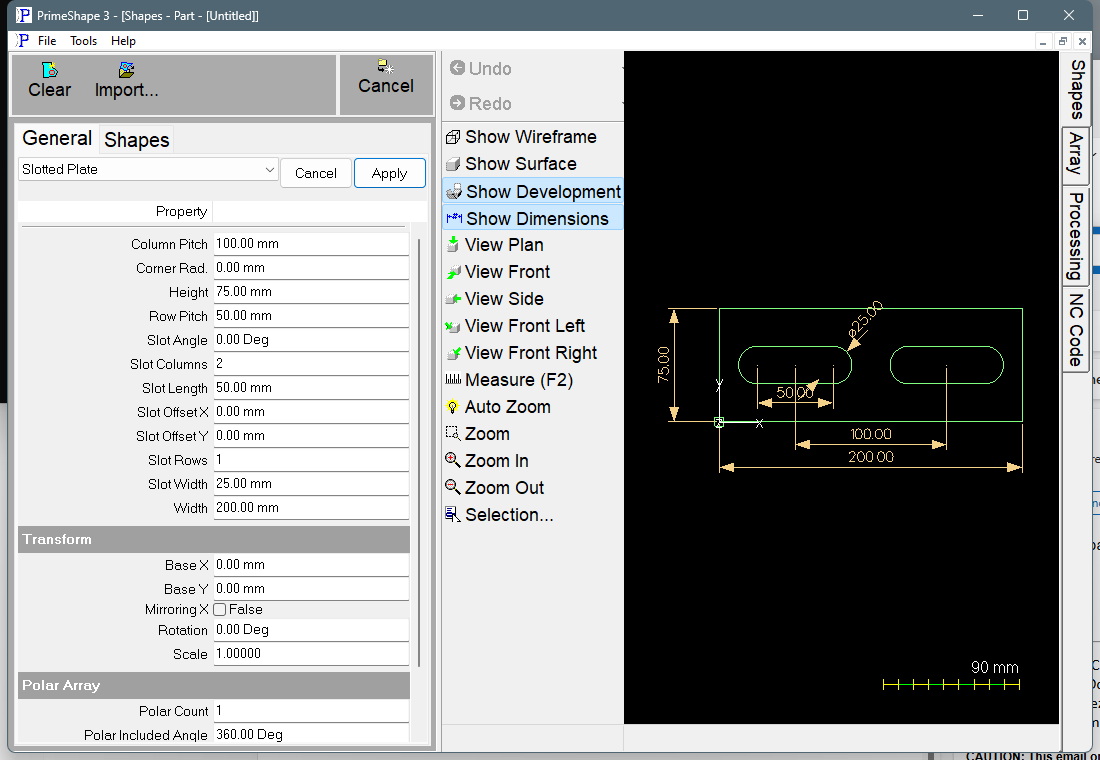
Slotted Plate in PrimeShape: the property page (left) and the shape with its dimensions (right).
Insert point and orientation
The insert point is the bottom left corner of the plate. Width is built to the right along X and Height upwards along Y.
The slot grid is centred on the plate centre, (Width / 2, Height / 2) from the insert point, plus Slot Offset X and Slot Offset Y. Columns are spaced by Column Pitch along X and rows by Row Pitch along Y, measured slot centre to slot centre. Each slot is centred on its grid position and lies along Slot Angle; turning the slots does not move their centres.
Properties
Lengths are in the current units (mm or inches). The defaults shown are for a new shape; the inch defaults are used when the program is set to inches.
Property |
Description |
Default |
Width |
Overall width of the plate, along X. Must be greater than 0. |
200 mm (8 in) |
Height |
Overall height of the plate, along Y. Must be greater than 0. |
75 mm (3 in) |
Corner Rad. |
Radius of the fillet on all four plate corners. 0 gives sharp corners. Cannot be negative or more than half the smaller of Width and Height. |
0 |
Slot Columns |
Number of slots across the plate, along X. 0 gives no slots. |
2 |
Slot Rows |
Number of slots up the plate, along Y. 0 gives no slots. Slot Columns x Slot Rows can be at most 1000. |
1 |
Slot Length |
Length of each slot from the centre of one end arc to the centre of the other, so the overall slot length is Slot Length + Slot Width. 0 gives round holes of diameter Slot Width. Cannot be negative. |
50 mm (2 in) |
Slot Width |
Width across each slot, which is also the diameter of its round ends (or of the hole when Slot Length is 0). Must be greater than 0 when there are slots. |
25 mm (1 in) |
Slot Angle |
Direction of every slot, in degrees anticlockwise from the X axis. 0 lays the slots along X, 90 along Y. Negative values are allowed. Has no effect when Slot Length is 0. |
0° |
Column Pitch |
Distance along X from one slot centre to the next. When there are slots, must be greater than 0 when Slot Columns is more than 1; not used with one column. |
100 mm (4 in) |
Row Pitch |
Distance along Y from one slot centre to the next. When there are slots, must be greater than 0 when Slot Rows is more than 1; not used with one row. |
50 mm (2 in) |
Slot Offset X |
Moves the whole slot grid along X from the plate centre. Positive moves it right, negative left. |
0 |
Slot Offset Y |
Moves the whole slot grid along Y from the plate centre. Positive moves it up, negative down. |
0 |
The dimensions drawn on the shape are named after these properties, and clicking one edits that value. Width, Height and Corner Rad. are drawn on the plate; Slot Length, Slot Width, Column Pitch, Row Pitch and Slot Angle are drawn on the bottom left slot of the grid; the slot offsets are drawn from the plate centre. A dimension that has no effect with the current settings (for example Row Pitch with one row, or Slot Angle at 0) is hidden.
Limits
The shape is checked every time it is built. If any of these conditions is broken the shape is not built and a warning gives the reason:
•Width and Height must be greater than zero.
•Corner Rad. cannot be negative, and Corner Rad. is too large for the plate when it is more than half the smaller of Width and Height.
•Slot Columns and Slot Rows must give from 0 to 1000 slots – neither count can be negative, and their product cannot be more than 1000.
•When there are slots: Slot Width must be greater than zero, Slot Length cannot be negative, and Column Pitch must be greater than zero when there is more than one column, and Row Pitch must be greater than zero when there is more than one row.
•A slot crosses the plate edge – every slot, including its round ends, must lie inside the plate. A slot that only touches a straight plate edge is also rejected, so leave a gap between the slot and the edge.
•A slot crosses the plate edge at a corner – with filleted corners, a slot end near a corner must also stay inside the fillet. Touching the fillet is allowed; crossing it is not.
•Slots overlap - increase Column Pitch or Row Pitch – two slots touch or cross. This is checked for the slots at their Slot Angle, so turning slots in a tight grid can make them overlap.
The slot grid is not checked against anything except the plate edge and the other slots. Leave enough web between the slots and the edge for the material and process you will cut with.
Every 2D shape also has the Transform properties (Base X, Base Y, Rotation, Scale, Mirroring X) and the Polar Array properties, listed after the shape's own properties.