The Truncated Cylinder is a thin walled development: a cylinder with a flat, square bottom end and a top end cut off by an angled plane. PrimeCut builds the cylinder in 3D and cuts its flat pattern – the plate that, rolled or folded up, makes the cylinder. Use it for ducts, hopper outlets, chutes and pipe stubs that have to meet a sloping surface.
It appears in the shapes library under Thin Walled Developments.
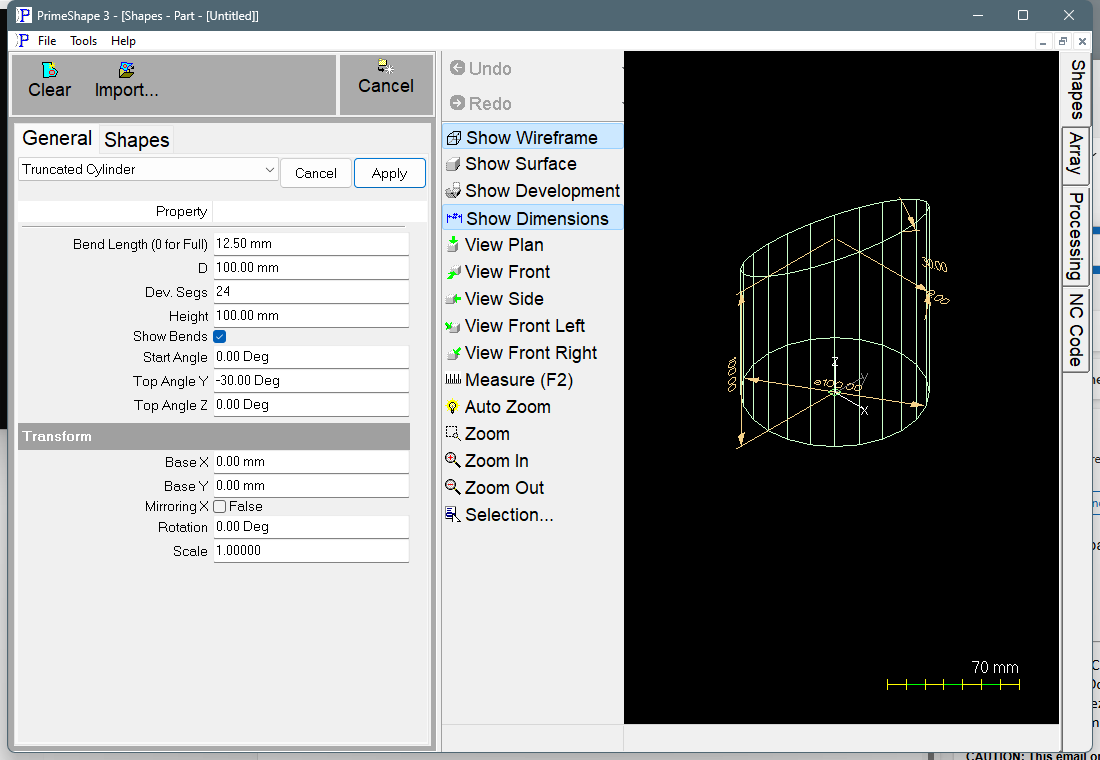
Truncated Cylinder in PrimeShape: the property page (left) and the shape as a wireframe with its dimensions (right).
How the shape is built
In 3D the cylinder stands on the XY plane with its axis along Z. The bottom end is flat at Z = 0. The top end is a plane that crosses the axis at Z = Height and is tilted by Top Angle Y, in the direction set by Top Angle Z. The side of the cylinder is made of Dev. Segs flat facets whose corners lie on the circle of diameter D. Each facet is unrolled flat, one after the other, to make the flat pattern.
The flat pattern is one closed outline:
•two straight seam edges – the line on the cylinder at the Start Angle, which becomes both ends of the pattern and is where the rolled plate is joined
•a straight edge from the flat bottom end of the cylinder
•a wave-shaped edge from the angled top end, made of straight lines, one per facet
The insert point is the top end of the first seam edge. That seam edge lies along X, running from the insert point in +X to the bottom edge, and the pattern unrolls from it in –Y. The length of the pattern, seam to seam, is the perimeter of the faceted cylinder, Dev. Segs × D × sin(180° / Dev. Segs). This is slightly less than π × D: with the default 24 segments it is about 0.3% shorter.
With Show Bends on, a bend line is marked on the pattern at every fold between two facets. The bend lines are marking, not cutting. They are ordered so that the marking path alternates direction across the pattern.
Properties
Property |
Description |
Default |
D |
Diameter of the cylinder (mm or inch). The facet corners lie on this diameter. The least allowed value is 1. Allow for the plate thickness yourself: the pattern is developed at this diameter. |
100 mm (4") |
Height |
Height of the cylinder measured on its axis, from the flat bottom end to where the angled top plane crosses the axis (mm or inch). The two extreme sides are Height + D/2 × tan(Top Angle Y) and Height – D/2 × tan(Top Angle Y). With a negative Top Angle Y the first is the shortest side and the second the longest; with a positive Top Angle Y it is the other way round. With the defaults these are 71.1 mm (shortest) and 128.9 mm (longest). No minimum is set on this property; see the note on the top plane below. |
100 mm (4") |
Top Angle Z |
Direction of the top cut, as an angle round the cylinder axis measured from X (degrees). With a negative Top Angle Y the longest side lies in this direction; with a positive Top Angle Y the shortest side does. The other side lies opposite it. |
0° |
Top Angle Y |
Tilt of the top cut plane away from square to the axis (degrees). 0 gives a plain cylinder with both ends square. The sign sets which side is longest (see Top Angle Z). The shape is valid only while D/2 × |tan(Top Angle Y)| is less than Height; with the default D and Height that limit is about 63°. Values near ±90° make the top plane almost parallel to the axis, so one side becomes very long and the other goes below zero. |
–30° |
Start Angle |
Position of the seam, as an angle round the cylinder axis measured from X (degrees). It sets where the flat pattern starts and finishes, and so where the joint will be on the finished cylinder. The facet corners are placed from it, so changing it turns the faceted cylinder round its axis; D, Height and the top angles are not changed. With Start Angle equal to Top Angle Z (both 0 by default) the seam is on the longest side for a negative Top Angle Y, or the shortest side for a positive one. |
0° |
Dev. Segs |
Number of flat facets the cylinder is divided into for the development. More segments follow the true curve more closely and give more bend lines. The least allowed value is 3. |
24 |
Show Bends |
Adds the bend lines between facets to the flat pattern. Turn it off to leave the bend lines out and cut the outline only. |
On |
Bend Length (0 for Full) |
Length of each bend mark (mm or inch). A bend line longer than 2.1 × this value is marked as two short marks of this length, one at each end of the line; a shorter bend line is marked full length. 0 marks every bend line full length. Cannot be negative. Only used when Show Bends is on. |
12.5 mm (0.5") |
The dimensions drawn on the 3D view are Height, D, Top Angle Z and Top Angle Y.
Notes
•The bottom end is always square to the axis. For a cylinder cut at an angle at both ends, use the Arbitrary Cylinder shape, which has Bot Angle Y and Bot Angle Z.
•The shape does not check that the top plane stays above the bottom end. Keep Height greater than D/2 × |tan(Top Angle Y)|, so that the shortest side is above 0, or the cylinder is not a valid development.
•If the shape cannot be built from the values entered, the property page shows a red bar reading Warning: Cannot build shape from these parameters. The 3D model is cleared, and the flat pattern may be missing or incomplete.
•The length defaults are in millimetres in metric and in inches in imperial (D and Height 4", Bend Length 0.5").
Thin walled developments also have the Transform properties (Base X, Base Y, Rotation, Scale, Mirroring X), listed after the shape's own properties. Thin walled developments have no Polar Array properties.