The Mitered Pipe is a 3D pipe development: a straight round pipe with a square (90°) cut at one end and a flat miter cut at the other. The shape draws the 3D pipe and the flat pattern of it – the plate you cut and then roll into the pipe. Use it to make a pipe section that meets a flat sheet, or another pipe of the same diameter, at an angle. The shape has no aliases (no former names). For a pipe mitered at both ends use Pipe Mitered both ends; for compound miters at both ends use Pipe with compound miters.
It appears in the shapes library under Thick Walled Developments and Pipe Development Shapes. The pipe-cutter version of the same shape, for cutting the end of an existing pipe, is Pipe Cutter - Mitered Pipe under Pipe Cutter Shapes.
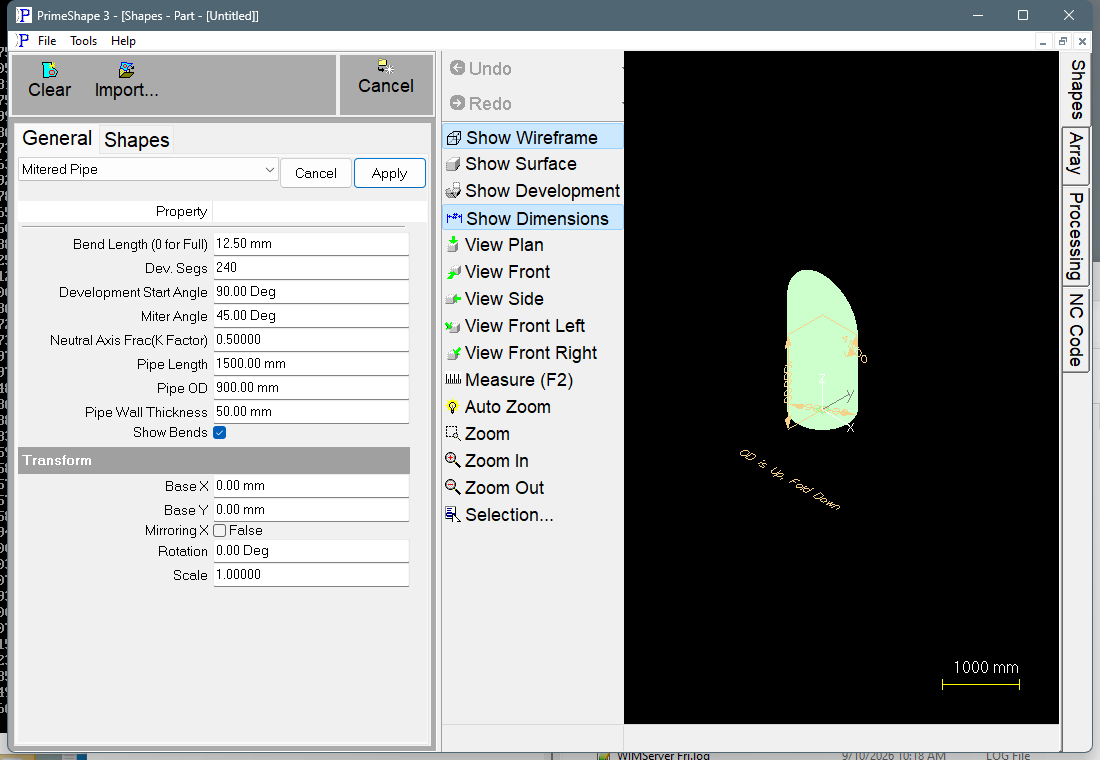
Mitered Pipe in PrimeShape: the property page (left) and the shape as a wireframe with its dimensions (right).
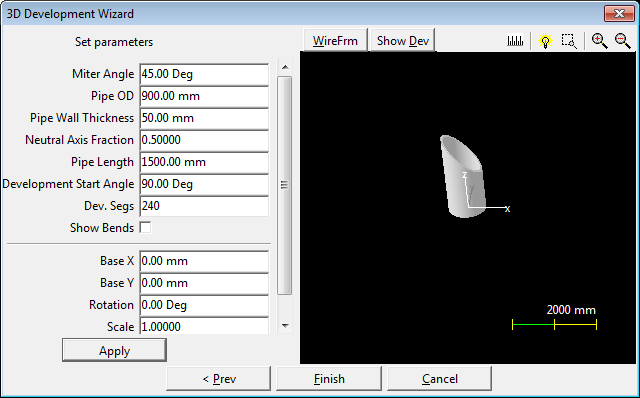
3D view of a pipe mitered at one end.
How the shape is built
In the 3D model the pipe axis runs along Z. The square end lies on the XY plane, centred on the origin. The mitered end is a flat plane that crosses the pipe axis at Pipe Length above the origin and is tilted from square by the Miter Angle. Pipe Length is therefore the length along the centre line. On the outside of the pipe one side is longer than this and the opposite side shorter, by (Pipe OD / 2) × tan(Miter Angle) each; the inside of the wall is offset by (Pipe ID / 2) × tan(Miter Angle) in the same way.
The pipe wall is divided into Dev. Segs flat strips around its circumference. The strips are unrolled at the neutral diameter (see Neutral Axis Frac below) to give the flat pattern:
•The pipe length runs along X and the circumference runs in –Y. The first strip edge – the one at the Development Start Angle, which becomes the seam – lies on the X axis, with its mitered-end point on the origin and its square-end point at +X. The origin of the flat pattern is therefore the mitered-end point of the seam.
•The width of the pattern is the circumference at the neutral diameter (strictly, Dev. Segs chords of that circle, which is very slightly less than π × neutral diameter).
•The square end is a straight edge. The mitered end is the curve that, once rolled, lies in the miter plane.
•The pattern is drawn with the outside of the pipe facing up, and is folded down to roll it. The shape shows the note OD is Up, Fold Down.
The two end profiles carry bevel hints. The square end is given a bevel of 0°; along the mitered end the bevel at each point is set from the height difference between the outside and inside of the wall, so that a bevel head cuts the edge in the miter plane through the full wall thickness.
The dimensions drawn on the shape are the pipe length (Height), the outside diameter (OD) and the miter angle (Angle), with the leader note OD is Up, Fold Down.
Properties
The properties are listed in the order the property page shows them.
Property |
Description |
Default |
Miter Angle |
Angle of the miter plane from square (0° is a square end). A negative value tilts the plane the other way. Angle units. |
45° |
Pipe OD |
Outside diameter of the pipe. Minimum 1. Length units. |
900 mm (36 in) |
Pipe Wall Thickness |
Wall thickness. The inside diameter is Pipe OD – 2 × Pipe Wall Thickness. Minimum 1. Length units. |
50 mm (2 in) |
Neutral Axis Frac(K Factor) |
Where in the wall the pattern is unrolled, as a fraction of the wall thickness measured from the inside: neutral diameter = inside diameter + Neutral Axis Frac × 2 × Pipe Wall Thickness. 0 unrolls at the inside diameter, 1 at the outside diameter. Use 0.5 (mid-wall) for plate that is rolled into pipe, or the K factor for your rolling process. Range 0 to 1, no units. |
0.5 |
Pipe Length |
Length of the pipe along its centre line, from the square end to where the pipe axis meets the miter plane. Length units. |
1500 mm (60 in) |
Development Start Angle |
Position around the pipe axis where the pattern starts and finishes, which is where the seam will be once the plate is rolled. The default of 90° puts the seam a quarter turn from the longest side of the pipe, half way between the long and short sides. Angle units. |
90° |
Dev. Segs |
Number of flat strips the circumference is divided into for the development. More segments give a smoother mitered edge and more bend lines. Minimum 3. |
240 |
Show Bends |
When ticked, the pattern includes a bend line between each pair of strips, as marking (not cutting). The line on the seam is not drawn. |
True |
Bend Length (0 for Full) |
Used when Show Bends is ticked. Each bend line is shortened to two marks of this length, one at each end of the line. A bend line not longer than 2.1 × Bend Length is left full length. 0 marks every bend line full length. Minimum 0. Length units. |
12.5 mm (0.5 in) |
Limits and errors
If the shape cannot be built from the values entered, the property page shows Warning: Cannot build shape from these parameters and the 3D model is cleared.
The shape does not check that the values make a sensible pipe. In particular:
•Pipe Wall Thickness must be less than half of Pipe OD, or the inside diameter is zero or negative.
•The property page sets no range for Miter Angle. At 90° the miter plane is parallel to the pipe axis and no mitered end can be formed, so the pattern is not usable.
•(Pipe OD / 2) × the absolute value of tan(Miter Angle) must be less than Pipe Length. Otherwise the miter plane goes below the square end on the outside wall and the pattern is not valid.
Check the pattern before cutting whenever the miter is steep or the pipe is short.
The shape also has the Transform properties (Base X, Base Y, Rotation, Scale, Mirroring X), listed after its own properties. Unlike a 2D shape, this 3D development has no Polar Array group, so none is listed on its property page.