The Pipe Cutter - Mitered Pipe is a length of pipe with one square end and one end cut on a flat angled plane (a miter). It is the pipe cutter version of the Mitered Pipe: instead of a flat blank to be rolled into a pipe, it produces the two end cuts for cutting existing pipe on a pipe cutter. Use it to cut a length of pipe with one mitered end.
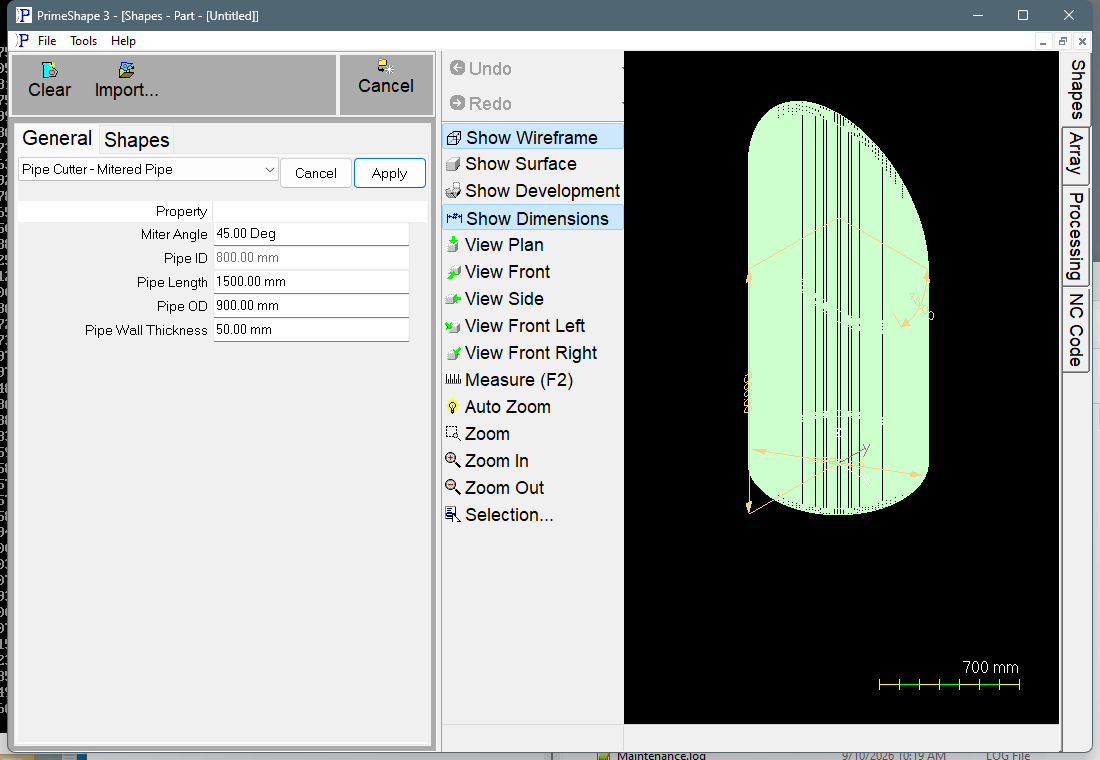
Pipe Cutter - Mitered Pipe in PrimeShape: the property page (left) and the shape as a wireframe with its dimensions (right).
How the shape is built
The pipe is modelled standing on its axis. The square end is at the bottom, on the plane through the origin, centred on the origin. The mitered end is at the top. The miter plane crosses the pipe axis at Pipe Length above the square end and is tilted from square by the Miter Angle, so the end is (Pipe OD / 2) x tan(Miter Angle) longer than Pipe Length on one side of the pipe and the same amount shorter on the opposite side. The longest and shortest points of the end therefore differ by Pipe OD x tan(Miter Angle).
The cut paths are the outlines of the two ends unrolled flat on the outside surface of the pipe (the OD). The flat pattern is therefore one OD circumference (π x Pipe OD) long:
•The development starts at a fixed seam. The seam is one of the two lines along the pipe where the miter plane is level with the axis, so the pipe is exactly Pipe Length long there. The start angle is fixed at 90° and is not shown on the property page.
•The pipe axis runs along X and the circumference runs along Y. The insert point is at the seam, where the mitered end cut is at X = 0.
•The square end is a straight cut at X = Pipe Length, running along Y for one OD circumference.
•The mitered end is a curved cut. It is at X = 0 at the seam and again halfway round the pipe. Between those points it moves to –X where that side of the pipe is longer than Pipe Length, and to +X where it is shorter, by up to (Pipe OD / 2) x tan(Miter Angle).
The pipe is divided into 360 segments, one per degree, so each end cut is made of 360 short lines. No fold or bend lines are produced.
Each segment of the mitered end carries a bevel angle so that the cut goes through the wall on the end plane. On the square end the bevel is 0. On the mitered end it changes around the pipe, from the Miter Angle one way, through 0 at the seam and halfway round, to the Miter Angle the other way.
Properties
The property page lists these properties in this order.
Property |
Description |
Default |
Miter Angle |
Tilt of the cut plane at the mitered end, measured from a square cut (angle units). 0 gives a square end. |
45° |
Pipe OD |
Outside diameter of the pipe (mm or inch). The cut paths are laid out on this diameter. The least allowed is 1. |
900 mm (36") |
Pipe ID |
Inside diameter of the pipe (mm or inch). Shown for information only and cannot be edited: it is Pipe OD – 2 x Pipe Wall Thickness. |
800 mm (32") |
Pipe Wall Thickness |
Wall thickness of the pipe (mm or inch). Sets Pipe ID and the bevel angles on the mitered end. The least allowed is 1. |
50 mm (2") |
Pipe Length |
Length of the pipe along its axis, from the square end to the point where the miter plane crosses the axis (mm or inch). On the long side of the pipe the length is longer, and on the short side it is shorter, by (Pipe OD / 2) x tan(Miter Angle). |
1500 mm (60") |
The dimensions shown on the shape are Pipe Length (height), Pipe OD and Miter Angle.
Notes
•The number of segments (360), the development on the OD (Neutral Axis Frac(K Factor) fixed at 1.0) and the development start angle (90°) are fixed. They are not on the property page.
•Pipe Length is not checked against the Miter Angle. If (Pipe OD / 2) x tan(Miter Angle) is greater than Pipe Length, the miter plane drops below the square end on one side and the cut paths do not describe a valid pipe. The code does not limit the Miter Angle. As it approaches 90° the tangent term grows without bound, so the shape is not meaningful there.
•Pipe Wall Thickness is not checked against Pipe OD. Keep it less than half of Pipe OD so that Pipe ID stays above 0.
•If the shape cannot be built from the values entered, the 3D view is cleared and the broken-shape symbol is drawn at the insert point. The error handler clears only the 3D view. The flat cut paths keep whatever was built before the failure, so they may be partial or empty. This shape's property page does not show the red "Warning: Cannot build shape from these parameters" bar, so check the values if the shape disappears or the broken-shape symbol appears.
•The defaults are in millimetres in metric and in inches (36", 2", 60") in imperial.
This is a 3D pipe shape. Unlike the 2D shapes, it has no Transform or Polar Array properties, and its property page lists only the properties above.