The Pipe Cutter - Pipe Mitered both ends shape is a length of round pipe with each end cut by a flat plane at an angle (a miter). It is the pipe cutter version of Pipe Mitered both ends: instead of a flat development to roll from plate, it produces the two end cuts laid out on the unrolled outside surface of an existing pipe, ready to cut on a pipe cutter. Use it to cut a straight pipe section that meets angled flat surfaces at both ends.
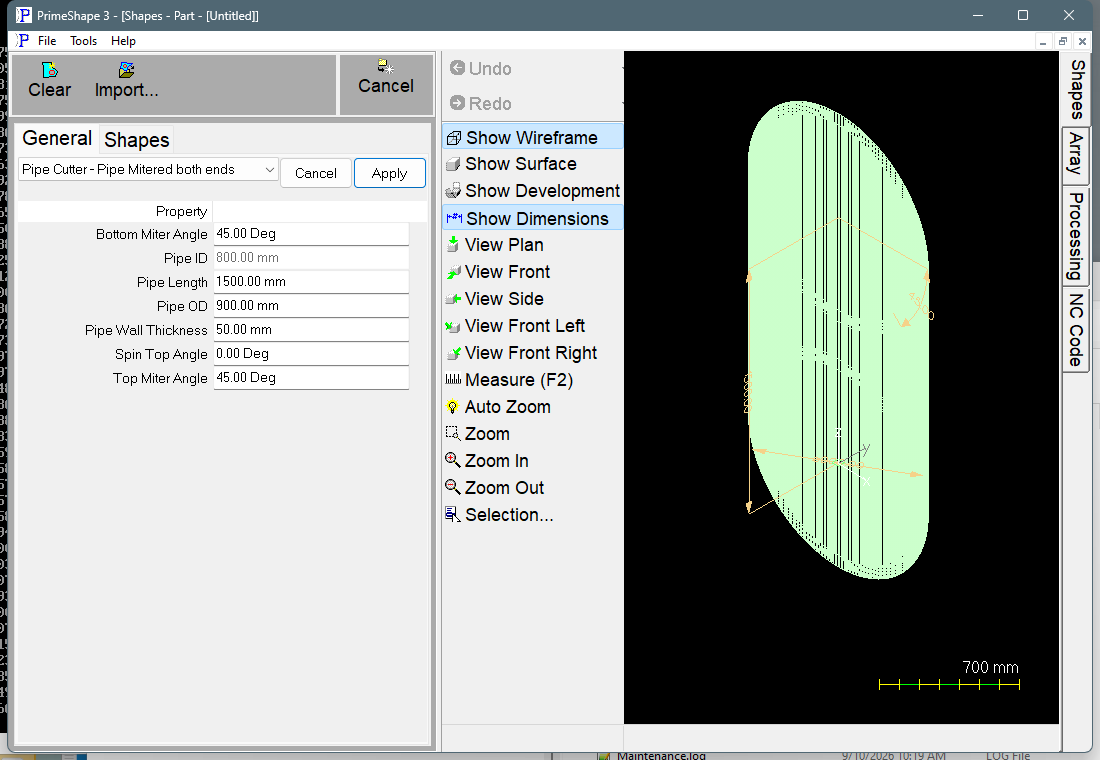
Pipe Cutter - Pipe Mitered both ends in PrimeShape: the property page (left) and the shape as a wireframe with its dimensions (right).
How the shape is built
The pipe is built along its own axis. The bottom cut plane passes through the pipe centreline at the start of the pipe and the top cut plane passes through the centreline Pipe Length further along. Each plane is tilted from square by its miter angle; the top plane can also be turned around the pipe axis by Spin Top Angle.
The cut lines are worked out on the outside diameter of the pipe (the neutral axis is fixed at the OD for pipe cutter shapes) and unrolled into a flat pattern, using 360 segments around the pipe – one per degree. In the flat pattern the pipe axis runs along X and the circumference runs along –Y. The pattern is unrolled from a fixed seam on the pipe (the development start angle, 90°). The insert point is where the top end cut crosses that seam; the bottom end cut crosses the seam along +X from it, at the length of the pipe's outside surface along the seam. Both end cuts run from the seam along –Y for one OD circumference. The output is two open paths: the top end cut and the bottom end cut. No fold or bend lines are drawn.
Every segment of both end-cut paths carries a bevel angle, worked out from the wall thickness and the difference in position of the cut on the outside and inside walls, so that a bevel-capable head can follow the miter plane through the wall.
Properties
Property |
Description |
Default |
Top Miter Angle |
Tilt of the top end cut plane, measured from a square cut (angle units). 0 gives a square end. |
45° |
Spin Top Angle |
Turns the top cut plane around the pipe axis relative to the bottom cut plane (angle units). With 0 and equal top and bottom miter angles the two end cuts are parallel; at 180° they lean in opposite directions. |
0° |
Bottom Miter Angle |
Tilt of the bottom end cut plane, measured from a square cut (angle units). 0 gives a square end. The bottom cut cannot be spun; use Spin Top Angle to set the relationship between the two ends. |
45° |
Pipe OD |
Outside diameter of the pipe (mm or inch). The flat pattern is the unrolled outside surface, so its width in Y is the OD circumference. The least allowed is 1. |
900 mm (36 in) |
Pipe ID |
Inside diameter of the pipe (mm or inch), shown for information only and greyed out. It is Pipe OD – 2 x Pipe Wall Thickness and is recalculated when the shape is rebuilt. |
800 mm (32 in) |
Pipe Wall Thickness |
Wall thickness of the pipe (mm or inch). It sets Pipe ID and the bevel angles on the end cuts. The least allowed is 1. |
50 mm (2 in) |
Pipe Length |
Length of the pipe measured along its centreline, between the points where the bottom and top cut planes cross the centreline (mm or inch). The long and short sides of the mitered pipe are longer and shorter than this, by an amount that depends on the OD and the miter angles. |
1500 mm (60 in) |
The dimensions drawn on the shape are the pipe length, the OD and the top miter angle.
Limits
•The miter angles have no limit on the property page. As an angle approaches 90° the cut plane approaches the pipe axis and the end cut becomes very long; keep the angles well below 90°.
•If the miters are steep enough for the top and bottom cut planes to cross inside the pipe, the end cuts overlap; the shape does not check for this. Increase Pipe Length or reduce the angles.
•Pipe Wall Thickness is not checked against Pipe OD. Keep it less than half the OD, or Pipe ID becomes 0 or negative and the bevel angles are meaningless.
•If the shape cannot be built, the property page shows a red bar reading "Warning: Cannot build shape from these parameters". The message does not say which parameter is at fault. When the 3D build fails, the 3D geometry is cleared. The flat pattern (the two end-cut paths) is built in the same routine and is not cleared by that handler, so after a failure it may hold part of a result. Do not cut from the paths until the warning has cleared.
•The number of segments (360), the development start angle and the neutral axis position are fixed for pipe cutter shapes and are not shown on the property page.
The shape has no aliases (no former names).
Unlike the 2D shapes, pipe cutter shapes do not have the Transform or Polar Array property groups; the property page shows only the properties above.