A straight round pipe whose two ends are each cut by two flat planes, for cutting on a pipe cutter. Use it for a pipe that has to fit against two flat surfaces at one or both ends – for example a brace that sits in the corner where two plates meet. Each end has two independent miter planes, each with its own angle and its own spin round the pipe axis, and the second plane at each end can be moved along the pipe.
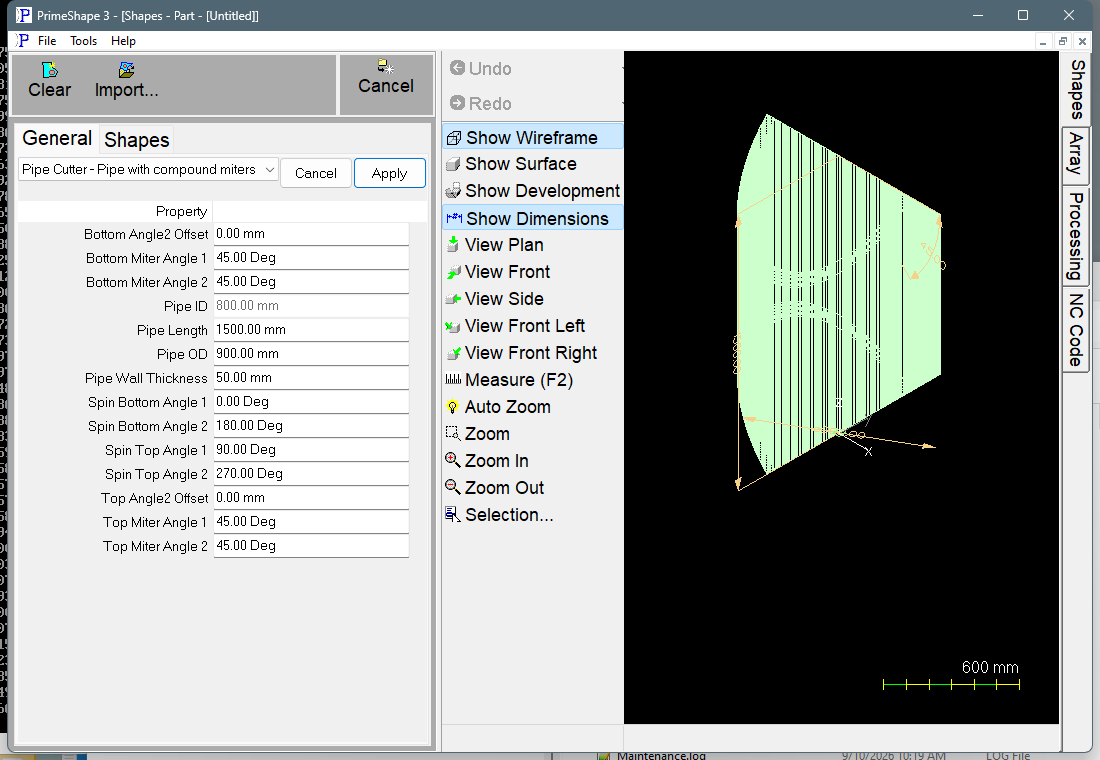
Pipe Cutter - Pipe with compound miters in PrimeShape: the property page (left) and the shape as a wireframe with its dimensions (right).
It is a 3D shape, listed under Pipe Cutter Shapes in the 3D Development Wizard. It is the pipe cutter version of the Pipe with compound miters shape. The geometry and the miter properties are the same, but the development is made on the pipe outside diameter, with one segment per degree and no fold or bend lines. The plate-rolling properties of the rolled pipe shapes (neutral axis fraction, development start angle, development segments and bend settings) are not shown.
Origin and how the shape is built
The pipe axis is the Z axis. The origin is on the axis at the bottom end, and the pipe runs up the axis for Pipe Length to the top end. Bottom miter plane 1 passes through the origin, and top miter plane 1 passes through the axis at Pipe Length. Plane 2 of each end is set by its Angle2 Offset: it passes through the axis at the same point as plane 1 when the offset is 0, and is moved along the axis by the offset otherwise.
Each miter angle tilts its plane away from square. The spin angle then turns that tilt round the pipe axis. The wall is trimmed by the two planes at each end, so where the two planes cross, the end has a ridge line. With the default values the two planes at each end face at 90° to each other (spins 90° and 270° at the top, 0° and 180° at the bottom), so each end is a 90° wedge, and the bottom wedge is turned 90° from the top wedge.
To give an end a single miter, set plane 2 to the same angle and spin as plane 1, with an Angle2 Offset of 0, so the two planes coincide.
What is cut
The development is the outside surface of the pipe unrolled flat. Its width is the pipe circumference (π × Pipe OD), because the development is made on the outside diameter. It holds two composite cut paths, one at the top end and one at the bottom end, each with one segment per degree round the pipe (360). Each end also carries bevel hints, so the pipe cutter bevels the cut through the wall to follow its miter planes.
Properties
Property |
Description |
Default |
Top Miter Angle 1 |
Angle of the first cutting plane at the top end, measured from a square cut. 0 is a square end. Degrees. |
45° |
Spin Top Angle 1 |
Turns the first top plane around the pipe axis, so it faces a different way round the pipe. Degrees. |
90° |
Top Miter Angle 2 |
Angle of the second cutting plane at the top end, measured from a square cut. Degrees. |
45° |
Top Angle2 Offset |
Moves the second top plane along the pipe axis. A positive value moves it outward, away from the bottom end; a negative value moves it inward. Negative values are allowed. Length units. |
0 |
Spin Top Angle 2 |
Turns the second top plane around the pipe axis. Degrees. |
270° |
Bottom Miter Angle 1 |
Angle of the first cutting plane at the bottom end, measured from a square cut. 0 is a square end. Degrees. |
45° |
Spin Bottom Angle 1 |
Turns the first bottom plane around the pipe axis. Degrees. |
0° |
Bottom Miter Angle 2 |
Angle of the second cutting plane at the bottom end, measured from a square cut. Degrees. |
45° |
Bottom Angle2 Offset |
Moves the second bottom plane along the pipe axis. A positive value moves it outward, away from the top end; a negative value moves it inward. Negative values are allowed. Length units. |
0 |
Spin Bottom Angle 2 |
Turns the second bottom plane around the pipe axis. Degrees. |
180° |
Pipe OD |
Outside diameter of the pipe. Minimum 1. Length units. |
900 mm (metric); 36 in (imperial) |
Pipe ID |
Inside diameter, shown for information only; it cannot be edited. It is calculated as Pipe OD – 2 × Pipe Wall Thickness and is recalculated each time the shape is built. |
800 mm (metric); 32 in (imperial) |
Pipe Wall Thickness |
Wall thickness of the pipe. Minimum 1. It must be less than half of Pipe OD, or the inside diameter is zero or negative. Length units. |
50 mm (metric); 2 in (imperial) |
Pipe Length |
Length of the pipe along its axis, from the point where bottom miter plane 1 crosses the axis to the point where top miter plane 1 crosses it. Length units. |
1500 mm (metric); 60 in (imperial) |
The dimensions drawn on the 3D view are the pipe length (Height), the outside diameter (OD) and Top Miter Angle 1 (Angle).
Limits and errors
•A miter angle of 90° makes that plane parallel to the pipe axis. The shape does not check the miter angles or the offsets, so keep each miter angle well below 90° (the default is 45°).
•Pipe Wall Thickness must be less than half of Pipe OD. The shape does not check this, so a thicker wall gives a zero or negative Pipe ID.
•If the shape cannot be built from the values entered, the 3D pipe is removed and the property page shows the red bar Warning: Cannot build shape from these parameters. Check the values, in particular the miter angles and offsets.
This is a 3D shape. The Transform and Polar Array property groups used by 2D shapes do not apply to it, so the property page shows only the properties above.