When a production database is reduced (see Reduce Database), the original database is preserved as a read-only archive datastore. An archive datastore contains all historical workorders and plates from before the reduction cutoff date and cannot be modified.
How Archives Appear in PC4LicGUI
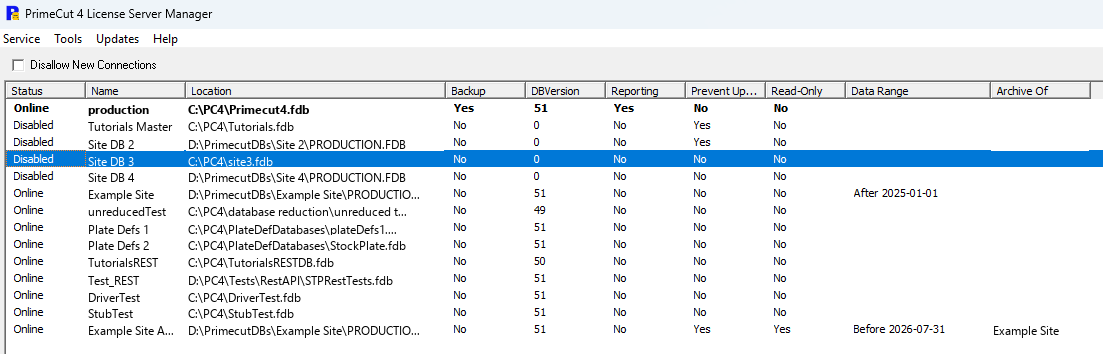
After a successful database reduction and deployment, the archive datastore appears in PC4LicGUI's DataStores panel alongside the production datastore. The archive is identified by its name, which follows the pattern <StoreName> Archive <YYYYMMDD>, where the date is the cutoff date used during the reduction.
The DataStores panel shows the following columns specific to archive datastores:
Column |
Meaning |
Read Only |
Ticked for all archive datastores. The database is locked at the Firebird level — no workorders or plates can be created or modified. |
Data Range |
The span of dates the database holds. A reduced production database reads After <date> and its archive reads Before <date>, where the date is the cutoff used for the reduction. If a database is reduced a second time, the resulting archive covers a period with a start and an end, and the range is shown with both dates. |
Archive Of |
The name of the production datastore this archive was created from. It is blank for ordinary production datastores. |
Browsing Historical Data
To view historical workorders and plates stored in an archive:
1.Launch PrimeCut NE on the server or a client computer.
2.At the login screen, select the archive datastore from the database list.
3.Log in normally. PrimeCut NE opens in read-only mode for the archive.
4.Browse workorders, plates, and jobs as you normally would — everything is visible but cannot be edited.
An archive session is easy to tell apart from a normal one: the application background turns a deep orange, and the title bar names the archive database.
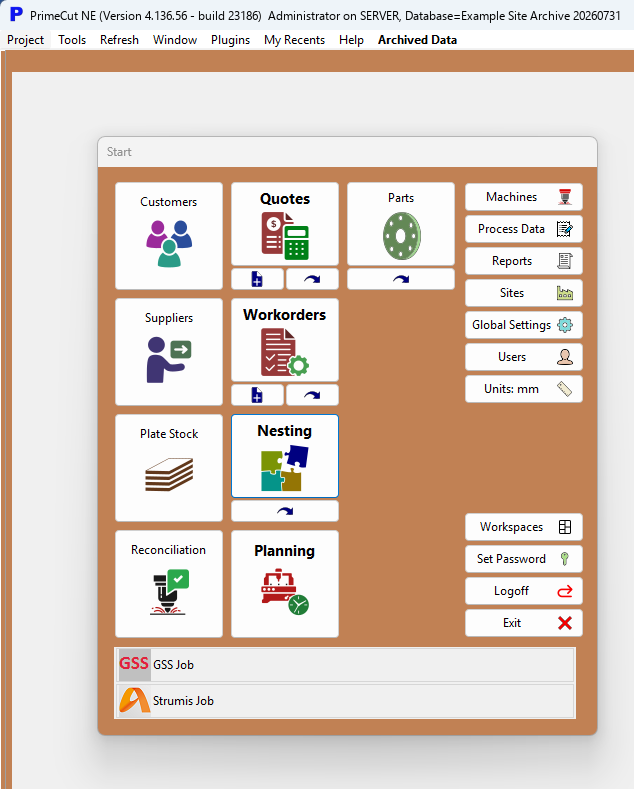
When logged in to a read-only archive, the Archived Data menu appears in the PrimeCut NE menu bar. This menu provides the Copy To Production action, which lets you copy a historical workorder or plate into the live production database.
Read-Only Enforcement
Archive datastores are locked at the Firebird database engine level. PrimeCut NE automatically detects this and disables all editing actions. Attempts to save, create, or delete records will have no effect.
See also: Reduce Database, Copy To Production