Copy To Production copies one or more workorders, or one or more plates, from a read-only archive database back into a live production database, together with the records they depend on. Use it when a historical job needs to be re-run, re-nested or referenced in the active production system.
The copy writes into a live production database. Review the preview before running it, and be sure the destination in the Destination Database list is the one you intend. Records that production already holds are never overwritten, with one exception described under Data the destination already has below.
Prerequisites
•PrimeCut NE must be logged in to an archive datastore. While one is open the main window is tinted and its title is marked to show the read-only state.
•The Archived Data menu appears in the menu bar only when connected to a read-only archive.
•The destination must be a configured datastore that is online and writable. Its credentials come from the License Server, so there is no password to enter.
Choosing what to copy
Select the workorders or plates first, then open Archived Data » Copy To Production. The menu item names what it has picked up, so you can confirm the selection before the dialog opens. The selection can come from any of these:
•The Workorder Explorer or Plates Explorer.
•The Workorder or Plate selector lists. Selecting a row in the plate selector takes every plate in that group, not just the one on display.
•If nothing is selected, the workorder currently open is used.
More than one item can be selected. Workorders and plates cannot be mixed in the same run, because the two need different options; select one kind or the other.
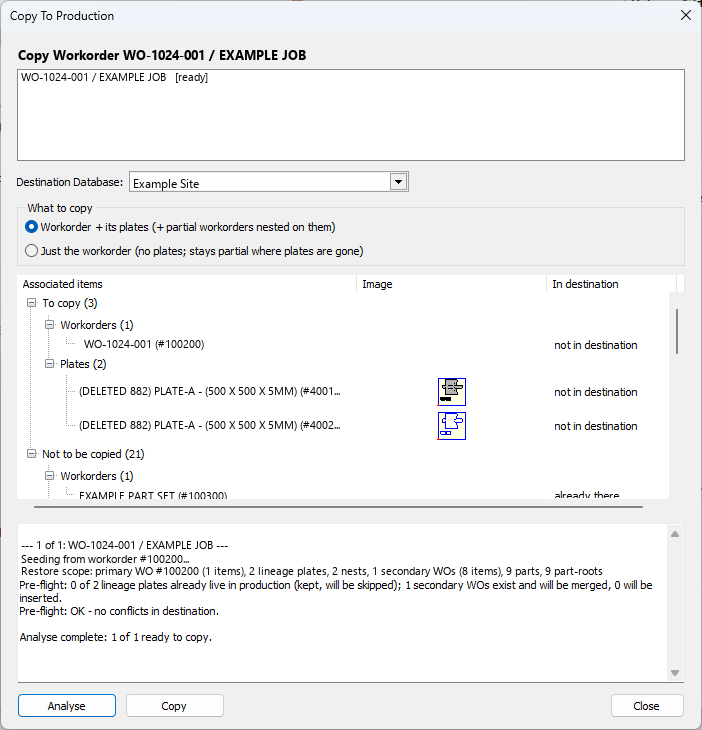
Choosing how much comes with it
The What to copy options set how far the copy reaches. For workorders:
•Workorder + its plates brings the workorder together with every plate it was nested on. Other workorders sharing those plates are merged in as far as the plates require.
•Just the workorder brings the workorder and its items but no plates. Where its plates are no longer in production the workorder stays partial, and only the nests whose plates production still has are restored.
For plates:
•Plate + partial workorders restores the plate lineage and, from the other workorders on it, only the items actually nested there.
•Plate + entire workorders restores those workorders with all of their items, but not their other plates.
Reading the preview
The Associated items list shows everything the run touches, grouped by what will happen to it:
•To copy — records that will be written into the destination.
•Not to be copied — records listed for context only, either because production already has them or because this kind of record is never copied.
Within each group the records are listed by type — workorders, plates, parts and so on. The same type can appear under both groups when some of its records are new to production and others are already there. Plate and part outlines are drawn beside their rows so they can be recognised at a glance.
The In destination column says what production holds, and nothing about intent — that is what the group above it is for:
Shown |
Meaning |
not in destination |
Production does not have this record. |
already there |
Production already has it. It is left exactly as it is. |
already there (partial) |
Production has only the stub left behind by a database reduction. It will be replaced with the full archive version. |
MISSING |
A material, plate template or machine that the copied records refer to but the destination does not have. See What is not copied below. |
The preview reads the archive only, so it costs nothing in the destination. Until Analyse has run the In destination column stays blank, because nothing has been compared yet.
Running the copy
1.Choose the destination from the Destination Database list.
2.Click Analyse. Each item is checked against the destination and the results appear in the log, along with anything that would block the copy.
3.Review the Associated items list, which now shows what production already holds.
4.If nothing is blocked, Copy becomes available. Click it to run the copy.
5.Each item reports its own outcome against its entry in the list at the top of the dialog.
When several items are copied, each is written in its own transaction. One item failing therefore does not undo the items that already succeeded, and the log and outcomes show which is which.
What is copied
•The workorder and its line items.
•The plates and nesting records the selected options bring in.
•Parts and part-root records the line items refer to, with their stored images.
•Shipment, packing and ERP records where present.
What is not copied
Materials, plate templates and machines are reported but never copied. A production database is expected to own its own material, template and machine configuration, and a copy from an archive will not overwrite it. Any that the destination does not have are shown as MISSING in the preview before the copy runs, so they can be added to the destination separately if they are needed.
Data the destination already has
Records that production already holds are skipped — the live version always wins. Only records that the reduction had removed are inserted.
A workorder is treated in one of three ways:
•If production does not have it, it is copied.
•If production has only the partial stub left by a database reduction, that stub is replaced with the full archive version.
•If production has it as an ordinary workorder, the copy is blocked and the log says so. Nothing is written. This protects a live workorder from being overwritten by an older archived copy.
Where a workorder is restored but some of its plates are gone from production, its quantities are adjusted so the outstanding to-nest figure stays correct, and a note on the workorder records that it is partial.
See also: Archive Datastores, Reduce Database