The Custom Rectangle is a rectangular plate where each of the four corners is set separately. Each corner can be left square or given a fillet, a reverse fillet, a chamfer or a rectangular notch, and each corner has its own height and width. Use it for plates, brackets and covers that need different corner treatments, such as one rounded corner, one cropped corner and one notched corner on the same part.
It appears in the shapes library under Rectangular Shapes.
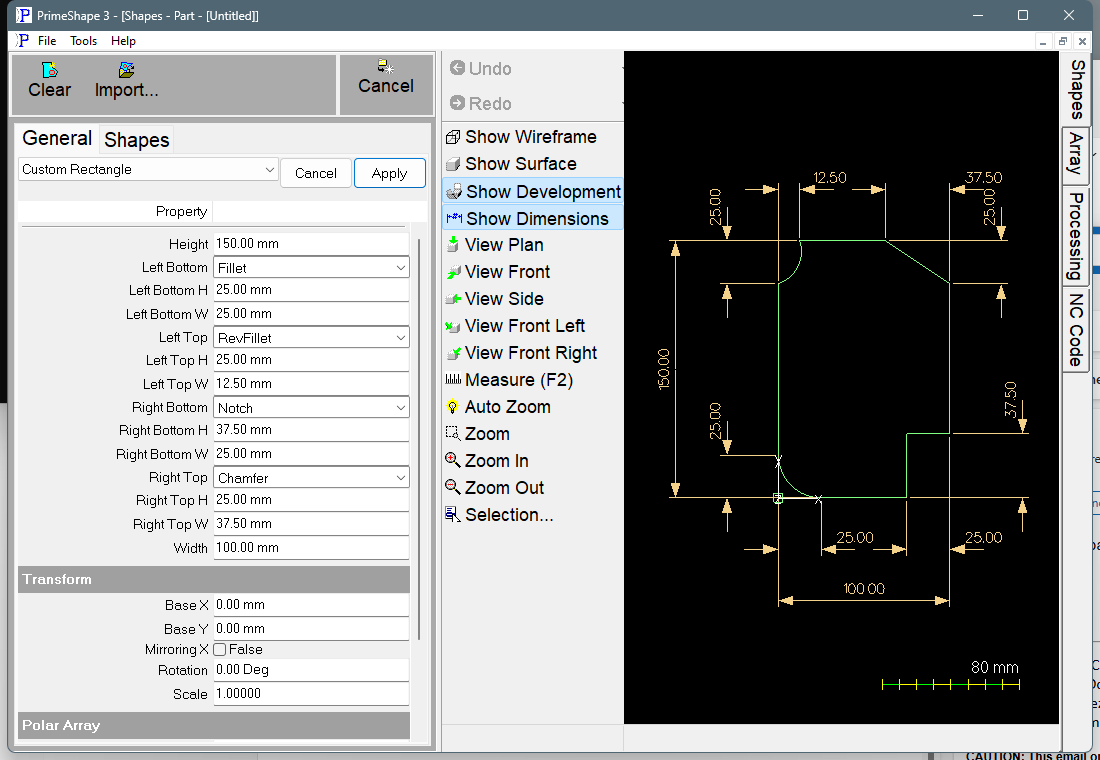
Custom Rectangle in PrimeShape: the property page (left) and the shape with its dimensions (right).
Insert point and orientation
The insert point (0,0) is the bottom left corner of the overall Width x Height rectangle. Width runs along X and Height along Y, so the part occupies 0 to Width in X and 0 to Height in Y. When the bottom left corner is anything other than None, that corner is cut away and the insert point lies outside the material.
The outline is a single closed profile. It starts on the left edge at height Left Bottom H and runs clockwise: up the left side, round the top left corner, across the top, round the top right corner, down the right side, round the bottom right corner and back along the bottom.
Corner types
Each corner has the same five choices. The corner's H value is measured along the left or right edge (in Y) from the corner, and its W value along the top or bottom edge (in X) from the corner.
•None – a square corner. H and W have no effect on the outline.
•Fillet – a convex 90 degree arc that rounds the corner off, from the point H along the side edge to the point W along the top or bottom edge.
•RevFillet – a concave 90 degree arc between the same two points, cutting a quarter-round bite into the corner.
•Chamfer – a straight line between the same two points.
•Notch – a rectangular notch W wide and H high cut out of the corner.
Fillet and RevFillet always draw a 90 degree circular arc between the two points. The arc is tangent to both edges, giving a true radius equal to H and W, only when H and W are equal. With unequal H and W the arc meets the edges at an angle.
Properties
Property |
Description |
Default |
Width |
Overall size of the part in X, measured across the full rectangle before the corners are cut. (mm or inch). |
100 mm (4 in) |
Height |
Overall size of the part in Y, measured across the full rectangle before the corners are cut. (mm or inch). |
150 mm (6 in) |
Left Bottom |
Corner type for the bottom left corner: None, Fillet, RevFillet, Chamfer or Notch. |
Fillet |
Left Bottom H |
Size of the bottom left corner in Y, measured up the left edge from the bottom. (mm or inch). |
25 mm (1 in) |
Left Bottom W |
Size of the bottom left corner in X, measured along the bottom edge from the left. (mm or inch). |
25 mm (1 in) |
Left Top |
Corner type for the top left corner: None, Fillet, RevFillet, Chamfer or Notch. |
RevFillet |
Left Top H |
Size of the top left corner in Y, measured down the left edge from the top. (mm or inch). |
25 mm (1 in) |
Left Top W |
Size of the top left corner in X, measured along the top edge from the left. (mm or inch). |
12.5 mm (0.5 in) |
Right Top |
Corner type for the top right corner: None, Fillet, RevFillet, Chamfer or Notch. |
Chamfer |
Right Top H |
Size of the top right corner in Y, measured down the right edge from the top. (mm or inch). |
25 mm (1 in) |
Right Top W |
Size of the top right corner in X, measured along the top edge from the right. (mm or inch). |
37.5 mm (1.5 in) |
Right Bottom |
Corner type for the bottom right corner: None, Fillet, RevFillet, Chamfer or Notch. |
Notch |
Right Bottom H |
Size of the bottom right corner in Y, measured up the right edge from the bottom. (mm or inch). |
37.5 mm (1.5 in) |
Right Bottom W |
Size of the bottom right corner in X, measured along the bottom edge from the right. (mm or inch). |
25 mm (1 in) |
Defaults are shown for metric units, with the imperial default in brackets.
The dimensions drawn on the shape are Height, Width and the H and W of every corner. The corner dimensions are drawn for all four corners, including a corner set to None.
Notes
The shape does not check the corner values against each other. Keep them within these limits:
•Left Bottom H + Left Top H no more than Height, and Right Bottom H + Right Top H no more than Height.
•Left Bottom W + Right Bottom W no more than Width, and Left Top W + Right Top W no more than Width.
•If a pair adds up to more than the side, the edge between the two corners runs backwards and the outline crosses itself, which is not a valid part.
•Sizes should be positive. Zero or negative H and W values are not checked by the shape.
If the geometry cannot be built, the property page shows a red banner, "Warning: Cannot build shape from these parameters", after the shape's own properties and above the Transform group. The banner is raised when building the outline or its dimensions raises an error. It is not a check on the limits above, so an outline that crosses itself is not reported by the banner.
Every 2D shape also has the Transform properties (Base X, Base Y, Rotation, Scale, Mirroring X) and the Polar Array properties, listed after the shape's own properties on the property page.