The Dog Bone Slot shape is a rectangular slot with a relief circle at each corner. It is one closed profile. Use it for tab and slot jointing: a cut slot never has perfectly sharp inside corners, so a square-cornered tab from the mating part would stand proud on the corner radius. The reliefs clear the corners so the tab goes fully home.
It appears in the shapes library under Basic Shapes and Other Shapes. Searching for Dogbone Slot, T-Bone Slot or Tab Slot also finds it.
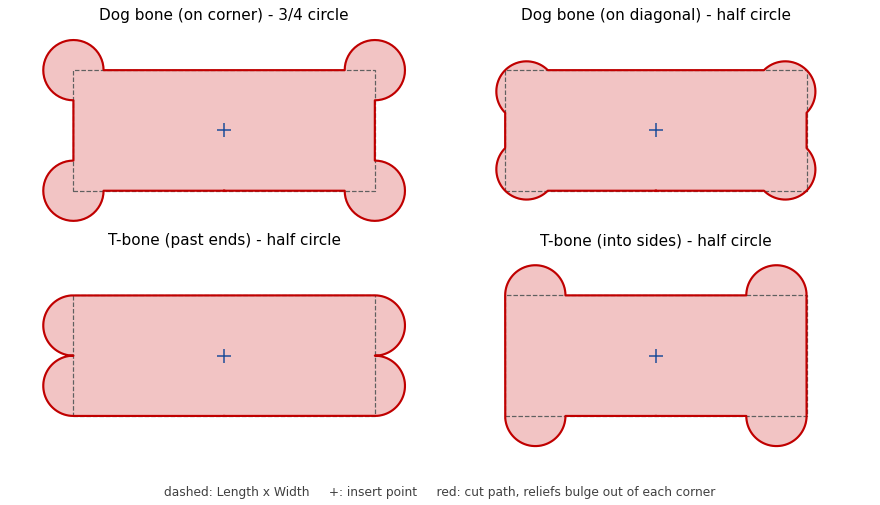
The four Relief Styles. Dashed: the Length x Width slot. +: the insert point. Red: the cut path.
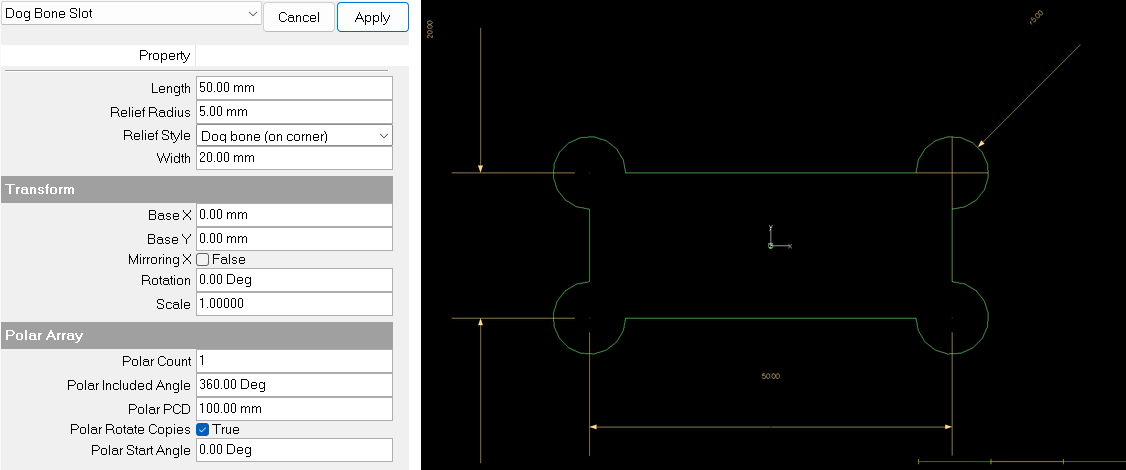
Dog Bone Slot in PrimeShape with the default values: the property page (left) and the selected shape with its dimensions (right).
Insert point and direction
The insert point (Base X, Base Y) is the centre of the slot. The Length runs along X and the Width along Y; use Rotation to turn the slot. This differs from the Slot shape, whose insert point is a corner.
The profile is cut anticlockwise from the middle of the bottom edge, round each corner relief in turn.
Each dimension drawn on the shape is named after the property it shows. Length is drawn along the bottom edge, Width along the left edge, and Relief Radius on the top right relief. The Relief Radius dimension is hidden when Relief Radius is 0.
Relief styles
Every style puts a circle of Relief Radius at each of the four corners. They differ in where the circle is centred, which decides how much of it is cut outside the slot:
•Dog bone (on corner) – the circle is centred on the corner. A quarter of it lies inside the slot, so the cut goes round three quarters of a circle at each corner. This gives the biggest, most obvious relief, and is the default.
•Dog bone (on diagonal) – the circle is centred on the corner's diagonal, one radius in from the corner, so its edge just passes through the corner. Half of it lies inside the slot, so the cut goes round half a circle at each corner. This is the smallest relief that still clears the corner, and is the usual dog bone used for milled pockets.
•T-bone (past ends) – the circle is centred on the end of the slot, one radius in from the corner, and the cut goes round half a circle bulging out past the end. The long sides stay straight.
•T-bone (into sides) – the circle is centred on the long side, one radius in from the corner, and the cut goes round half a circle bulging out past the side. The ends stay straight.
A T-bone keeps one pair of slot edges straight right into the corner, which can matter where that edge locates the mating part, or where the relief must not be seen from one side.
Properties
Property |
Description |
Default |
Length |
Length of the slot along X, corner to corner, not counting the reliefs (mm or inch). Must be greater than 0. |
50 mm (2") |
Width |
Width of the slot along Y, not counting the reliefs (mm or inch). Must be greater than 0. For a tab joint this is normally the thickness of the mating plate plus a clearance. |
20 mm (0.8") |
Relief Radius |
Radius of each corner relief circle (mm or inch). 0 gives a plain rectangular slot with sharp corners. The editor does not allow a negative value. See Limits for the largest value. |
5 mm (0.2") |
Relief Style |
Where the relief circles sit: Dog bone (on corner), Dog bone (on diagonal), T-bone (past ends) or T-bone (into sides). See Relief styles above. |
Dog bone (on corner) |
Limits
The two reliefs on any one edge must not run into each other:
•Dog bone (on corner): each relief takes one Relief Radius of each edge from its corner, so 2 × Relief Radius must be no more than the smaller of Length and Width.
•Dog bone (on diagonal): each relief takes √2 × Relief Radius (about 1.41 ×) of each edge from its corner, so 2.83 × Relief Radius must be no more than the smaller of Length and Width.
•T-bone (past ends): each relief takes a whole diameter (2 × Relief Radius) of the end, so 4 × Relief Radius must be no more than the Width.
•T-bone (into sides): each relief takes a whole diameter (2 × Relief Radius) of the long side, so 4 × Relief Radius must be no more than the Length.
When the shape cannot be built
If the values cannot make a valid shape, the shape is not drawn, a broken-shape marker is shown at the insert point, and the property page shows Warning: Cannot build shape from these parameters. This happens when Length or Width is 0 or negative, Relief Radius is negative, or Relief Radius is too big for the Relief Style as described under Limits.
Every 2D shape also has the Transform properties (Base X, Base Y, Rotation, Scale, Mirroring X) and the Polar Array properties, listed after the shape's own properties.