The Filleted Rectangle with Filleted Hole is a rectangular plate with rounded corners and a rectangular cutout, also with rounded corners, inside it. Use it for frames, window plates and flanges with a rectangular opening. The cutout can be sized directly, or set as a border of equal width all round the plate.
This shape was formerly called Filleted Rectangle 2. It can also be found by searching for Plate with Rectangular Cutout or Frame with Rectangular Hole. It appears in the shapes library under Rectangular Shapes and Flanges.
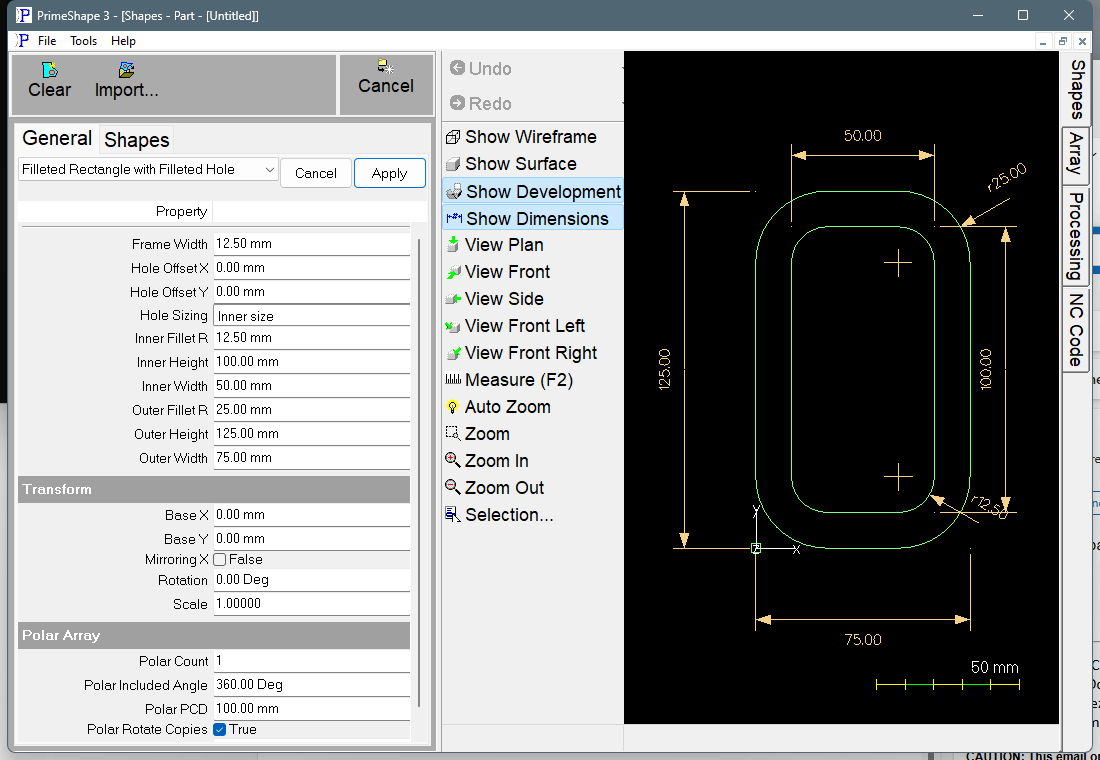
Filleted Rectangle with Filleted Hole in PrimeShape: the property page (left) and the shape with its dimensions (right).
Insert point and orientation
The insert point is the bottom left corner of the plate (the corner of its bounding box, since the corner itself is rounded off by the Outer Fillet R). The plate is built to the right by Outer Width and upward by Outer Height. The cutout is placed relative to the plate: centred on it when Hole Sizing is Inner size and both Hole Offsets are 0.
Properties
Lengths are in the current length unit. The defaults are shown in mm, with the inch default in brackets.
Property |
Description |
Default |
Outer Width |
Width of the plate, along X. Must be more than 0. |
75 (3") |
Outer Height |
Height of the plate, along Y. Must be more than 0. |
125 (5") |
Outer Fillet R |
Radius of the four plate corners. 0 gives square corners. Cannot be more than half the smaller of Outer Width and Outer Height. A negative value is refused. |
25 (1") |
Hole Sizing |
How the cutout is sized. Inner size uses Inner Width and Inner Height, centred on the plate and moved by Hole Offset X and Y. Frame width makes the cutout the plate size less Frame Width on every side, so the border is the same all round; Inner Width, Inner Height and the Hole Offsets are not used. |
Inner size |
Inner Width |
Width of the cutout, along X (Inner size only). A value of 0 or less, in either Inner Width or Inner Height, leaves no cutout. In Frame width mode this is overwritten with the cutout width the frame gives when the shape is built. |
50 (2") |
Inner Height |
Height of the cutout, along Y (Inner size only). A value of 0 or less leaves no cutout. In Frame width mode this is overwritten with the cutout height the frame gives when the shape is built. |
100 (4") |
Frame Width |
Width of the border between the plate edge and the cutout, on all four sides (Frame width only). Must be more than 0, and twice Frame Width must be less than the smaller of Outer Width and Outer Height. |
12.5 (0.5") |
Inner Fillet R |
Radius of the four cutout corners, in either sizing mode. 0 gives square corners. Cannot be more than half the smaller side of the cutout. A negative value is refused, even when there is no cutout. |
12.5 (0.5") |
Hole Offset X |
Distance the cutout centre is moved from the plate centre along X (Inner size only). Positive moves it right, negative left. |
0 |
Hole Offset Y |
Distance the cutout centre is moved from the plate centre along Y (Inner size only). Positive moves it up, negative down. |
0 |
All properties are listed whichever Hole Sizing is chosen; the ones that do not apply to the current mode are ignored. The dimensions drawn on the shape are Outer Height and Outer Width (always), Outer Fillet R (when more than 0), Inner Width and Inner Height (Inner size mode, when there is a cutout), Inner Fillet R (when there is a cutout and it is more than 0), Hole Offset X and Hole Offset Y (Inner size mode, when there is a cutout and the offset is not 0) and Frame Width (Frame width mode, when there is a cutout).
Limits
If any of the following is true the shape is not built and the property page shows Warning: Cannot build shape from these parameters:
•Outer Width or Outer Height is 0 or less.
•Outer Fillet R or Inner Fillet R is negative.
•Outer Fillet R is more than half the smaller of Outer Width and Outer Height.
•In Frame width mode, Frame Width is 0 or less, or twice Frame Width is equal to or more than the smaller of Outer Width and Outer Height.
•Inner Fillet R is more than half the smaller side of the cutout (checked only when there is a cutout).
•The cutout touches or crosses the plate edge. This includes the rounded plate corners: a cutout that fits inside the plate's bounding rectangle can still be refused if one of its corners cuts through an outer fillet.
With Inner size sizing, an Inner Width or Inner Height of 0 or less is not an error: the shape is built as a plain filleted plate with no cutout.
Parts saved before Hole Sizing, Frame Width and Hole Offset were added open in Inner size mode with no offset, and build exactly as they did before.
Every 2D shape also has the Transform properties (Base X, Base Y, Rotation, Scale, Mirroring X) and the Polar Array properties, listed after the properties above.