The Gusset (Concave Corners) is a rectangular plate with a quarter-circle cut out of each of its four corners. Each cut-out is centred on the corner of the Width x Height rectangle, so the corners curve inward rather than outward. The profile is a single closed outline of four straight edges and four 90° arcs, all with the same radius. This shape was formerly called Gusset 7.
It appears in the shapes library under Gussets.
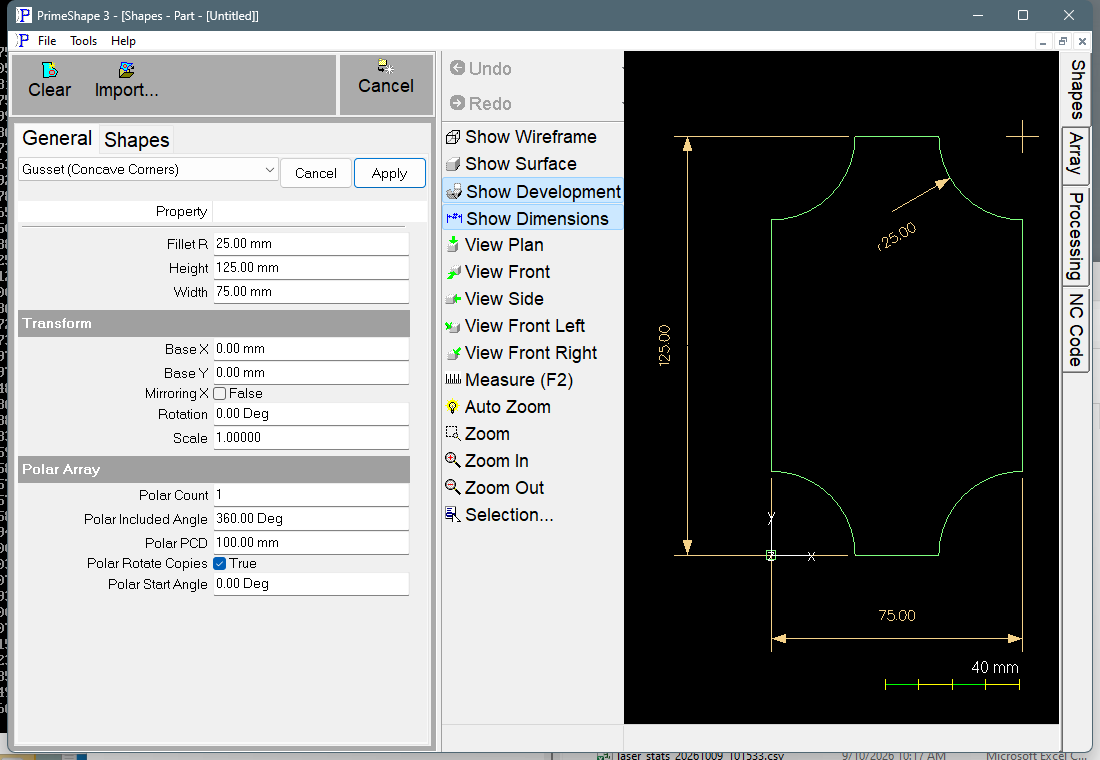
Gusset (Concave Corners) in PrimeShape: the property page (left) and the shape with its dimensions (right).
Insert point and direction
The insert point is the bottom left corner of the Width x Height rectangle. Because that corner is cut away, the insert point is not on the profile: it is the centre of the bottom left cut-out. The shape extends Width to the right (+X) and Height upward (+Y) from it.
The profile starts on the left edge, Fillet R above the insert point, and runs clockwise: up the left edge, round the top left cut-out, along the top edge, round the top right cut-out, down the right edge, round the bottom right cut-out, along the bottom edge and round the bottom left cut-out back to the start.
Properties
Property |
Description |
Default |
Width |
Overall size along X, from the left edge to the right edge (mm or inch). The straight top and bottom edges are Width − 2 x Fillet R long. |
75 mm (3") |
Height |
Overall size along Y, from the bottom edge to the top edge (mm or inch). The straight left and right edges are Height − 2 x Fillet R long. |
125 mm (5") |
Fillet R |
Radius of the four concave corner cut-outs (mm or inch). Each cut-out is centred on a corner of the Width x Height rectangle and removes Fillet R from both edges that meet there. The same radius is used at all four corners. |
25 mm (1") |
Defaults follow the drawing units: the metric values above, or the inch values in brackets when working in inches.
Limits
The shape does not check its values. The red Warning: Cannot build shape from these parameters banner on the property page only appears if building the geometry raises an error; the limits below are not checked for you. Keep the values within these limits:
•2 x Fillet R should be no more than the smaller of Width and Height. If 2 x Fillet R is more than Width, the top and bottom edges run backwards; if it is more than Height, the left and right edges run backwards. Either way the profile crosses itself, which will not cut correctly. If 2 x Fillet R equals Width, the top and bottom edges have zero length; if it equals Height, the left and right edges have zero length. In both cases the cut-outs meet at a point.
•Fillet R should be greater than 0. At 0 each corner arc has zero length and its start and end points sit on the corner of the rectangle; the shape has no special case for 0, so its outline there is not defined. Use a plain rectangle shape if that is what is needed.
•Width, Height and Fillet R should be positive. The corner points are calculated as Width − Fillet R and Height − Fillet R, so a negative Width or Height does not mirror the profile: the outline is distorted and crosses itself. Use Mirroring X in the Transform properties to mirror the shape. A negative Fillet R moves the arcs outward, so the corners bulge out instead of being cut in, and the straight edges run backwards.
Every 2D shape also has the Transform properties (Base X, Base Y, Rotation, Scale, Mirroring X) and the Polar Array properties, listed after the shape's own properties.