The Gusset (Scalloped Sides) is a rectangular plate with a semicircular scallop cut into the middle of each of its four edges. Each scallop has its own radius. The scallops give clearance along the edges, for example around a weld or a pipe running along the joint. The profile is one closed outline of eight straight lines and four semicircular arcs. Earlier versions called this shape Gusset 6. The old name is kept as an alias, so searching for it still finds the shape.
It appears in the shapes library under Gussets.
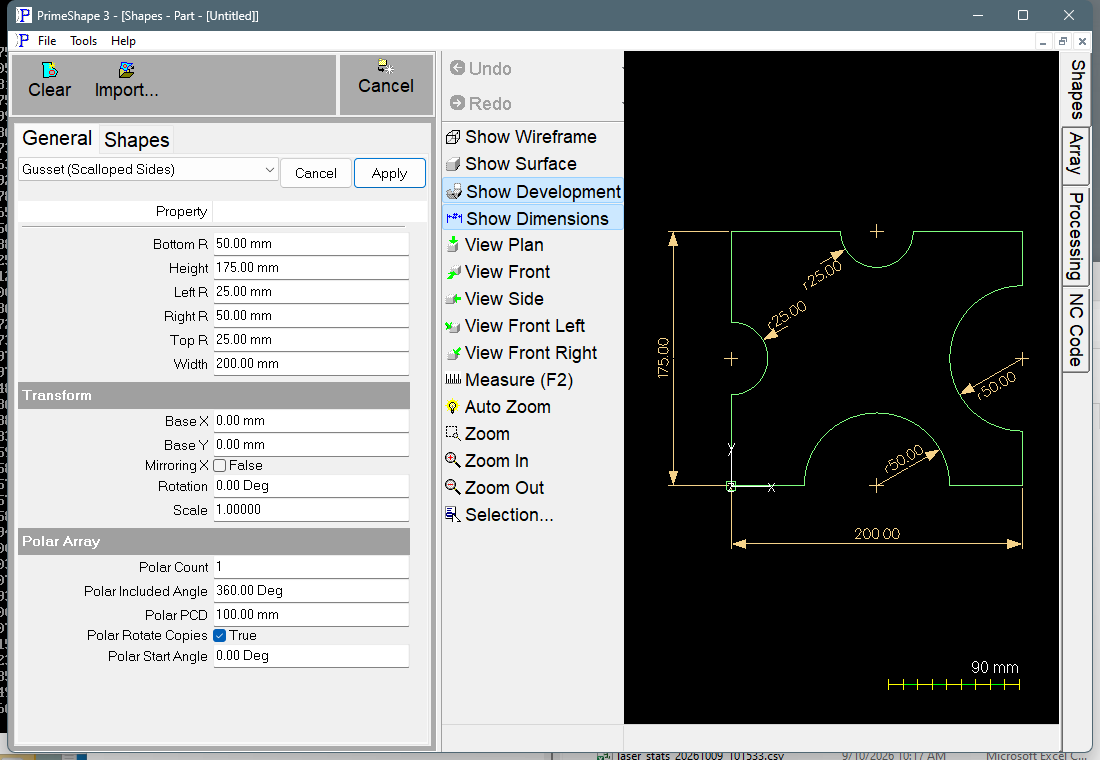
Gusset (Scalloped Sides) in PrimeShape: the property page (left) and the shape with its dimensions (right).
Insert point and direction
The insert point is the bottom left corner of the plate, which is on the profile. The shape extends Width to the right (+X) and Height upward (+Y) from it. All four corners are square.
Each scallop is a half circle (180°) centred on the midpoint of its edge and cut into the plate: the left and right scallops are centred at half the Height, the top and bottom scallops at half the Width. A scallop of radius R removes 2 × R of the edge and reaches R in from it.
The profile starts at the insert point and runs clockwise: up the left edge and round the left scallop, along the top edge and round the top scallop, down the right edge and round the right scallop, then back along the bottom edge and round the bottom scallop to the start.
Properties
The shape's own properties are listed in this order on the property page, followed by the Transform and Polar Array groups.
Property |
Description |
Default |
Width |
Overall size along X, from the left edge to the right edge (mm or inch). |
200 mm (8 in) |
Height |
Overall size along Y, from the bottom edge to the top edge (mm or inch). |
175 mm (7 in) |
Left R |
Radius of the scallop in the left edge, centred at half the Height (mm or inch). |
25 mm (1 in) |
Top R |
Radius of the scallop in the top edge, centred at half the Width (mm or inch). |
25 mm (1 in) |
Right R |
Radius of the scallop in the right edge, centred at half the Height (mm or inch). |
50 mm (2 in) |
Bottom R |
Radius of the scallop in the bottom edge, centred at half the Width (mm or inch). |
50 mm (2 in) |
Defaults follow the drawing units: the metric values above, or the inch values in brackets when working in inches.
Limits
The values are not range-checked when they are entered. If the outline cannot be built, the property page shows the red warning Warning: Cannot build shape from these parameters. Keep the values within these limits yourself:
•Do not set a radius to 0. At 0 the two end points of that scallop coincide, so the scallop has no depth. The shape has no check for this, and the result of building it has not been verified. Use a radius greater than 0 on every edge.
•Left R and Right R should each be less than half the Height, and Top R and Bottom R less than half the Width. A larger radius runs the scallop past the corner of the plate, so the outline no longer matches the plate.
•Left R + Right R should be less than Width, and Top R + Bottom R less than Height. Otherwise the opposite scallops overlap in the middle of the plate.
•Large neighbouring scallops (for example Left R and Top R) can also cross each other near the corner between them. Check the drawn shape when using large radii.
•A negative radius turns that scallop outward, so it bulges past the edge of the plate instead of into it. Do not enter negative radii.
•Width and Height are not checked. Use positive values, large enough that the limits above hold for the radii you choose.
Every 2D shape also has the Transform properties (Base X, Base Y, Rotation, Scale, Mirroring X) and the Polar Array properties, listed after the shape's own properties.