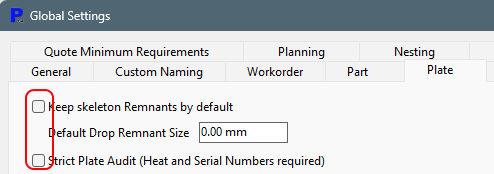
Global Settings, Plate
Uncheck Keep Skeleton Remnants by Default - Generally Tekla only wants to know about our drop plates.
Uncheck Strict Plate Audit - we do not want machine or Primecut operators entering heat/serial data differing from what Tekla EPM knows as this will likely derail the Reconciliation process (TFSCut).
Optimise Process Data
As Primecut is launches anew for every combining run, it must re-cache the process data. If there are a large number of grades in your system you should ensure the grades inherit from base materials for their process data, eg all steels might inherit from "MS" for their process data, and that each material does not keep a copy of its own process data when that data is identical to the parent.
Tekla EPM Datastore Settings
Turn on Tekla inventory stock tracking so PowerFab inventory is held as counted stock plates, and Scope plates to Tekla EPM job numbers where PowerFab reserves stock to jobs, so PrimeCut NE nests each job only on the plates PowerFab has set aside for it. Both are on the Datastore Settings tab of the Tekla EPM settings, see Tekla EPM Datastore Settings.
See Also
Tekla EPM (PowerFab) Integration
How the Tekla EPM Integration Works
Tekla EPM Transaction Sequence