This topic is a one-page summary of the whole Tekla EPM (PowerFab) integration — what travels between the two systems, in what order, and where each piece of information lives once it arrives. Each section links to the topic that covers it in full.
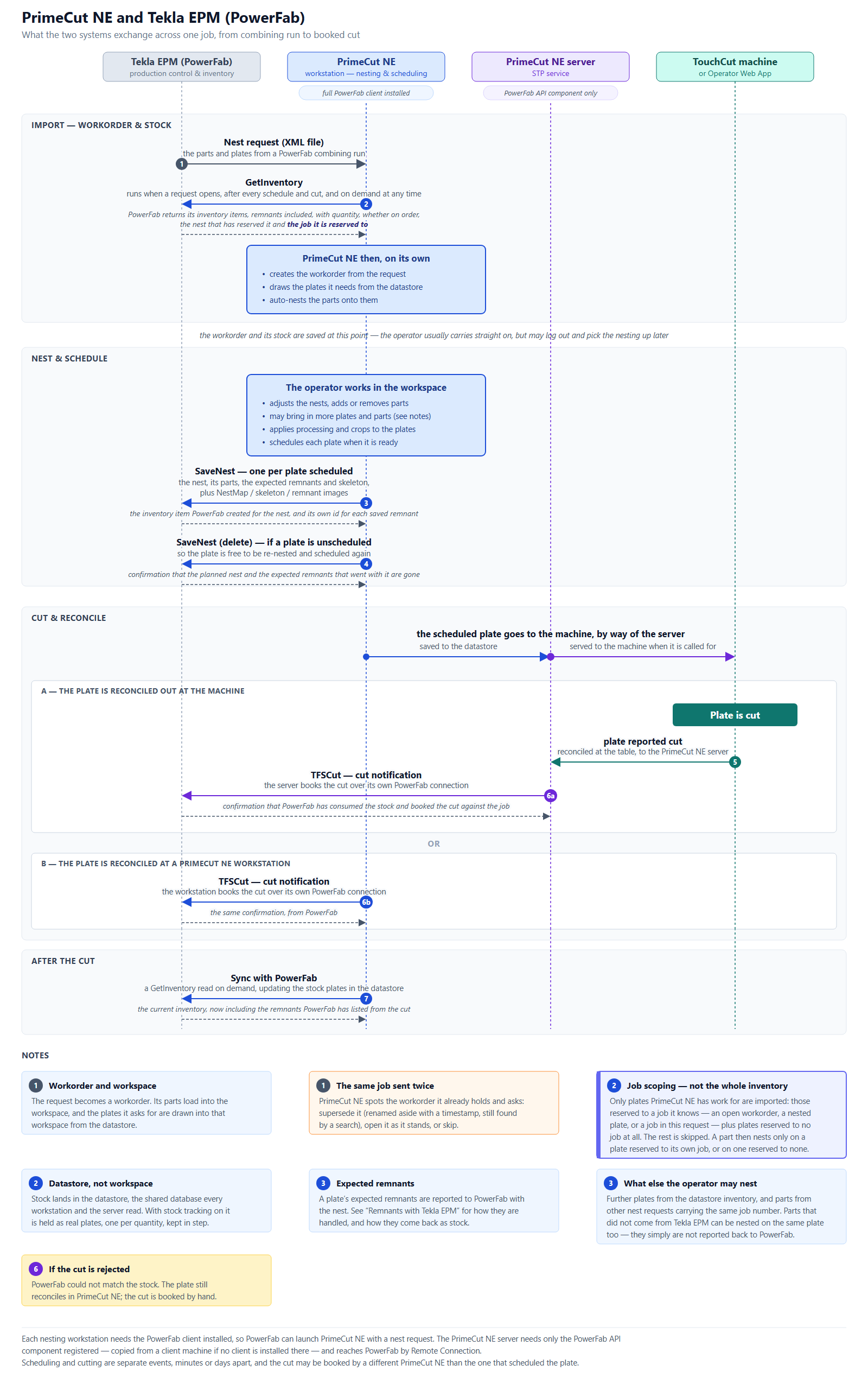
The whole exchange on one page. Open the image at full size to read the detail.
The exchange, in order
All communication with Tekla EPM goes through the PowerFab (FabSuite) OpenAPI, as a request from PrimeCut NE and a matching response from PowerFab. The exception is the nest request, which PowerFab hands to PrimeCut NE as an XML file rather than an API call.
Stage |
Message |
What happens |
Import |
Nest request (XML file) |
PowerFab hands PrimeCut NE the parts and plates from a Production Control combining run. Everything PrimeCut NE needs is in this one file. |
Import |
GetInventory |
PrimeCut NE reads PowerFab’s plate inventory — quantities, remnants, whether an item is on order, the nest that has reserved it and the job it is reserved to. This runs when a request opens, after every schedule and every cut, and on demand at any time. Nothing is written to PowerFab by it. |
Import |
(no message — PrimeCut NE works on its own) |
PrimeCut NE creates the workorder from the request, draws the plates it needs out of the datastore, and auto-nests the parts onto them. The stock read above happens first, so nesting works against current stock. |
Nest & schedule |
SaveNest |
Sent once per plate as it is scheduled: the nest, the parts on it, the expected remnants and skeleton, and NestMap / skeleton / remnant images. PowerFab replies with the inventory item it created for the nest and its own id for each saved remnant. |
Nest & schedule |
SaveNest (delete) |
Sent if a scheduled plate is unscheduled. PowerFab removes the planned nest and the expected remnants that went with it, freeing the plate to be re-nested and scheduled again. |
Cut & reconcile |
TFSCut |
The Take From Stock (Cut) notification, sent when the plate is reconciled. PowerFab consumes the stock and books the cut against the job. See Where the cut is booked from below. |
After the cut |
Sync with PowerFab |
A GetInventory read on demand. Remnants PowerFab has now listed come back with its own ids, names and reserved jobs, and plate counts on both sides are brought back into step. |
Scheduling and cutting are separate events and may be minutes or days apart. The cut may be booked by a different PrimeCut NE than the one that scheduled the plate. For the fields carried in each message, see Tekla EPM Transaction Sequence.
Workorder, workspace and datastore
Three different things receive what arrives from PowerFab, and it is worth keeping them apart:
•The workorder is created from the nest request, and carries the request’s parts.
•The workspace is the nesting session the operator works in. The request’s parts load into it, and the plates it asks for are drawn into it from the datastore.
•The datastore is the shared PrimeCut NE database that every workstation and the PrimeCut NE server read. PowerFab’s stock lands here, not in any one workspace. With Tekla inventory stock tracking switched on it is held as real stock plates, one per item quantity, kept in step with PowerFab.
The workorder and its stock are saved once the import finishes. The operator normally carries straight on into nesting, but may log out and pick the job up later.
What the operator may add
The operator is not limited to what the request supplied. Further plates may be brought in from the datastore inventory, and parts from other nest requests carrying the same job number. Parts that did not come from Tekla EPM at all can be nested on the same plate — they are simply not reported back to PowerFab.
Job scoping filters what is imported
Where PowerFab reserves stock to a job, PrimeCut NE can follow those reservations. This is off by default; see Tekla EPM Datastore Settings.
With it on, PrimeCut NE takes in only the plates it has work for — those reserved to a job it knows, plus any plate reserved to no job at all. An item reserved to a job it has no work for is skipped, so this is not the whole of your PowerFab inventory. A job counts as known while PrimeCut NE has an open workorder for it, has a plate nested for it, or has received a nest request for it in the current session. A part may then only be nested on a plate reserved to its own job, or on a plate reserved to no job; a part with no Tekla job may use any plate. Full detail in Tekla EPM Job Scoping.
If the same job is sent through twice
If a second nest request arrives carrying an invoice number PrimeCut NE already holds a workorder for, it does not silently create a duplicate. It reports how many items the existing workorder holds and how many of them are already nested, and asks what to do:
•Supersede — the existing workorder is renamed aside with a timestamp, for example WO-1234 (superseded 20260909-153755), and the incoming one is imported. The original number stays at the front of the name so the old workorder is still found by searching for it. Renaming frees the number without touching the nest or the stock.
•Open existing — nothing is imported for that number; the workorder already held is opened instead.
•Skip — nothing is imported and nothing is opened.
•Cancel — the whole request is abandoned.
Superseding a workorder that is already nested leaves two claims on the same PowerFab parts. The item and nested counts are shown precisely so that this can be judged before choosing.
Where the cut is booked from
Once a plate is scheduled it is held in the datastore and served to the machine by the PrimeCut NE server. The plate is then cut, and the cut can be booked to PowerFab by either of two routes:
•Reconciled out at the machine — a TouchCut machine or the Operator Web App reports the plate cut to the PrimeCut NE server, and the STP service sends TFSCut over the server’s own PowerFab connection. This requires STP version 1.6.97 or later.
•Reconciled at a workstation — the operator reconciles the plate in PrimeCut NE, and that workstation sends TFSCut over its own PowerFab connection.
If PowerFab cannot match the nest and the stock it is asked to consume, the notification is rejected. The plate is still reconciled in PrimeCut NE — only the notification failed — and the cut must then be booked in PowerFab by hand. See Tekla EPM Transaction Sequence for how to capture the exchange when this happens.
What each machine needs installed
•Each PC used for nesting or reconciliation needs the Tekla EPM client installed, so that PowerFab can launch PrimeCut NE with a nest request.
•The PrimeCut NE server needs only the PowerFab API component — the FabSuiteAPI.dll COM component — registered for 64-bit use. If no Tekla EPM client is installed there, the DLL can be copied from a client machine and registered. The STP service reaches the PowerFab server by Tekla Remote Connection.
Step-by-step setup, including the registration commands and the firewall ports, is in Setup Tekla EPM Integration.
Tekla EPM plates are expected to be rectangles. Crops should be straight horizontal or vertical cuts that leave rectangular remnants — PowerFab treats any other shape as a rectangle the size of the remnant’s extents.
See Also
•Tekla EPM (PowerFab) Integration