Each nest request PowerFab sends is the output of one Production Control combining run. Its WorkOrderID is the combining run number. When parts of a run are still not nested, PowerFab includes them again in a later combining run, with the quantity still to nest. PrimeCut NE already holds those parts in the earlier run's workorder, so importing the later run as it stands would nest the same parts twice.
PrimeCut NE prevents this automatically. When a combining run arrives, it looks for the same parts in the workorders of earlier runs and takes them over for the new run. It does not ask; what it did is written in each earlier workorder's internal notes.
Which parts are the same
A part in an earlier run is the same part when it has the same Tekla part ID, job and main mark. Only Tekla workorders that are still open (Active or On hold) count. Rows of the new run that share all three are added together.
Which runs count as earlier
PowerFab numbers combining runs in the order it creates them, so a run takes parts only from runs with a lower combining run number. Normally runs arrive in that order. If one arrives after a later run, for example because it was exported late, it does not take back the parts the later run already holds: they stay with the later run, and the nest request lists them under Parts a later combining run already holds, so this run did not take them - check they are not nested twice. Check that each part named there is not nested in both runs.
A workorder item that carries no combining run number, such as one imported by an older PrimeCut NE, counts as earlier. A run number that is not a whole number is never taken from. A workorder that is renamed aside because the new run needs its name follows the same rule: its parts are taken over only if its run is earlier.
The order of events
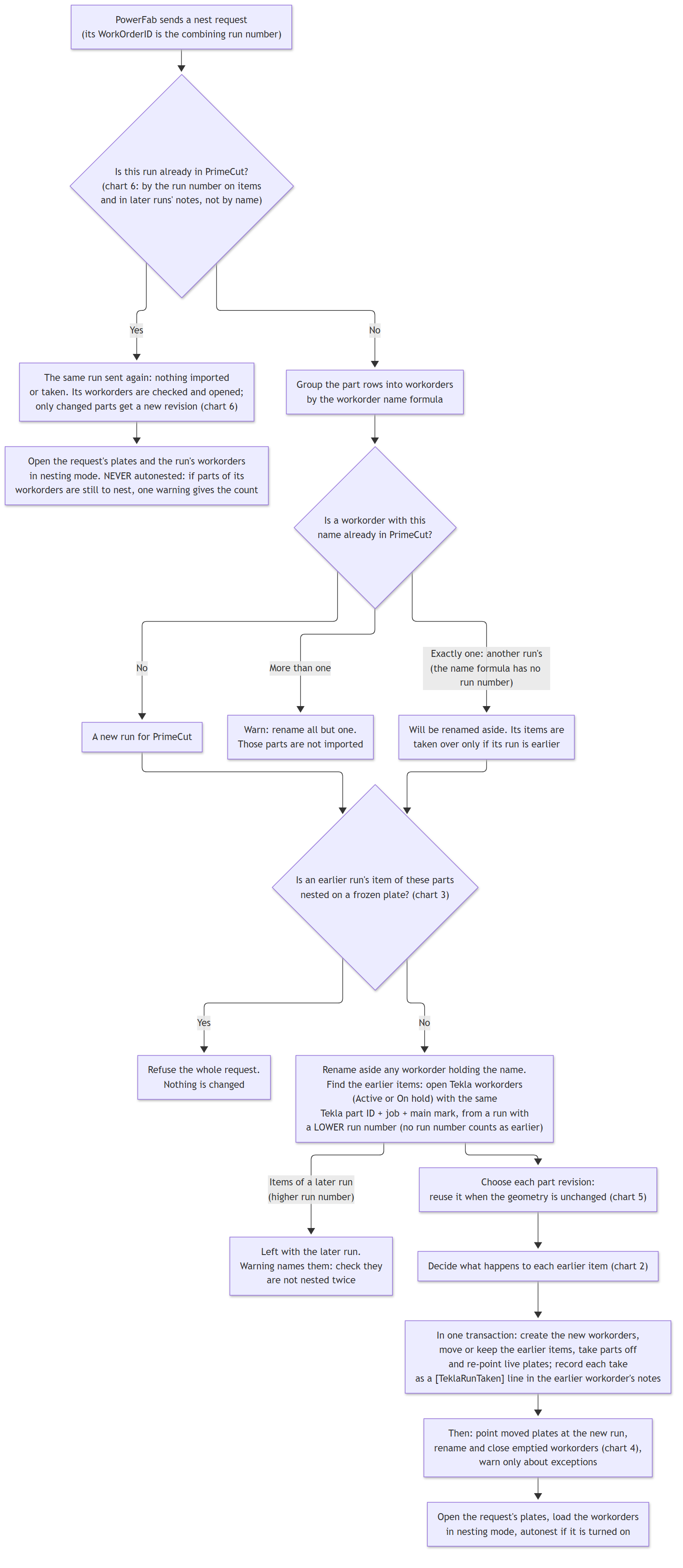
Chart 1 - a combining run arrives
The charts in the following topics show each step in detail:
•What Happens to an Earlier Run's Parts (chart 2) - moved, kept with its done work, or taken off plates.
•The Earlier Workorder Afterwards (chart 4) - renamed (superseded by run N) and closed when left with nothing to do.
•Changed and Unchanged Parts (chart 5) - how PrimeCut NE decides a part's geometry has not changed.
•Frozen Plates Stop a Combining Run (chart 3) - why a request is refused, and what to do.
•The Same Combining Run Sent Again (chart 6) - nothing is imported or taken over: its workorder is opened and checked, and only a part whose geometry changed gets a new revision. It is never autonested.
What the operator sees
Normally nothing: taking over an earlier run is what a later run is for, so it is not announced. The nest request warns only when:
•an earlier run's part was left alone because its workorder, the part or one of its plates was open in this or another PrimeCut NE session - check that part is not nested twice;
•a later combining run already holds some of the parts, because this run arrived after it - check those parts are not nested twice;
•a part had changed since the earlier run, so its parts were taken off their plates - nest the new revision;
•the same combining run was sent again and part of its workorder does not add up, or parts of it are still to nest by hand (see The Same Combining Run Sent Again);
•something could not be done, listed under Check: with the workorder or plate concerned.
Close the earlier runs' workorders and plates in PrimeCut NE before bringing in a new combining run. Anything open is left exactly as it was.
See Also
How the Tekla EPM Integration Works
Tekla EPM Transaction Sequence
What Happens to an Earlier Run's Parts
The Earlier Workorder Afterwards