PowerFab sends the cutting data (for example a DSTV NC1 file) for every part in every combining run. When the part is already in PrimeCut NE, the import decides whether its geometry has changed. Unchanged, the existing part revision is used again; changed, a new revision is made.
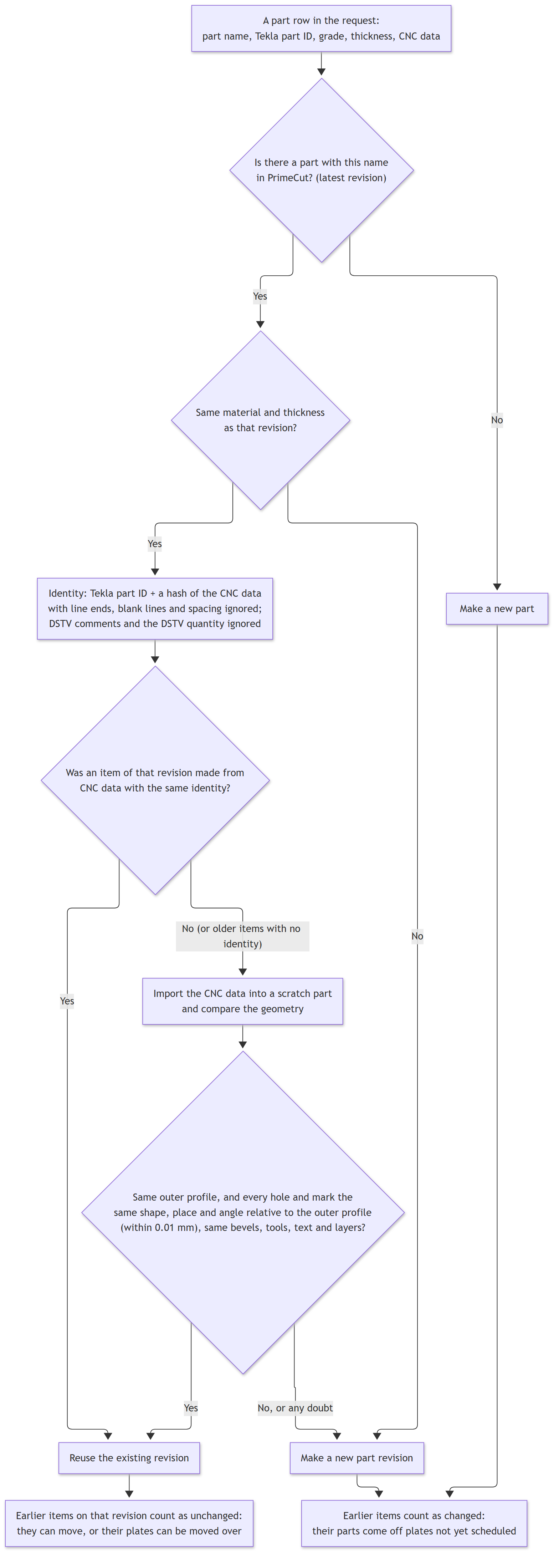
Chart 5 - is the part unchanged?
How it is decided
•The part is looked up by its name, as the part-name formula in the Tekla EPM settings builds it. Only the latest revision is compared.
•The material and thickness must be the same.
•The cutting data is compared with that from which the existing revision was made, ignoring line ends, blank lines, spacing, DSTV comments and the DSTV quantity, which PowerFab changes from run to run.
•If that does not match, or the part was imported before PrimeCut NE kept this record, the new data is imported into a scratch part and its geometry compared: the outer profile, and every hole and mark by shape, position and angle relative to the outer profile, within 0.01 mm, together with bevels, tools, text and layers. A part moved or turned as a whole is unchanged; a moved hole is a change.
Any doubt is treated as a change. That costs a new part revision, never a wrong one.
Why it matters for earlier runs
An earlier run's item on the same revision can be moved to the new run, or have its plates moved over. An item on any other revision has its parts taken off plates not yet scheduled - see What Happens to an Earlier Run's Parts.
See Also
Combining Runs: Parts Moving Between Runs