For every part of the new combining run, PrimeCut NE finds the earlier runs' workorder items with the same Tekla part ID, job and main mark, and decides what happens to each one. Only runs with a lower combining run number are earlier: items of a run with a higher number are left with that run and named in a warning - see Combining Runs: Parts Moving Between Runs.
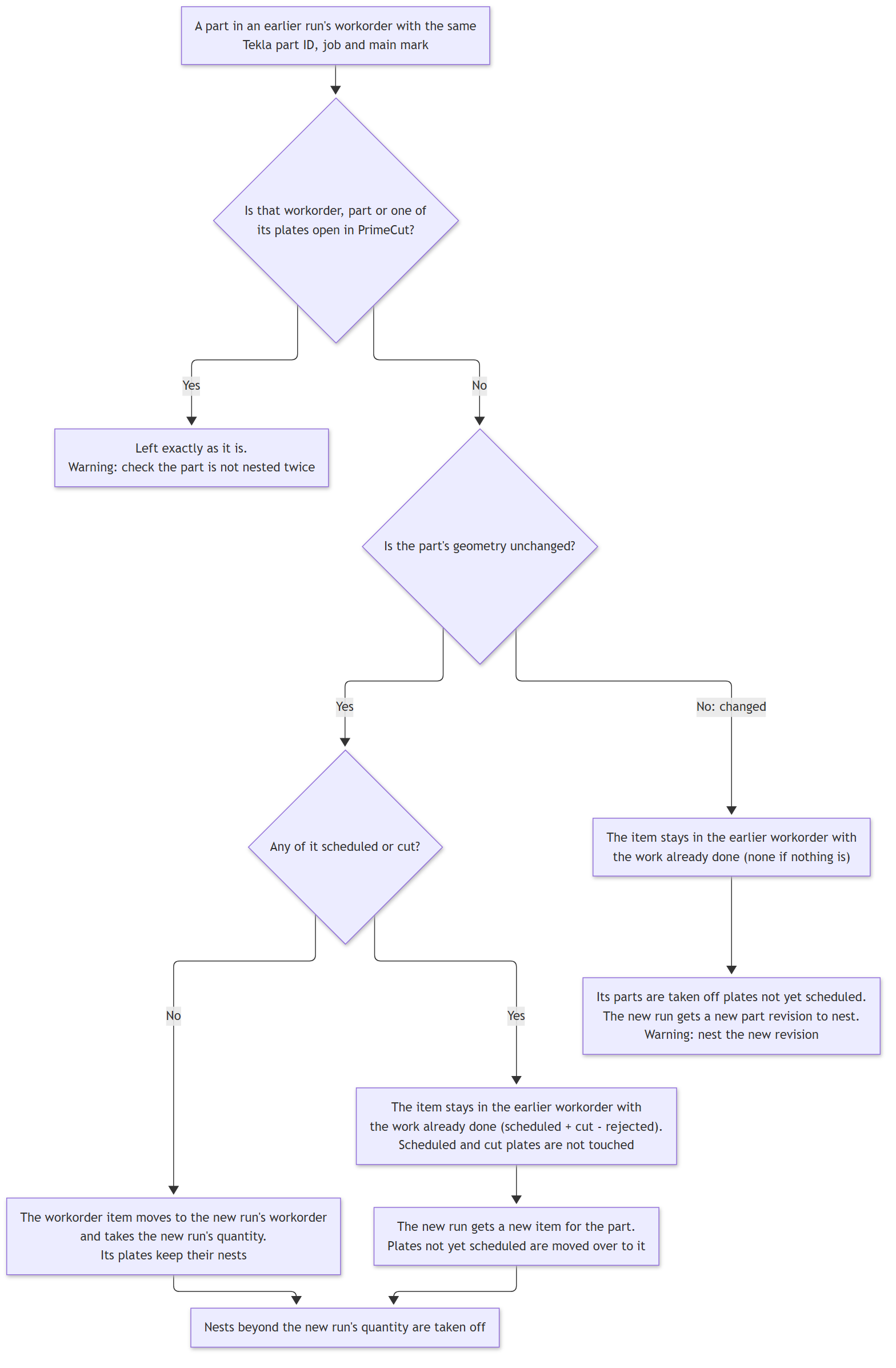
Chart 2 - one earlier run's part
Nothing scheduled or cut yet
If the part's geometry is unchanged, the whole workorder item moves to the new run's workorder and its required quantity becomes the new run's quantity. Its nests stay where they are, so nothing has to be nested again. If more of it is nested than the new run asks for, the extra parts are taken off their plates.
Some scheduled or cut
The item stays in the earlier workorder, keeping the work already done: its required quantity becomes what is on scheduled and cut plates, less any rejected. Scheduled and cut plates are never changed. The new run gets a new item for the part with the new run's quantity, and the earlier item's nests on plates not yet scheduled are moved over to the new item, up to that quantity; any beyond it are taken off.
The part has changed
If the new run sends different geometry for the part, PrimeCut NE makes a new part revision for it (see Changed and Unchanged Parts). The earlier item keeps any done work, but all its parts on plates not yet scheduled are taken off, because they were nested with the old geometry. The new revision is not nested automatically - nest it as usual. The nest request warns which parts this happened to.
Plates and PowerFab
Scheduled and cut plates keep reporting the earlier run to PowerFab, which already holds their nests under it. A plate not yet scheduled that holds moved parts, and that reports a combining run to PowerFab, is switched to the new run.
Plates in the states In Stock, Expected Remnant, Backorder and Pre-order are the ones that can still be changed. A frozen plate cannot - see Frozen Plates Stop a Combining Run.
See Also
Combining Runs: Parts Moving Between Runs