PowerFab gives every combining run a new number, so a later combining run never arrives with an earlier run's number. The same run arrives twice only when something went wrong the first time, for example PrimeCut NE stopped part-way through importing it. Its quantities are the run's total and the workorder PrimeCut NE made from it was right, so the run is not imported again.
PrimeCut NE recognises the run by its number, which every workorder item of the run carries, not by the workorder name. A workorder name that happens to match an earlier run's (a name formula without the run number) is a new run, and is handled as one.
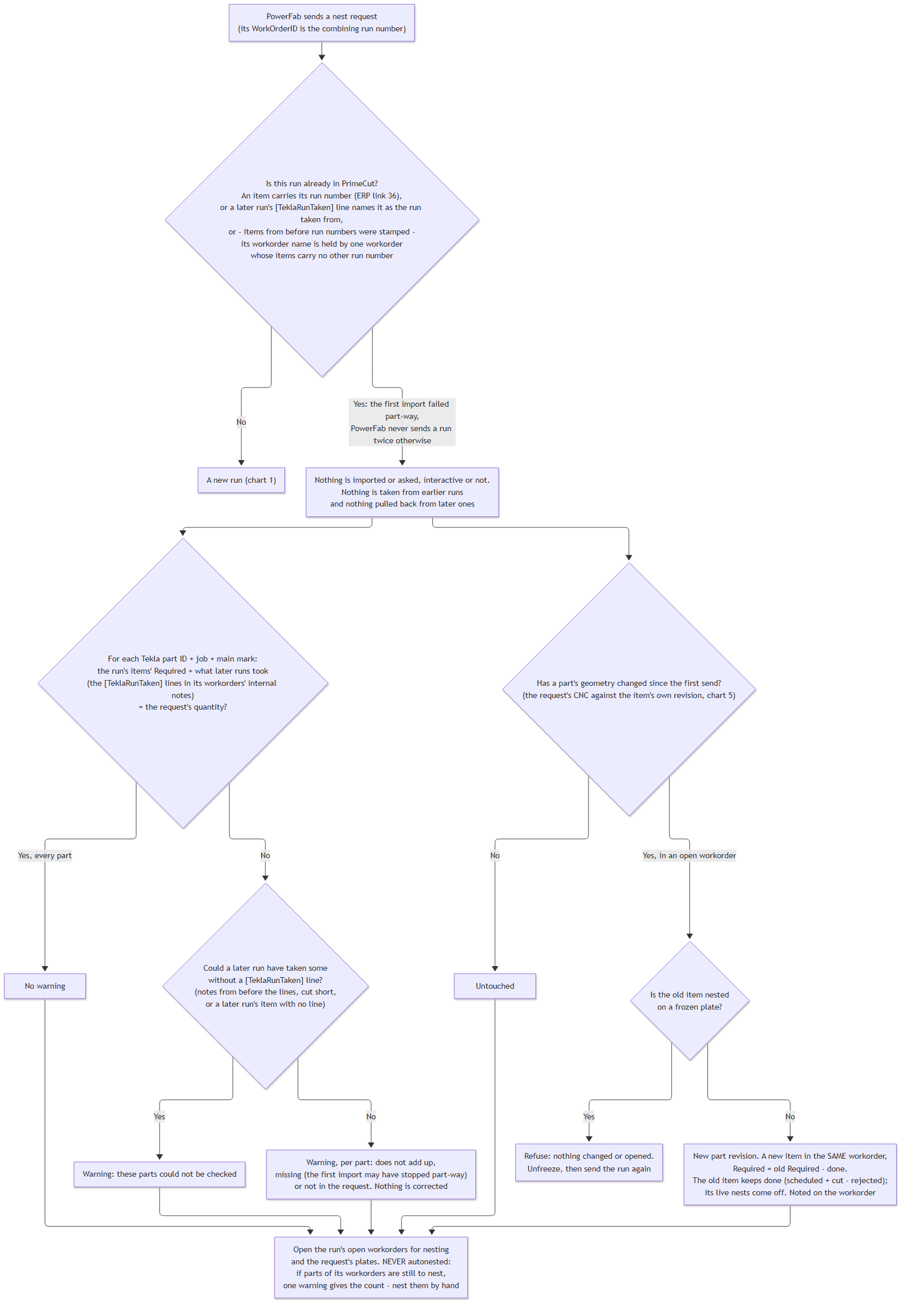
Chart 6 - the same run sent again
What happens
•Nothing is imported and nothing is asked, whether or not PrimeCut NE runs interactively.
•No parts are taken from earlier runs, and none are taken back from later runs.
•The run's workorder is opened for nesting as it is, and the request's plates are opened as usual.
•The run is never autonested, even when autonest is turned on in the Tekla EPM Datastore Settings; whatever is still outstanding is nested by hand. If parts of the run's own workorder are still to nest, the request warns how many, for example Combining run 9201 was sent again, so nothing was autonested: 3 parts are still to nest - nest them by hand. Parts of other runs' workorders, opened because they are on the request's plates, are not counted.
•The workorder is checked against the request (below). If everything adds up there is no message at all.
The check
For each part (Tekla part ID, job and main mark), the quantity the run's workorder still requires plus the quantity later combining runs took from it must equal the quantity in the request. When a later run takes parts over (see What Happens to an Earlier Run's Parts), it records what it took in the earlier workorder's internal notes, one line per part, for example:
[TeklaRunTaken] run=9202 from=9201 wo=1234 part=25823 job=5791 mark=B12 qty=3
Leave these lines as they are: the check reads them. Anything that does not add up is listed in a warning and is never corrected:
•A part whose quantities differ - the warning gives the request's quantity, what the workorder holds and what later runs took.
•A part the workorder does not have - the first import may have stopped part-way.
•A part the workorder has but the request does not.
•A part that cannot be checked, because a later run may have taken some of it before PrimeCut NE recorded what later runs take, or the notes were too full to record all of it.
A part whose geometry changed
If a part's CNC data has changed since the run was first sent (see Changed Parts), it gets a new part revision and a new item in the same workorder, requiring what the old item had left. The old item keeps the work already done (scheduled plus cut, less rejected), and its parts are taken off plates that are not yet scheduled. The workorder's internal notes say so. Unchanged parts are not touched. If the old item is nested on a frozen plate, the request is refused and nothing is changed: unfreeze the plate, then send the run again.
See Also