The Star is a flat star with any number of points from 3 to 1000. The tips lie on the Outer Radius and the valleys between them lie on the Inner Radius, half way between each pair of tips. The tips and the valleys can each be left sharp or filleted, and an optional round hole can be cut in the centre. Use it for star plates, badges, signs and decorative cut-outs.
It can also be found by searching for Star Plate or Pentagram.
It appears in the shapes library under Basic Shapes and Other Shapes.
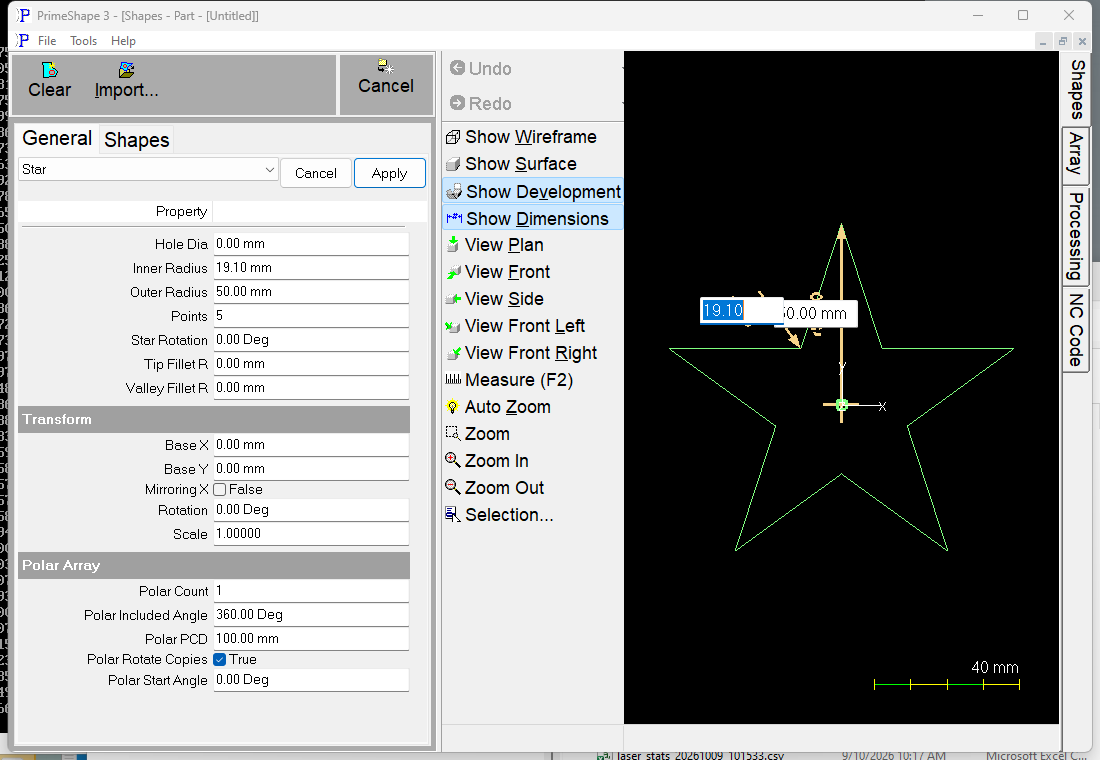
Star in PrimeShape: the property page (left) and the shape with its dimensions (right).
Insert point and orientation
The insert point is the centre of the star. The optional hole is centred on it.
At a Star Rotation of 0 the first tip points straight up (along +Y). The other tips follow anticlockwise, spaced evenly at 360° / Points, with a valley half way between each pair. A positive Star Rotation turns the star anticlockwise about the insert point, a negative one clockwise.
Star Rotation turns the star within its own properties. The Transform Rotation then turns the whole shape on top of that.
Properties
Lengths are in the current units (mm or inches); angles are in degrees. The defaults shown are for a new shape; the inch defaults are used when the program is set to inches.
Property |
Description |
Default |
Points |
Number of tips on the star. Whole number from 3 to 1000. |
5 |
Outer Radius |
Distance from the centre to the sharp point of each tip. Must be greater than 0. When the tips are filleted this is still measured to where the sharp tip would be, so the finished star is slightly smaller than this radius. |
50 mm (2 in) |
Inner Radius |
Distance from the centre to the sharp bottom of each valley. Must be greater than 0 and less than Outer Radius. A smaller Inner Radius gives thinner, sharper points; a value close to Outer Radius gives a shallow, almost round outline. Like Outer Radius it is measured to the sharp corner, whether or not the valley is filleted. |
19.098 mm (0.764 in) |
Star Rotation |
Angle of the first tip from straight up, measured anticlockwise. Negative values are allowed. |
0° |
Tip Fillet R |
Radius of the fillet on every tip. 0 gives sharp tips. Cannot be negative. |
0 |
Valley Fillet R |
Radius of the fillet in every valley. 0 gives sharp valleys. Cannot be negative. |
0 |
Hole Dia |
Diameter of a round hole cut in the centre of the star. 0 means no hole. Cannot be negative, and the hole must stay clear of the outline. |
0 (no hole) |
The default Inner Radius is Outer Radius x (3 – √5) / 2, about 0.382 x Outer Radius. With five points this puts every valley on the straight line joining a tip to the tip two along from it, so each edge lies on one of the five lines of a pentagram, giving the regular five point star (pentagram outline). Changing Outer Radius later does not change Inner Radius, so set both when you resize the star.
The dimensions drawn on the shape are named after these properties, and clicking one edits that value. Outer Radius is drawn to the first tip and Inner Radius to the valley after it; Tip Fillet R and Valley Fillet R are drawn on that same tip and valley; Hole Dia is drawn across the hole; Star Rotation is drawn from straight up to the first tip. A dimension that has no effect with the current settings (a fillet or hole of 0, a Star Rotation of 0, or a fillet that does not fit the star, in which case the star is not built) is hidden.
Limits
The shape is checked every time it is built. If any of these conditions is broken the shape is not built and a warning gives the reason:
•Points must be from 3 to 1000.
•Outer Radius must be greater than zero.
•Inner Radius must be greater than zero and less than Outer Radius.
•Tip Fillet R and Valley Fillet R cannot be negative.
•Hole Dia cannot be negative.
•Tip Fillet R or Valley Fillet R is too large for the star – the two fillets at the ends of one straight edge together need more length than that edge has. Thin points (many Points, or Inner Radius well below Outer Radius) leave less room for fillets.
•Hole Dia is too large for the star – the hole would touch or cross the outline. The check takes the closest point of the finished outline to the centre and requires the hole radius to be less than that distance. On a normal star the closest points are the valleys, so the largest hole is just under twice the Inner Radius. Valley fillets move the outline away from the centre and can allow a larger hole. On a shallow star (Inner Radius close to Outer Radius) the straight edges between tips can pass closer to the centre than the valleys, so the largest hole is smaller still.
The hole is only checked against the outline. Leave enough web between the hole and the valleys for the material and process you will cut with.
Every 2D shape also has the Transform properties (Base X, Base Y, Rotation, Scale, Mirroring X) and the Polar Array properties, listed after the shape's own properties.